Port Mirroring
The Port mirroring is a method to monitor traffic in switched networks. Traffic through ports can be
monitored by one specific port. That is, traffic goes in or out monitored ports will be duplicated into the
mirroring port.
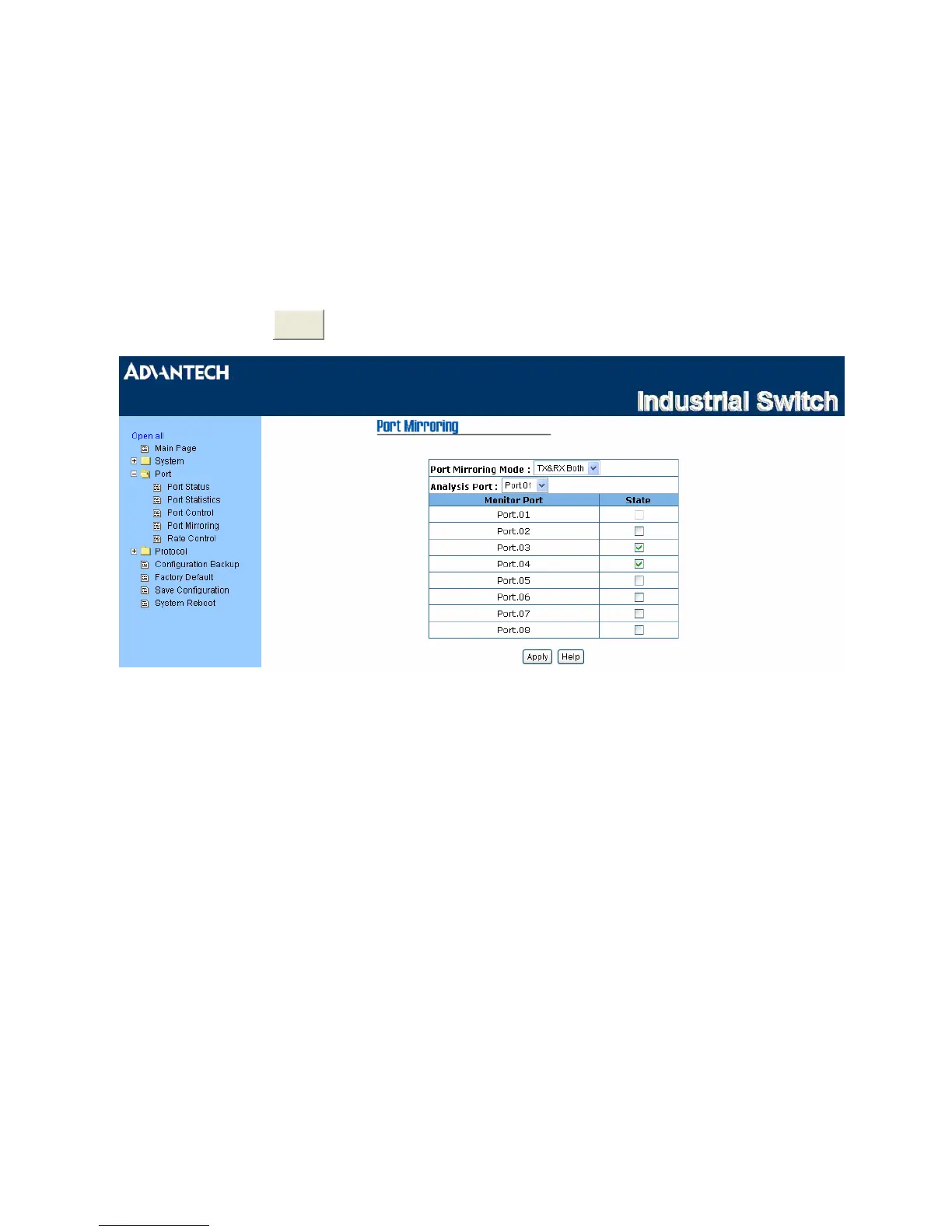
• Port Mirroring Mode: Set mirroring mode -- Disable, TX Only, and Both. The default value is
“Disable”.
•
Analysis Port:
Select one port to be the mirroring port to see all monitored port traffic. Users can
connect the mirroring port to LAN analyzer or Netxray.
• Monitor Port: The ports users want to monitor. All monitored port traffic will be copied to the mirroring
port. Mark the State check box to select the port.
•
And then click
pply
to have the configuration take effect.
Figure 3.1-18 Port Mirroring
Note
1. Select Disable for the monitor mode item to disable port mirroring.
2. Remember to click the Save button of the Save Configuration page,
otherwise the new configuration will lose when switch powers off.
39 Chapter3



 To Next Page