Advent Instruments Inc. 2. TRsSim Software
AI-5620 User Guide 11
fixed to the center of the graph, while its width is determined by the number of sample
points used to calculate the FFT.
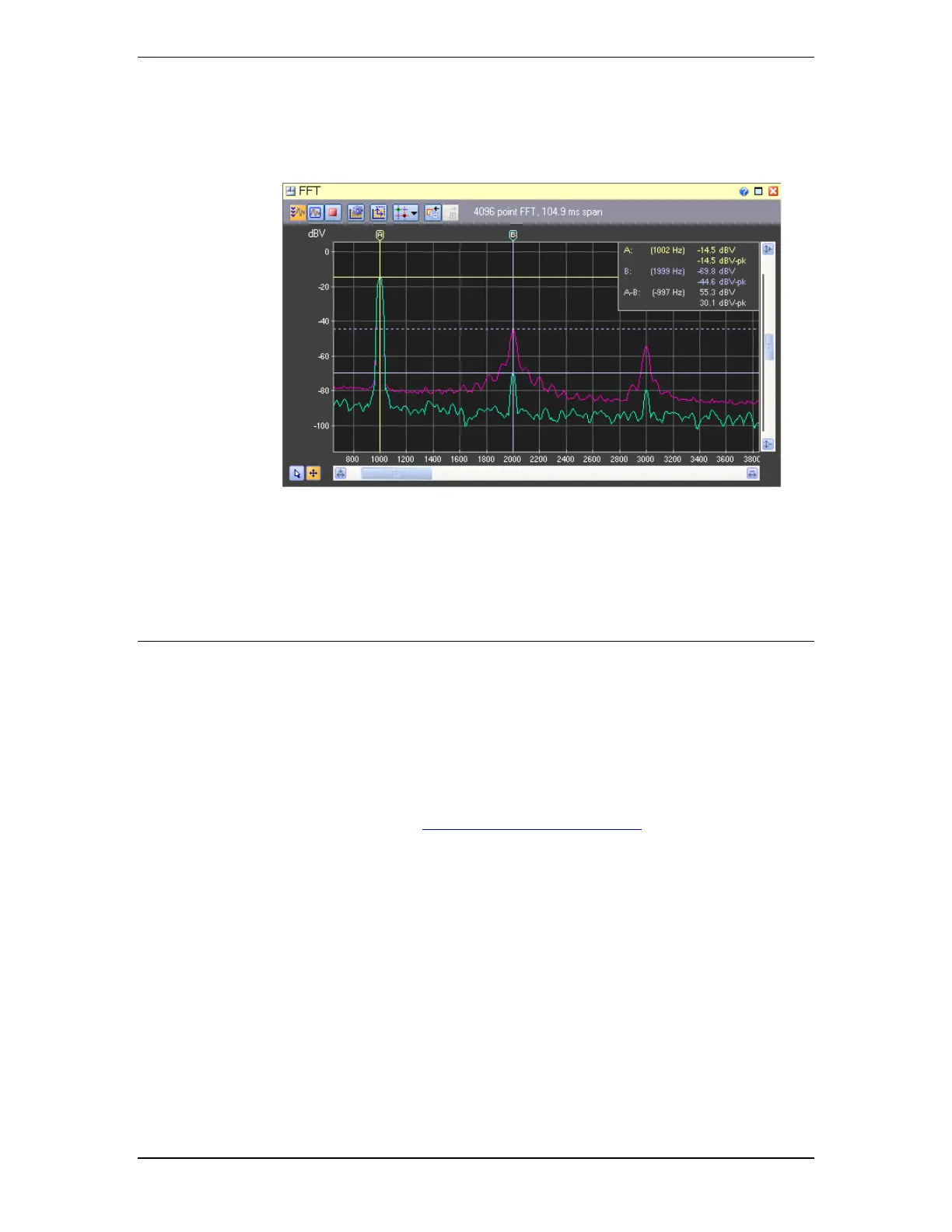
4. Viewing a real time FFT of a 1 kHz tone. The purple trace represents the peak hold
channel, which shows the effect of transient conditions. The two cursors are used to
measure the second harmonic level of the 1 kHz tone. In this case, the second harmonic
is normally 55 dB lower than the fundamental tone; however a transient event recorded
by the peak hold dramatically increased the harmonic level by approximately 25 dB.
2.4 For More Information
Detailed information on the operation of the TRsSim software for the AI-5620 can be
found in the TRsSim - Terminal Equipment Simulator - User Guide document. It
shows how to install and setup the software along with more complete instructions on its
use. This document is included with the AI-5620 package.
As newer versions of the TRsSim software are made available, they are posted on our
web site at:
http://www.adventinstruments.com
Along with software updates, the web site provides the latest versions of any relevant
documentation for download.
For technical support questions regarding the AI-5620 or the TRsSim software, please
contact us in any of the manners listed in Error! Reference source not found. on page
Error! Bookmark not defined..



 To Next Page