Need help?
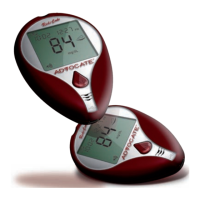
Do you have a question about the Advocate Redi-Code+ BMB-EA001 and is the answer not in the manual?
Hear and see results in English and Spanish.
Insert test strip and you are ready to go.
Hear and see results in 5 seconds.
Requires only a tiny drop of blood.
Supports testing before and after meals.
6 preset alarms available to record data.
400 memory results with 7, 14, 21, 28, and 60 day averaging.
Software available for download.
Test from palm, upper arm, calf, thigh, forearm.
Details dimensions, weight, power, display, memory, and operating conditions.
Covers analysis method, physical characteristics, chemical components, and performance.
Identifies front components like test strip slot, speaker, display, buttons, and port.
Identifies back components like release button, battery door, and set button.
Explains when to replace batteries and the E-2 error code.
Steps to enter and exit the meter's setting menu.
Procedure to set the year on the meter.
Procedure to set the month on the meter.
Procedure to set the day on the meter.
Procedure to set the hour on the meter.
Procedure to set the minutes on the meter.
How to choose between mg/dL and mmol/L.
Instructions for setting up to six alarms.
How to switch between English and Spanish.
Adjusting the speaking volume level from 0 to 6.
Steps to clear all stored memory from the meter.
Items needed and initial steps for control testing.
How to get and apply control solution to the test strip.
Comparing test results with the provided range.
Step-by-step guide to prepare the lancing device for use.
Inserting the test strip and choosing test modes (pre-meal, post-meal, general).
Procedures for obtaining blood from fingertip or alternate sites.
Applying blood to the strip and interpreting results.
Expected ranges for fasting and post-meal blood glucose levels.
Factors affecting accuracy and usage restrictions.
Steps to take before going to the lab for comparison.
Guidelines for concurrent meter and lab testing.
How to access and leave the meter's memory function.
How to view pre-meal, post-meal, and general 7-day averages.
How to access 14, 28, and 60-day average results.
Recalling the most recent and second most recent test results.
How to turn off the meter after viewing results.
Guidelines for cleaning and disinfecting the meter and lancing device.
Detailed steps for disinfecting the meter and lancing device.
Explains messages for low (Lo), high (HI), and ketone results.
Explains error codes like E-1, E-2, and low battery indicators.
Addresses temperature errors, memory issues, and alarm functions.
Solutions for no display, test not starting, and control solution range errors.
Provides phone numbers for purchasing and technical support.
 General
| Device Type | Blood Glucose Meter |
|---|---|
| Brand | Advocate |
| Model | Redi-Code+ BMB-EA001 |
| Measurement Range | 20-600 mg/dL |
| Test Time | 7 seconds |
| Power Source | Battery |
| Operating Humidity | 10-90% RH |
| Operating Temperature | 10-40°C |
| Sample Size | 0.7 µL |
| Memory Capacity | 300 results |
| Battery | 2 x AAA batteries |

 To Next Page