18
Digital Transformer Ratiometer DTR
®
Model 8500
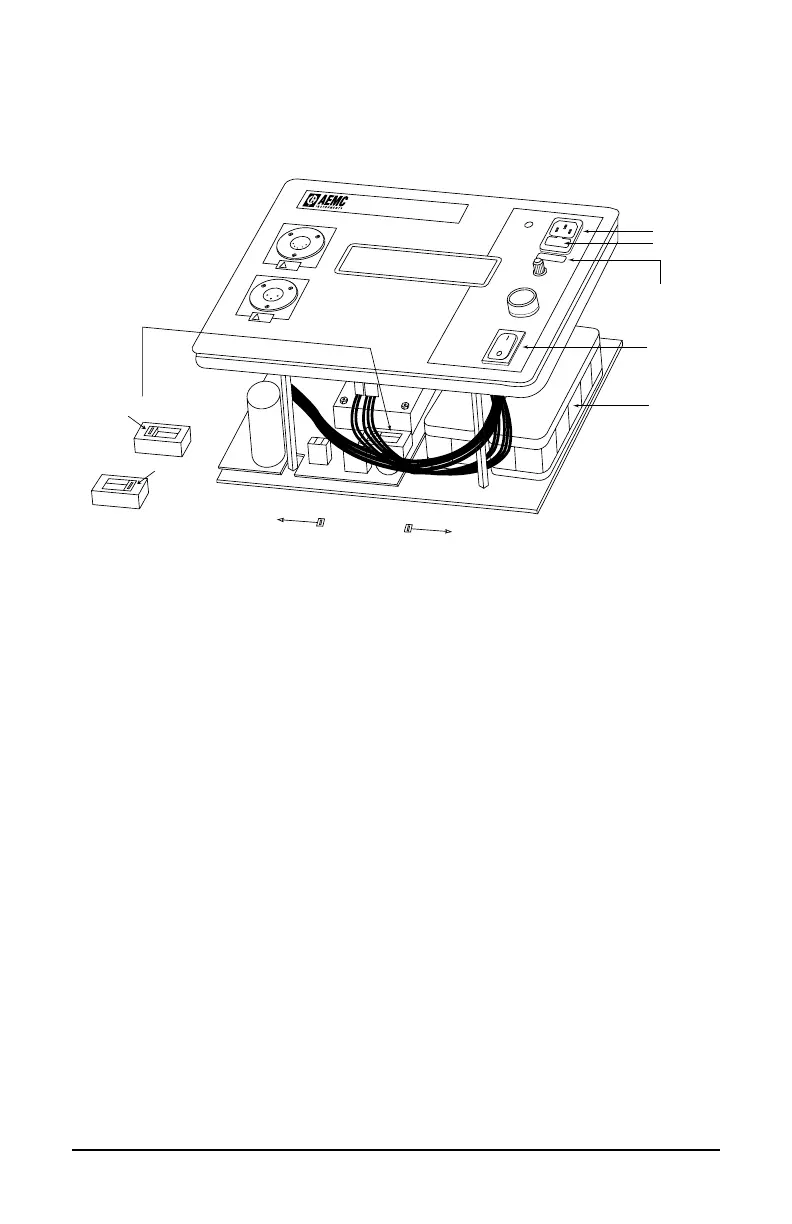
4.7 Changing Power Supply Setting from
115V to 230V or 230V to 115V
H
TEST
POWER
CONTRAST
CHARGING
TRANSFORMER RATIOMETER
MODEL 8500
!
X
!
¨
Battery Pack
On/Off Switch
Power Input
Fuse
Power Supply
Voltage Selector
(Black Body, Red Switch)
Switch Position for Power Supply Setting
11 5 V 230 V
11 5 V Setting Position
230 V Setting Position
115V
230V
115V
110V 50/60 Hz
Input Voltage Label
(to match power supply
voltage switch setting)
The instrument’s power supply setting can be changed from 115 to 230V
by following the procedure below:
1. Turn the power OFF and unplug instrument from all inputs and
power.
2. Unscrewallfourbottomscrews.
3. Remove instrument from case.
4. Locate switch next to transformer (see drawing).
5. Set red switch 115V or 230V as appropriate.
Switch setting indicates the selected supply voltage.
6. Replace the fuse (see power inlet) with appropriate current rating.
115V = 1 A, 230V = 0.5A
7. Carefully reinstall instrument into the case and fasten bottom screws.
8. Remove old voltage label.Afx input voltage label (115V or 230V)
under the AC power inlet.



 To Next Page