2-42 Subject to Export Control, see Cover Page for details.
2-4-6. CLONE UNIT
Follow these instructions to clone a Unit:
1. Connect Units to Network.
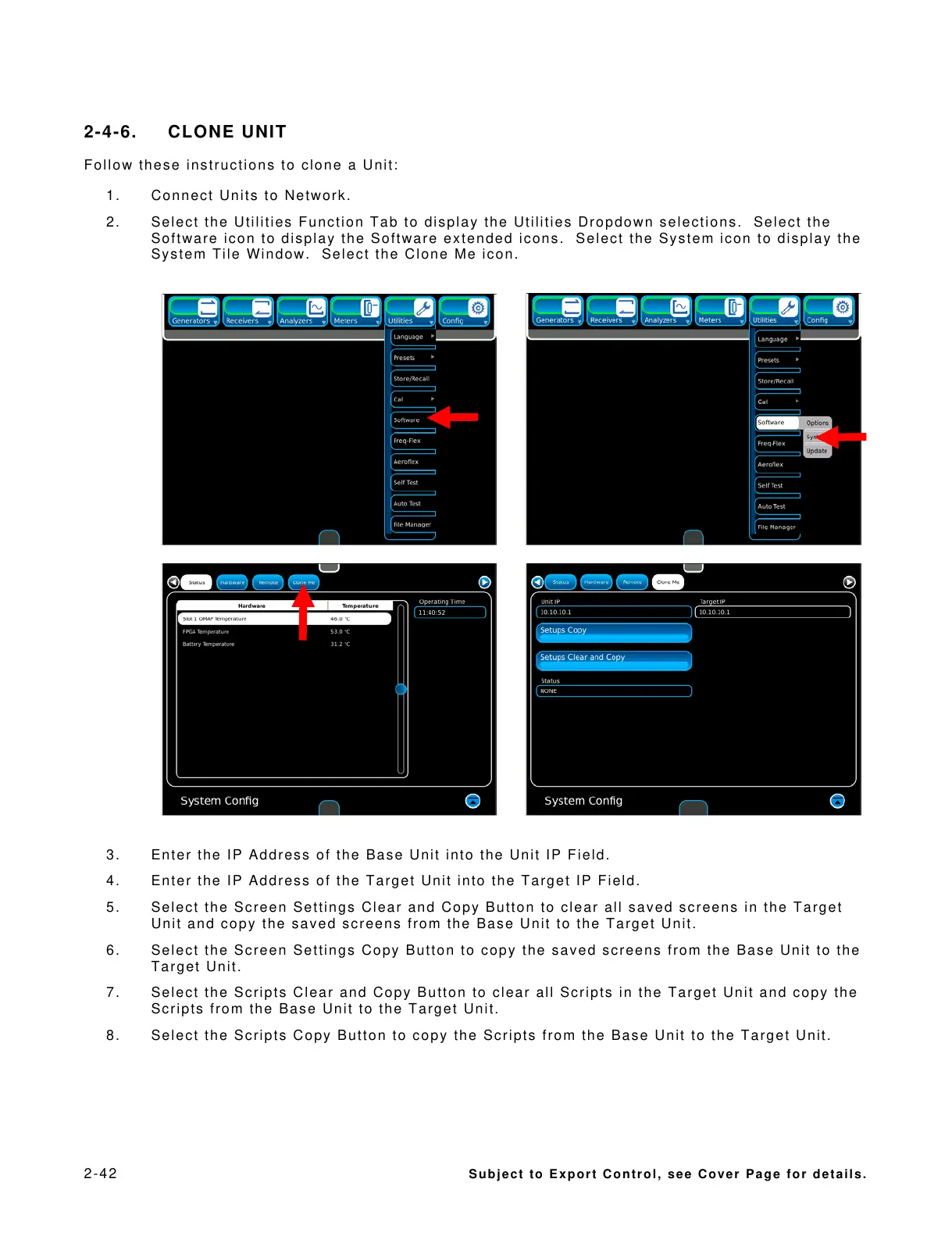
2. Select the Utilities Function Tab to display the Utilities Dropdown selections. Select the
Software icon to display the Software extended icons. Select the System icon to display the
System Tile Window. Select the Clone Me icon.
3. Enter the IP Address of the Base Unit into the Unit IP Field.
4. Enter the IP Address of the Target Unit into the Target IP Field.
5. Select the Screen Settings Clear and Copy Button to clear all saved screens in the Target
Unit and copy the saved screens from the Base Unit to the Target Unit.
6. Select the Screen Settings Copy Button to copy the saved screens from the Base Unit to the
Target Unit.
7. Select the Scripts Clear and Copy Button to clear all Scripts in the Target Unit and copy the
Scripts from the Base Unit to the Target Unit.
8. Select the Scripts Copy Button to copy the Scripts from the Base Unit to the Target Unit.













 To Next Page