2-36 Subject to Export Control, see Cover Page for details.
2-4-3. INSTALL SOFTWARE
System Software can be installed in the Digital Radio Test System. The System Update Function
Window displays the System Software version installed in the Unit.
NOTE: When loading Software into the Unit, the Calibration Values are not affected.
Follow these instructions to install System Software in the Unit:
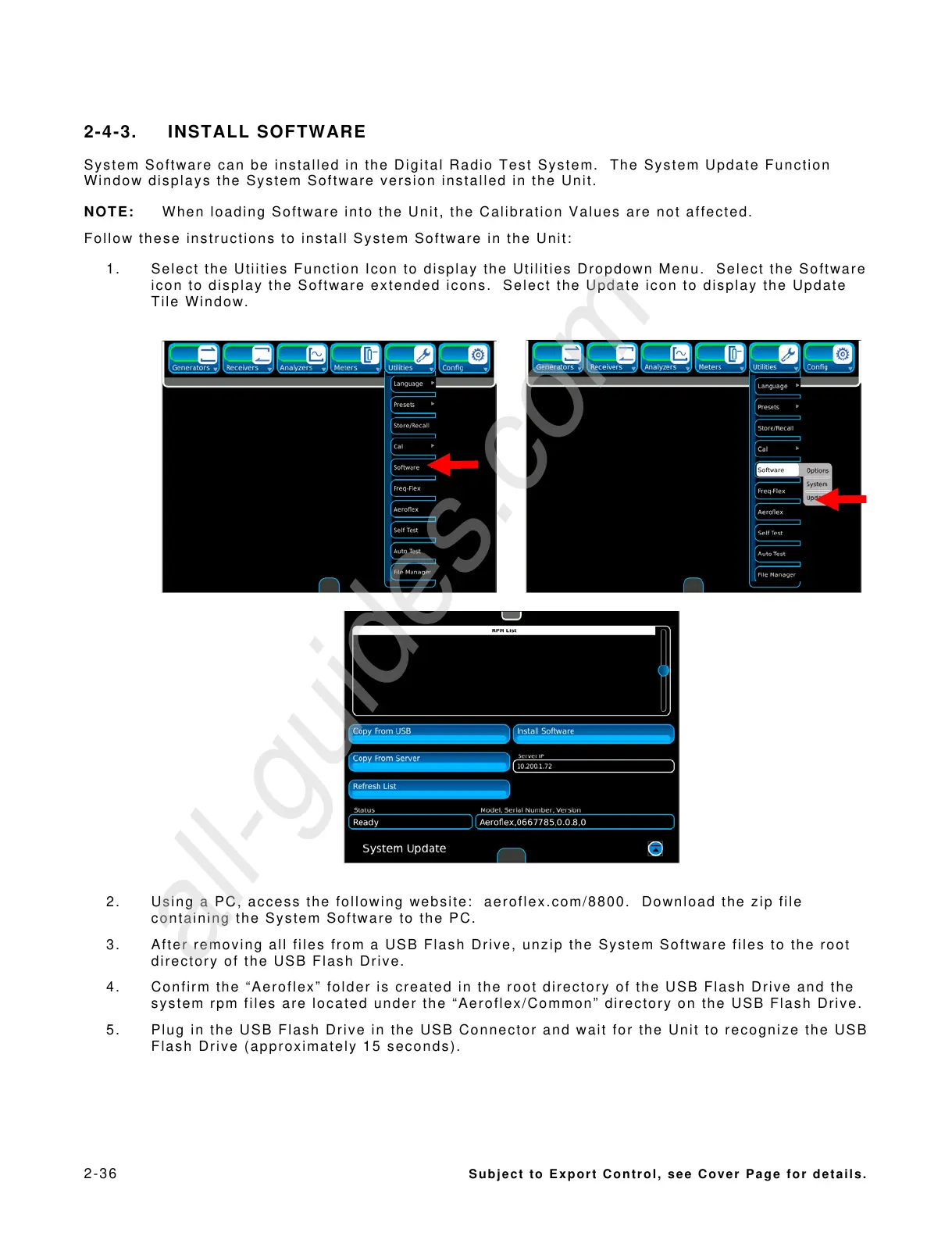
1. Select the Utiities Function Icon to display the Utilities Dropdown Menu. Select the Software
icon to display the Software extended icons. Select the Update icon to display the Update
Tile Window.
2. Using a PC, access the following website: aeroflex.com/8800. Download the zip file
containing the System Software to the PC.
3. After removing all files from a USB Flash Drive, unzip the System Software files to the root
directory of the USB Flash Drive.
4. Confirm the “Aeroflex” folder is created in the root directory of the USB Flash Drive and the
system rpm files are located under the “Aeroflex/Common” directory on the USB Flash Drive.
5. Plug in the USB Flash Drive in the USB Connector and wait for the Unit to recognize the USB
Flash Drive (approximately 15 seconds).













 To Next Page