Subject to Export Control, see Cover Page for details. 2-47
2-5. BASIC LMR CONFIGURATION SETUPS
2-5-1. ANALOG DEMOD
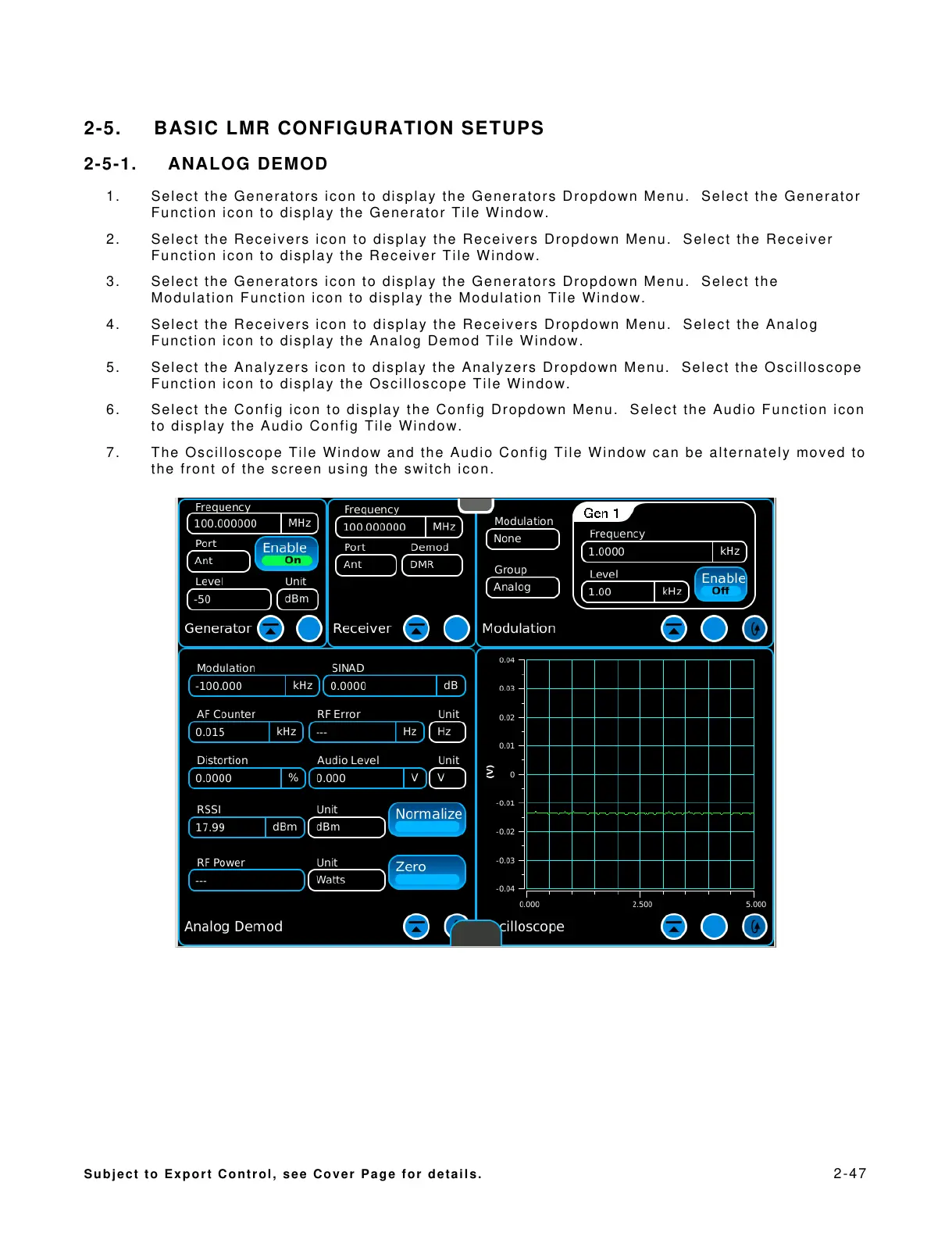
1. Select the Generators icon to display the Generators Dropdown Menu. Select the Generator
Function icon to display the Generator Tile Window.
2. Select the Receivers icon to display the Receivers Dropdown Menu. Select the Receiver
Function icon to display the Receiver Tile Window.
3. Select the Generators icon to display the Generators Dropdown Menu. Select the
Modulation Function icon to display the Modulation Tile Window.
4. Select the Receivers icon to display the Receivers Dropdown Menu. Select the Analog
Function icon to display the Analog Demod Tile Window.
5. Select the Analyzers icon to display the Analyzers Dropdown Menu. Select the Oscilloscope
Function icon to display the Oscilloscope Tile Window.
6. Select the Config icon to display the Config Dropdown Menu. Select the Audio Function icon
to display the Audio Config Tile Window.
7. The Oscilloscope Tile Window and the Audio Config Tile Window can be alternately moved to
the front of the screen using the switch icon.













 To Next Page