Switching between the wireless DR detector and the wireless
hospital network
The MUSICA Acquisition Workstation can be configured to connect to a
wireless DR detector as well as to a wireless hospital network.
In a configuration without System Control Unit or without a wireless access
point that is connected to the workstation, the DR detector communicates via
the internal wireless adapter of the MUSICA Acquisition Workstation. Only
one connection can be active at a time. The user must manually switch
between the wireless connection to the hospital network and the wireless
connection to the DR detector.
WARNING:
If the network connection is interrupted, the MUSICA
Acquisition Workstation may reconnect to different access point
if the option Connect automatically in the Windows wifi
settings is enabled. Do not enable the option Connect
automatically when connecting to the hospital network or to a
DR detector.
To switch between wireless networks:
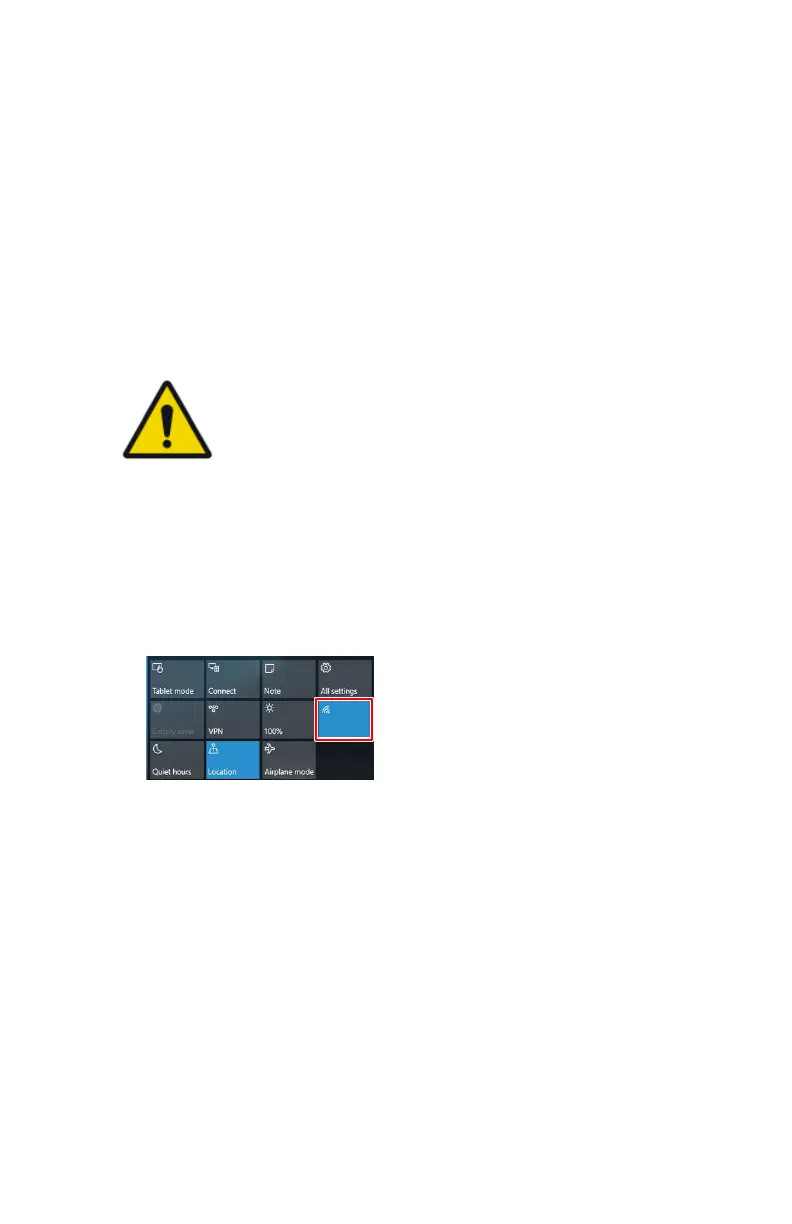
1. Swipe in from the right side of the screen.
The Windows action center is displayed.
Wi-Fi
Hospital Network
DR Detector 1
DR Detector 2
Figure 29: Windows action center with Wifi button highlighted
2. Touch the Wifi button
The available wireless networks are displayed.
3. Select the wireless network.
110 | XD 14, XD⁺14 | Advanced Operating
0430A EN 20210426 1355



 To Next Page