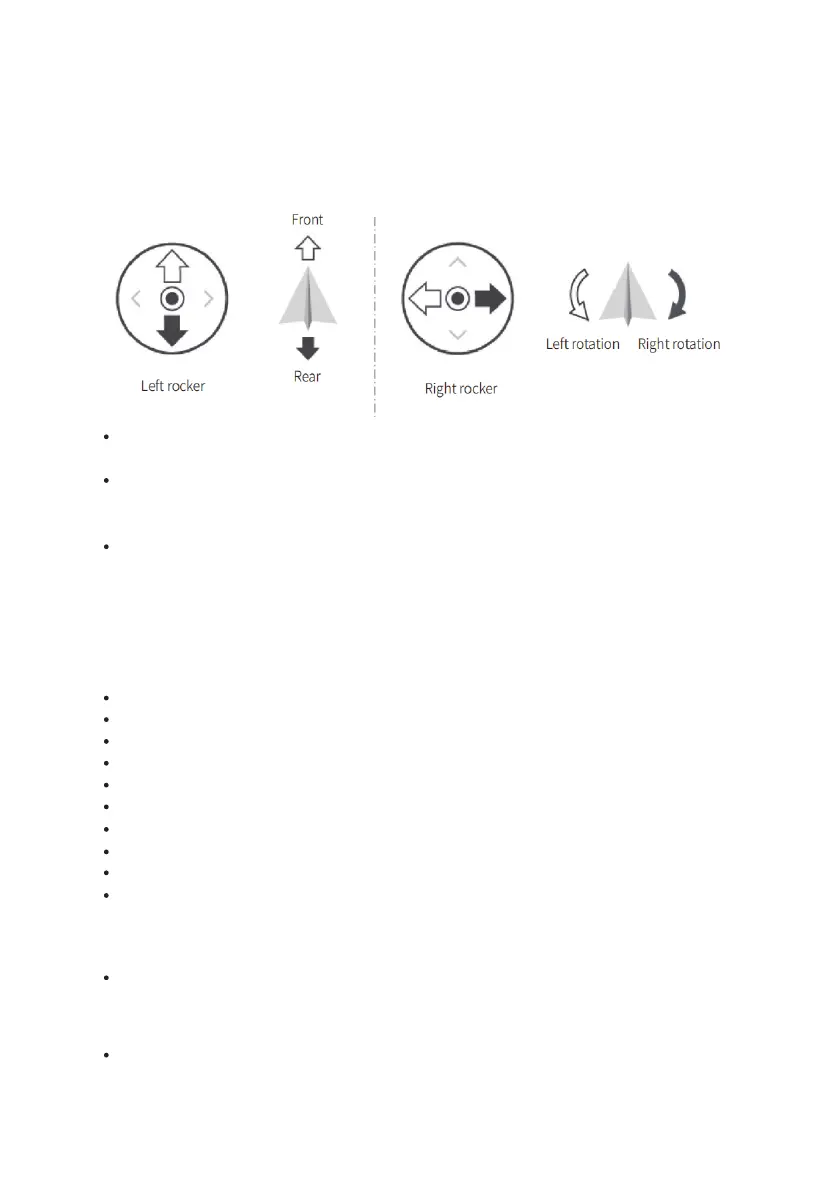
The remote control has preset switches default setting . Please do not change the switches setting. Any changing may cause
control failure. SWB switch the control mode, the SWC is controlling the light on and off while SWD controls the speed mode,
the left rocker controls the Scout mini move forward and backward while the right rocker controls the rotation. Please note
that the internal mapping motion of the chassis is mapped based on percentage, so when the joysticks are at the same
position,the speed is constant.
Press SCOUT MINI power button and then release。
Hold the power button 1 and 2 at the same time for few seconds until turned off
Please use SCOUT MINI in a relatively open area for the first time to avoid any inappropriate operation and damage.
1.3.2.3 Remote Control Operation
1.3.2.4 SCOUT MINI Preparation
1.3.2.5 SCOUT MINI Shut down
1.3.2.6 Remote Control Shut down
4
SWB control the control mode, top position is the command mode, remote control mode is the middle position, and the
bottom position the constant speed mode.
SWC is the light controlling button. When it is at the bottom position, it is closed, when it is in the middle, the light is open,
and the top position is the breathing light mode. Please note that the lighting control option setting is only valid under the
remote control mode, other modes are invalid.
SWD is the speed gear selection mode, the up position is the low gear mode (the fastest speed is about 10km/h), and bottom
position is the high gear (the fastest speed is about 20km/h). Please note that the gear setting button is only valid under the
remote control mode, other modes are invalid.
Press the SCOUT MINI power button and wait a few seconds;
Set SWB to the middle position;
Try to switch the light mode manually to make sure that the mode is selected correctly;
Try to gently push the left joystick forward, you can see that the car is moving forward slowly;
Try to gently push the left joystick back, you can see that the car is moving backwards slowly;
Release the left joystick and the mobile base will stop;
Try to gently push the right joystick to the left, it can see that the car slowly rotates to the left;
Try to gently push the right joystick to the right, it can see that the car slowly rotates to the right;
Release the right joystick and the mobile base will stop;
Then may try to control the mobile base in the relatively open area and be familiar with the speed control of the vehicle。


 To Next Page