DocNo.FM5505issueDPage11
8.SYSTEMCONFIGURATION
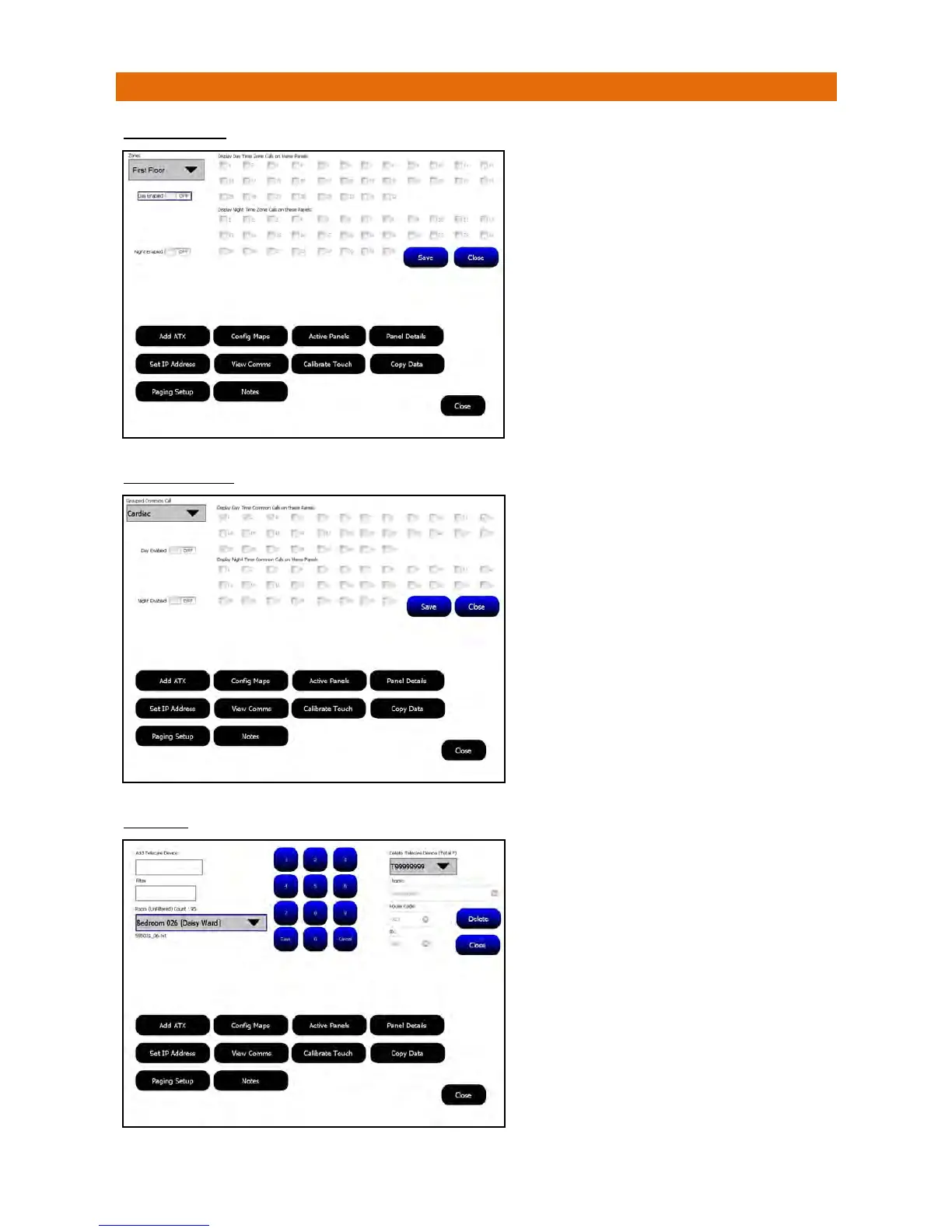
ZONEROUTING
COMMONCALLS
TELECARE
Callsfromeachzonecanbesettodisplayonspecific
panelsduringthedayanddifferentpanelsatnight.
SelecttheZonefromthepull‐downbox,settheDay
EnabledswitchonandtickthecheckboxesfortheDay
TimePanelsyouwantthiszonecallstobedisplayedon
duringtheday.
SettheNightEnabledswitchonandtickthecheck
boxesfortheNightTimePanelsyouwantthiszonecalls
tobedisplayedonduringthenight.
Repeatforeachzoneinthepull‐downbox.
Note:thenightstarttimeanddurationissetinthe
NightModeoption.
PresstheSavebuttonthenClosetoexit.
Commoncalltypescanbesettodisplayonspecific
panelsduringthedayanddifferentpanelsatnight.
SelecttheGroupedCommonCallfromthepull‐down
box,settheDayEnabledswitchonandtickthecheck
boxesfortheDayTimePanelsyouwantthesecalltypes
tobedisplayedonduringtheday.
SettheNightEnabledswitchonandtickthecheck
boxesfortheNightTimePanelsyouwantthesecall
typestobedisplayedonduringthenight.
Repeatforothercalltypesinthepull‐downbox.
Note:thenightstarttimeanddurationissetinthe
NightModeoption.
PresstheSavebuttonthenClosetoexit.
Thesystemmusthave169MHzTelecareReceivers
installedifTelecareDevicesarebeingused.
EachTelecareDevicehasaunique8digitIDprintedon
itsproductlabel.Usethekeypadtoenterthisnumber
intheAddTelecareDeviceboxthentypeazoneinthe
Filterbox.SelecttheCallPointIDbeingusedtocancel
thecallfromtheRoompull‐downboxthenpre
ssSave.
ToDeleteaTelecareDeviceselecttherequiredID
(prefixedwitha“T”)fromthepull‐downlistbox.The
room,housecodeandIDwillbedisplayedforthe
devicechosen,ifcorrectpressDelete .
PresstheClosebuttontoexit.



 To Next Page