Ailunce HS2 HF/VHF/UHF Full Mode SDR Transceiver
Back Homepage
7-2. Find the required signal, turn on NR, usually the effect of NR is more obvious, then press ○6 to open the digital filter to the maximum bandwidth, and then
adjust the digital filter bandwidth a little bit. You will find that the noise will be greatly suppressed. At this time, you can also adjust the combination of the
previous RFG and IFG to achieve the best reception effect.
Through the above settings, you have mastered the advanced receiving settings of HS2. Now, let HS2 explore with you in the ocean of radio waves.
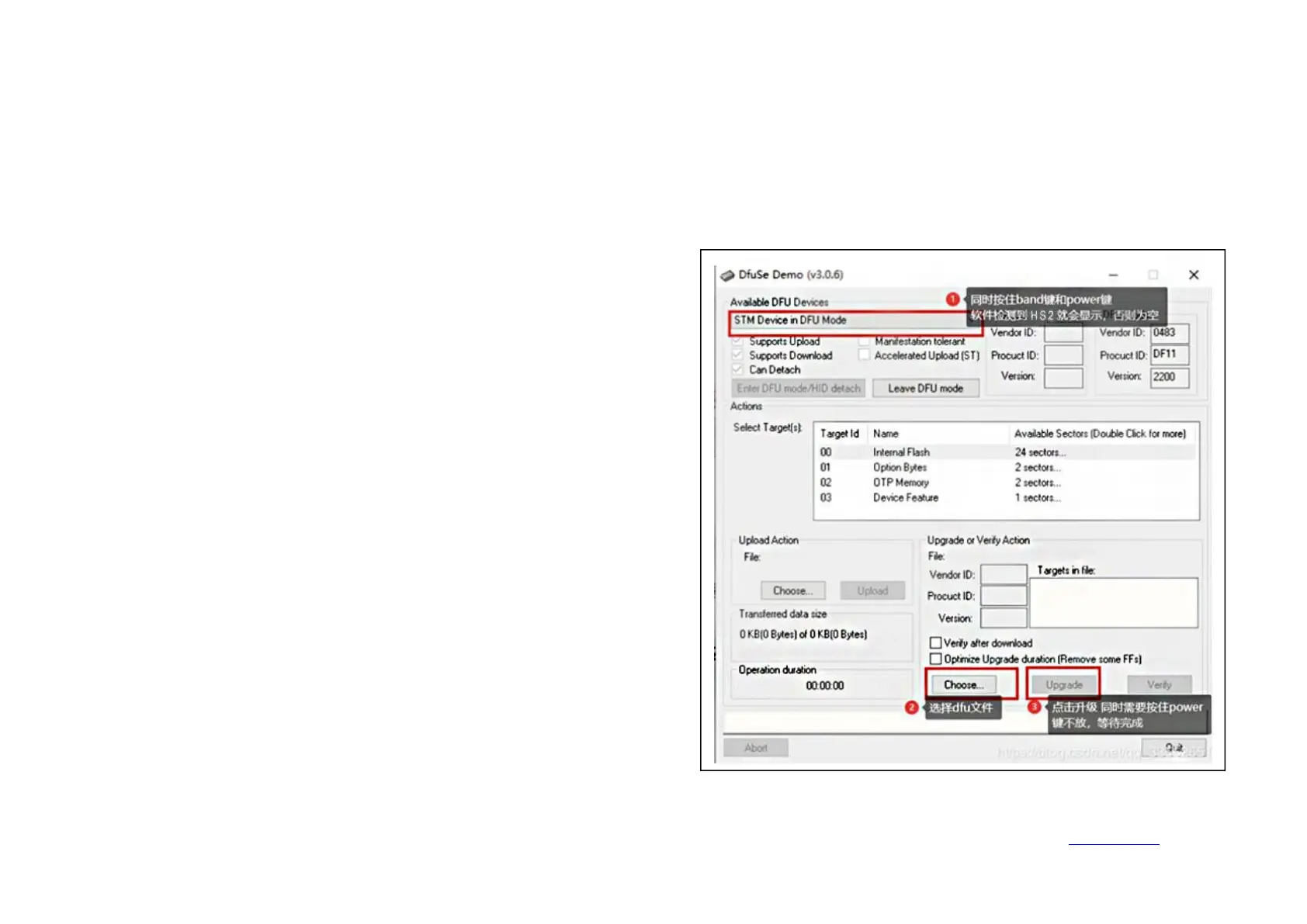
HS2 firmware upgrade
1. Open the DfuSe Demo software.
2. Plug the HS2 power supply and connect it to USB.
3. Hold down the BAND key and then hold down the POWER key. At this
time, if the computer is connected to the HS2 normally,
○
1 will display
(STM Device in DFU Mode). Otherwise, please check whether the computer
is properly connected to the HS2.
4. Select the firmware file *.dru
○
2
5. Hold down the BAND and power keys, click
○
3Upgrade
At this point, the upgrade begins, wait for the progress bar to finish, release
the button, and restart the computer.
6. If you let go of the button or power off halfway, you only need to restart
the operation.


 To Next Page