10
4.4 – The bike keyboard
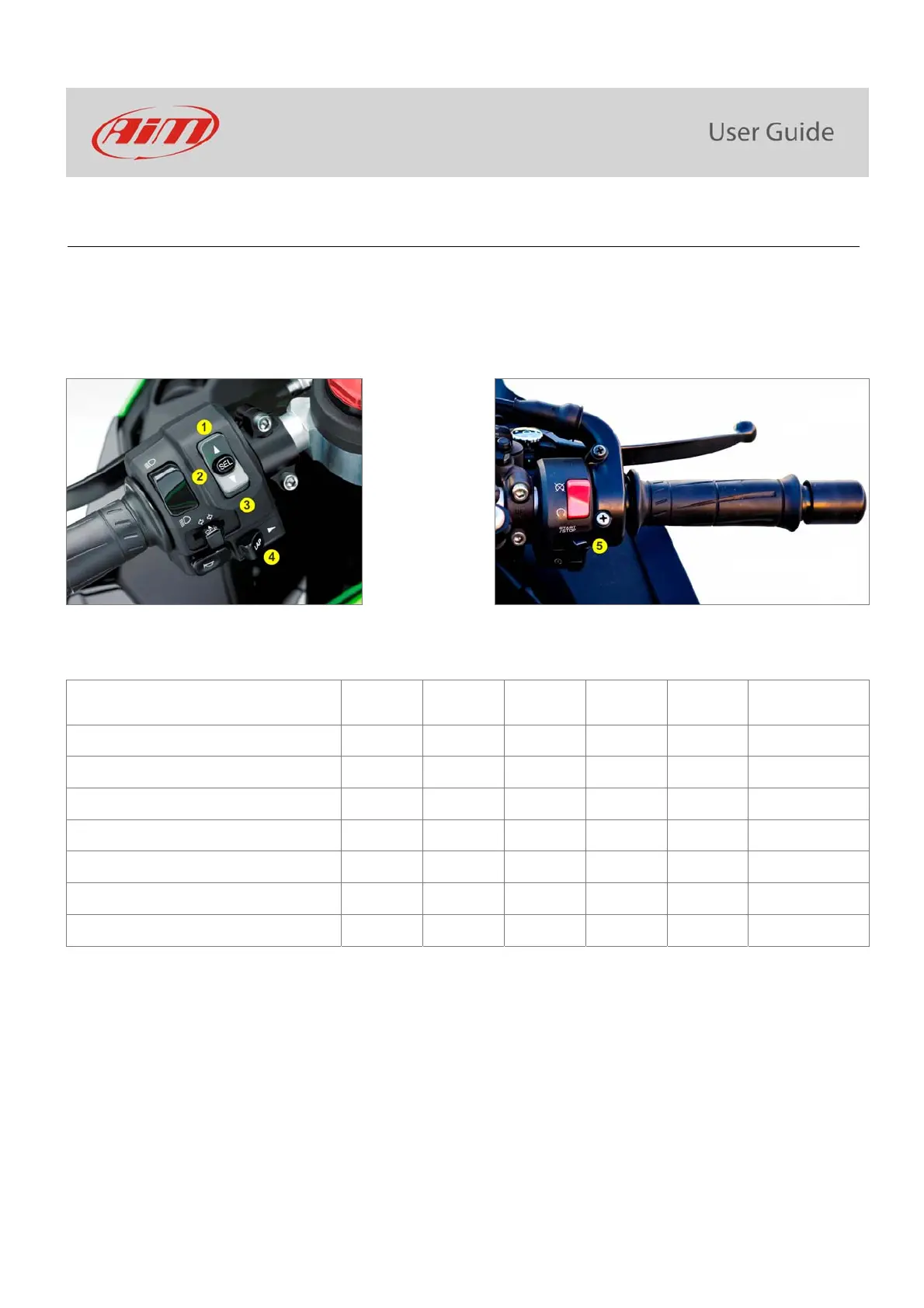
Kawasaki Ninja features five buttons: four on the left handlebar and one on the right one, used to manage MXK10 dash logger:
UP (1)
SEL (2)
DOWN (3)
LAP (4)
START/STOP (5)
Differently pushed they perform different actions on MXK10 display pages. With reference to the following table: S stays for short (less
than half of a second) pressure, L for long pressure (from half of a second to a second).
Function Up Down Sel Lap Start/Stop Notes
Access Menu
S
Access Data Recall
S
Change S-KTRC (traction control) settings
L L
Change S-KTRC (traction control) settings
S S
Racing kit only
Activate Launch control
L
L
Laptime
L
Recording
Power mode
S
Racing kit only
Please note: as a general rule “UP” and “DOWN” pushbuttons scroll the options, “SEL” pushbutton select an option and “LAP” pushbutton
exit a menu.



 To Next Page