Get Help
Get Help
34 35
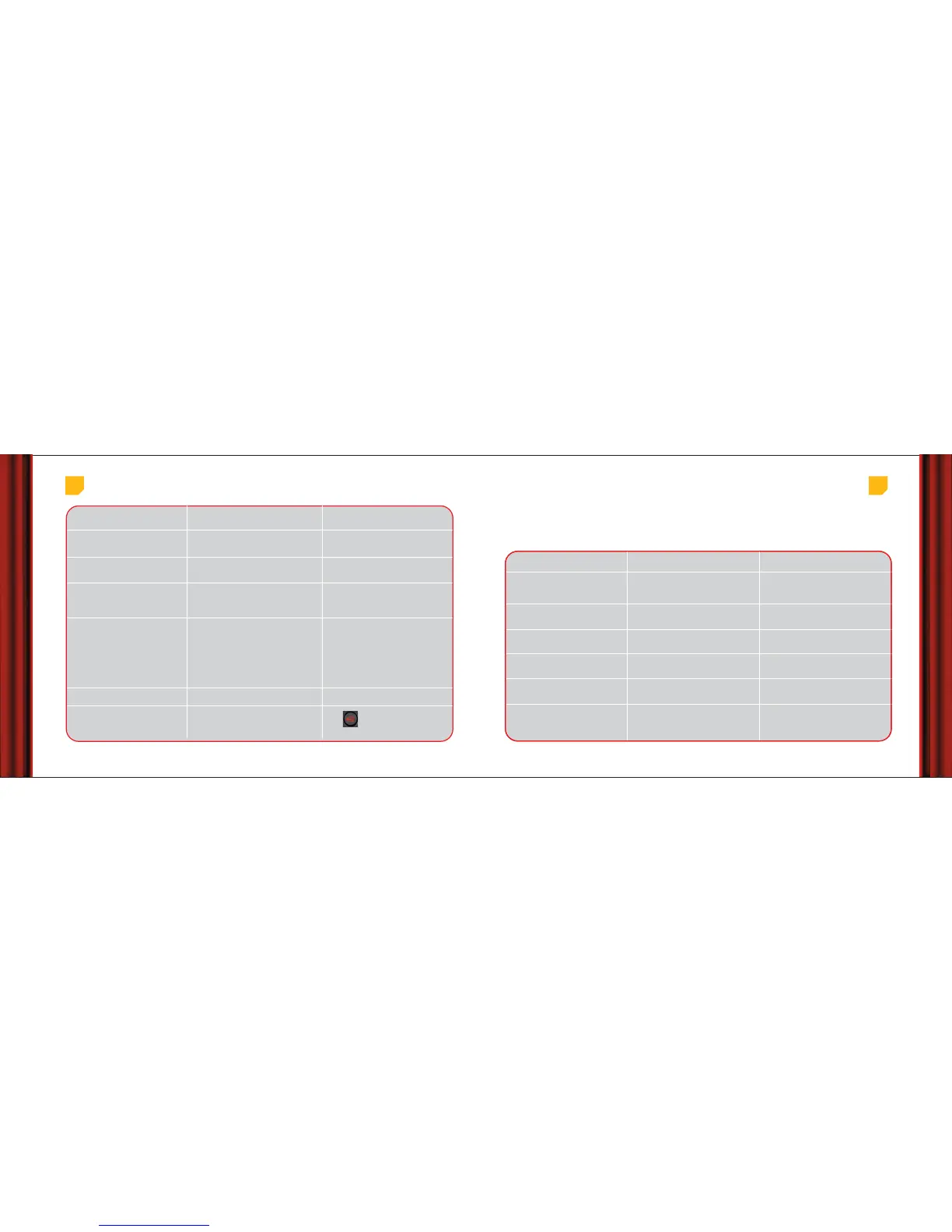
Problem
Irregular or bad reception.
A blank screen comes when you
choose some service.
The remote works with the TV & not
with my STB.
The remote control does not
operate.
I have forgotten my PIN.
I cannot close the Electronic Programme
Guide.
Possible Cause
Problem with cable connections.
[damaged, broken connection or wires].
You are watching an encrypted service or
programme.
You need to reset your remotecontrol.
1. Your STB may be off.
2.There are no batteries or the
batteries are discharged.
Action
1.Check all the connections and
cables.
2.Contact customer care.
1.Choose another service or programme.
2.Contact customer care.
1.Press STB on your remote control to
control your STB.
2.Refer this guide to use your remote.
Make sure you point your remote directly
towards your STB and nothing is between
the two. The remote command light on
your STB and on your remote control
should flash each time you press a remote
button. If neither light flashes, check
batteries in your remote and check if your
STB is plugged to mains.
Call customer care to have your PIN reset.
Press exit button on remote.
Error Messages
Read these tips if you see a message on screen and don’t know what to do next :
Message
Insert your View card.
There is a problem with your
View Card.
This program has already
started.
No satellite signal is being
received.
A yellow envelope blinks on
screen.
This channel is blocked.
What does it mean
There is no View Card in the card slot
of your STB.
Your STB cannot recognize your View
Card.
The program has already started and
you can’t buy it now.
Your STB is not receiving a satellite
signal.
You have received a new message
from Airtel.
Your current subscription does not
include this channel.
Action
Insert or reinsert your View Card. The
card holds all the information your STB
needs to know about your subscription.
Check if your View Card is right way
up and not damaged.
Check the listing to find when you can
buy it next.
Check if the cables from your satellite
dish are correctly plugged to your STB.
Press the yellow key on remote to read
the message.
Call Customer Care to upgrade your
plan.



 To Next Page