Watch TV
Watch TV
10 11
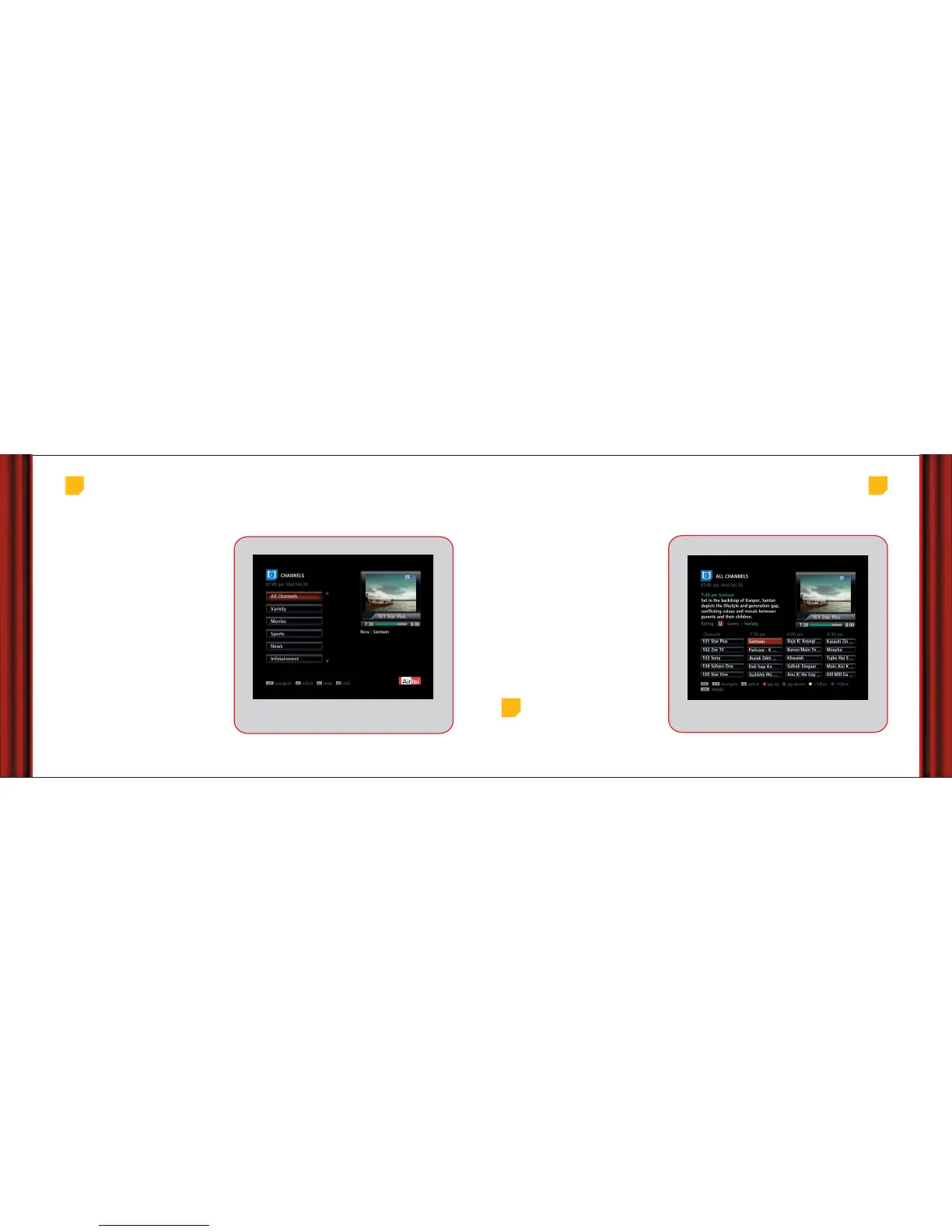
You can see the list of all channels and programmes
or quickly find the channels clubbed in different
categories eg News , Movies, Sports, etc from the
‘Channels’ option in the main menu.
If you want to see all channels, simply select
‘All Channels’ option on the Channels menu or press
the ‘guide’ button on your remote for the channel
guide.
Once you select a category of channels, the
respective guide appears on screen. Here you can
find a range of information about listed
programmes. Just choose and start watching!
Please refer to Help Video on Ch.999 for more
details.
Browse through channels
Complete channel
guide
Main Menu > Channels
Main Menu > Channels > All Channels
We understand your need for watching every
moment of a programme. A small preview
screen on the top right corner plays your last
viewed programme even while you navigate
through the EPG.
Depending on what you want to watch you can
also change the channel with Ch +/- buttons or use
the numeric buttons to enter a 3 digit cha nnel
number to go to that channel. This will make the
selected channel appear in preview screen. Press
OK to see in full screen.
View as you surf
Top
tip
While moving up/down the programme list in the
current time band, highlight it for 4 seconds and it will
start playing in the preview screen. Simply press OK to
switch to full screen.
Remember: If you are not subscribed to a channel, you will get
the non-subscription message in the preview screen.



 To Next Page