FS-HDR Frame Synchronizer/Converter/HDR-WCG Processor v1.0r1 32 www.aja.com
Software Update Installation
Although the FS-HDR comes from the factory pre-installed with software, it may
not be as up-to-date as software posted on the AJA website. This topic describes
the steps required to update the software in your AJA FS-HDR.
Download the Latest Software
Current and past releases of FS-HDR software are available on the World Wide
Web from AJA’s website. To get the software, point your browser to the FS-HDR
support page, which will contain helpful FS-HDR information and links to the
updates.
https://www.aja.com/en/family/fs
Once you’re at the update page, you can select FS-HDR software files to
download to your Mac or PC for upgrading your local FS-HDR machine.
Unpack the Software
FS-HDR software update files are “ZIP” files that you can open with a number of
standard and third party file compression applications. The software image that
you’ll install on the FS-HDR is a file with a name like FS-HDR_ver_1.0.0.0.bin or
similar.
NOTE: Depending on your PC or Mac operating system settings, the “.bin” extension
may not be visible to you in a file directory.
Uploading and Installing the Software to the FS-HDR
Uploading and installing the software update requires a PC or Mac that can
“see” the FS-HDR via its Ethernet connection. Follow this procedure to install the
software:
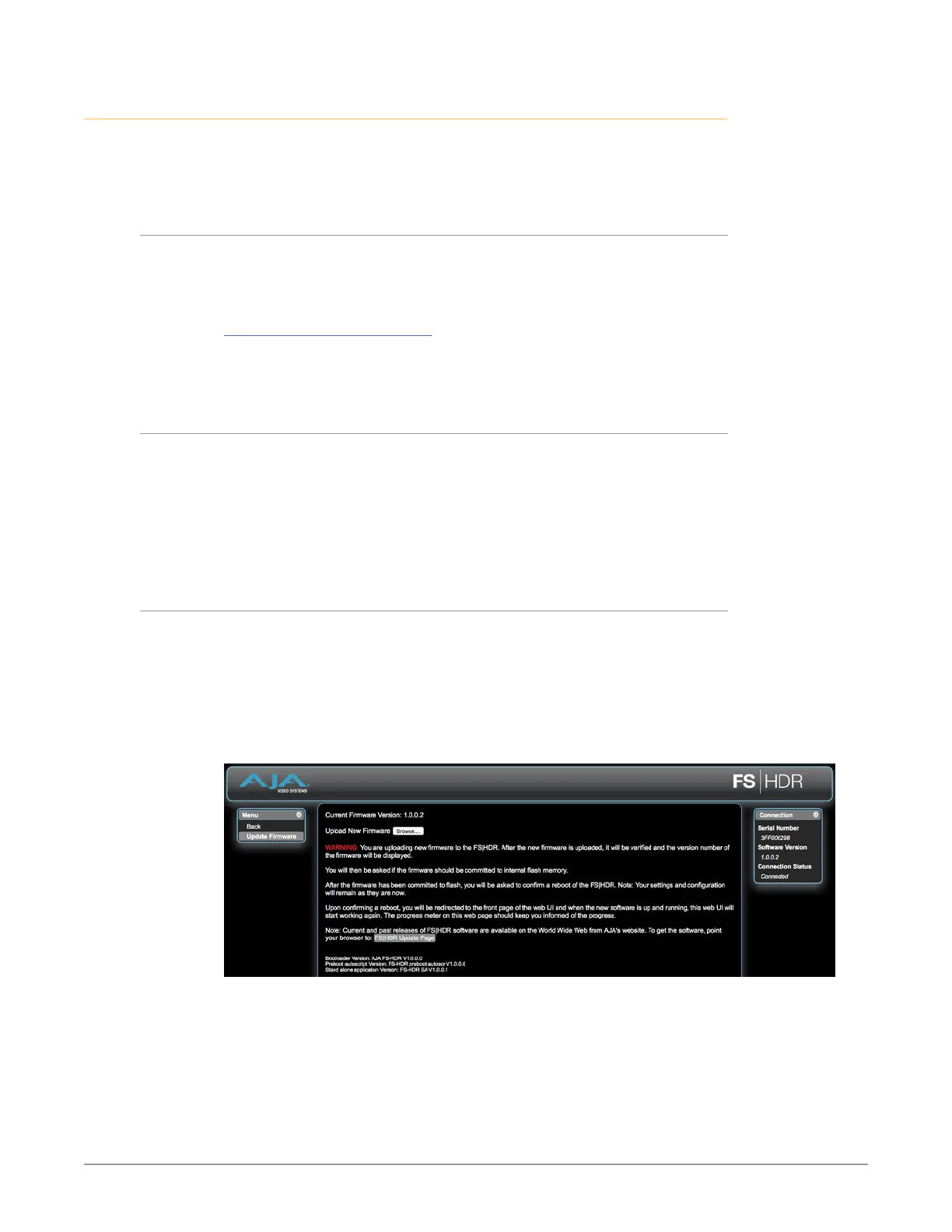
1. Point your browser at the FS-HDR’s upgrade page by clicking on the
Firmware link at the bottom of the navigation box on the left-hand side of
any FS-HDR web page. The FS-HDR web pages are discussed in Chapter 5.
Figure 6. Update Firmware Browser Screen
2. Click the Browse... button to nd and select the downloaded le. For
example: FS-HDR_ver_1.0.0.10.bin contained in the le downloaded from
AJA.
3. Click OK when asked if you want to Upload Firmware. The le uploads to
the FS-HDR and is tested for validity. Incomplete, corrupted, or non-FS-HDR
les are rejected. Wait for the procedure to complete—it will take only a few
minutes. Progress bars show upload progress.



 To Next Page