FS1-X v1.1 www.aja.com
109
In addition, the following front panel CONFIG screens can affect SNMP alarm messaging:
• 5.0 Power Supply Alarm (see page 55).
• 6.1 & 6.2 Video Format Alarm (see page 55).
•7 Reference Alarm (see page 56).
Front Panel Octet Value
Entry Procedure
Set the octets (numbers between periods) values as follows:
1. Push ADJUST momentarily to enter edit mode.
2. Turn SELECT to select the octet you want to edit, indicated by blinking.
3. Turn ADJUST to enter the new value.
• If you need to revert to the previous setting (undo changes), push SELECT.
4. Push ADJUST momentarily to save and activate the new setting.
• If you want to revert to the default value, hold down ADJUST for 4 seconds.
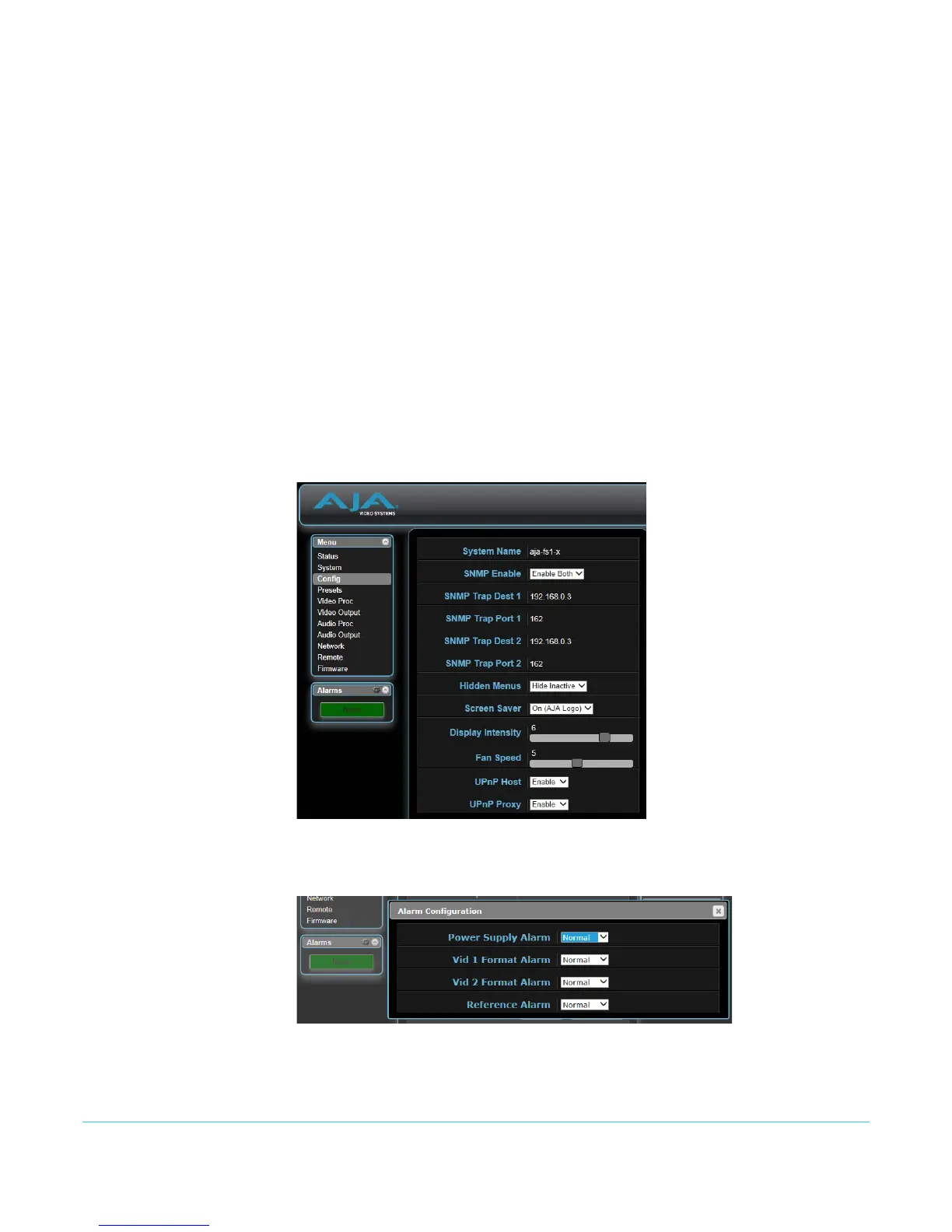
Web Browser SNMP direct configuration settings are available on the Config screen of the web browser
interface.
Figure 15. Web Browser Config Screen SNMP Parameters
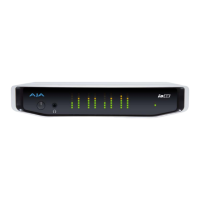
Clicking on the Alarms gear icon opens a window that permits setting alarm messaging.
Figure 16. Web Browser Alarm Configuration Window



 To Next Page