FS1-X v1.1 www.aja.com
67
7 Upconvert Mode This parameter selects the type of upconversion performed by the Video Processor. This
parameter is in effect only when the input is SD (525i or 625i) and the selected output
format is HD (720p, 1080i, or 1080p), or when the input is HD (720p, 1080i, or 1080p) and
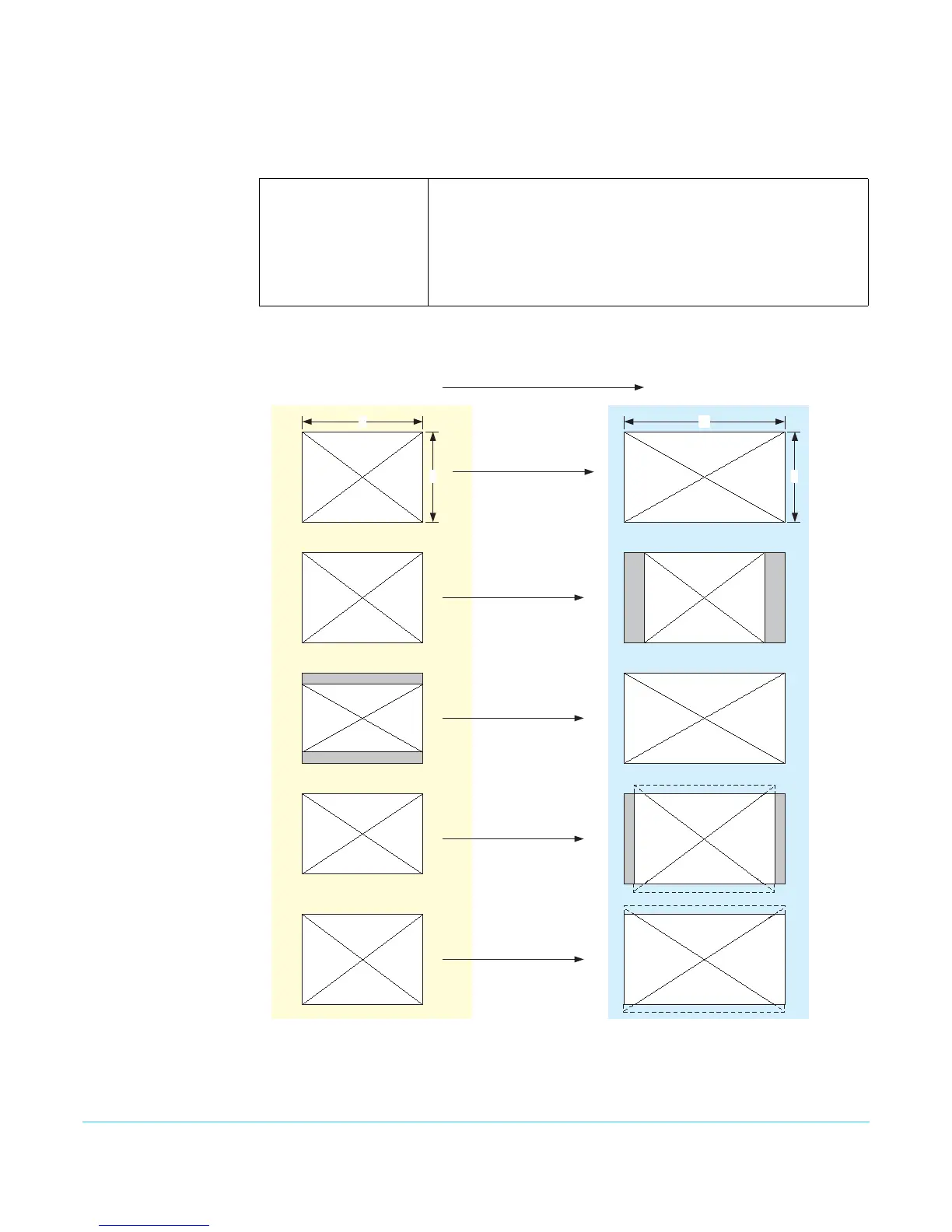
the output is 2K (2048 x 1080). See the following Upconvert Illustrations for examples.
4x3 Pillar (default)
14x9 Pillar
Full Screen
LB to Full
Wide Zoom
Results in 4x3 image at center screen with black sidebars.
Results in 14x9 image, zoomed slightly to fill a 14x9 image with
black sidebars.
Anamorphic full screen display.
Image is zoomed to fit the full screen (letterbox).
Using a combination of zoom and stretch, the image is sized to fit a
16x9 screen (this can introduce a small aspect ratio change).
Upconvert Illustrations
Full Screen
4:3 Pillar
LB to Full
14:9 Pillar
Wide Zoom
16
9
4
3
4:3 Upconverts To These displays on 16:9



 To Next Page