FS1-X v1.1 www.aja.com
93
• “Video Output Screen” on page 103
• “Audio Proc Screen” on page 104
• “Audio Output Screen” on page 105
• “Remote Screen” on page 106
• “Firmware Screen” on page 107
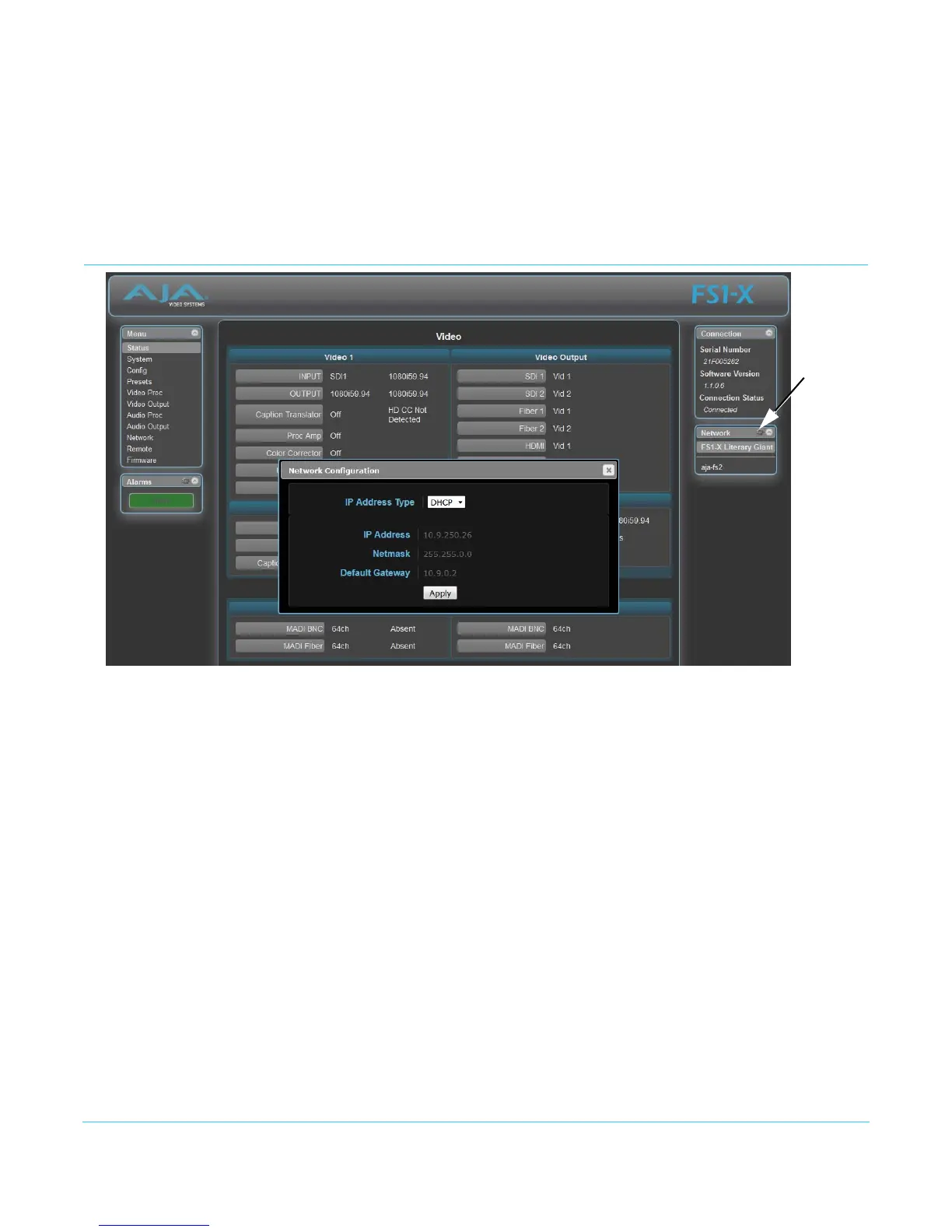
Network Pane and Network Configuration Screen
The Network pane on the right side of any screen lists the FS1-X systems that appear on
the network. This pane includes three additional controls:
• Hover the cursor over any system name to see its IP address.
• Right-click any system and select Identify to blink the system ID LEDs.
• Click the gear-shaped icon in the Network pane (or select Network from the Menu list on
the left side of the screen) to open the Network Configuration screen listing FS1-X
network settings.
The Network Configuration screen allows you to view and change your FS1-X's network
settings and then click Apply to activate them.
See “Networking” on page 29 for detailed setup instructions for connecting the FS1-X to a
network. Consult your network administrator about how to configure network settings.
IP Address Type IP Address Type determines the type of TCP/IP network configuration used by the FS1-X.
DHCP enables the FS1-X to connect to the network DHCP server, which assigns the IP
Address, Netmask, and Gateway automatically. Static lets you set these parameters
manually.
Click the
Network
gear icon



 To Next Page