Page 13DD8
plus
Version 2.20 - September 1998
PLAY MODE - 2
PLAY MODE
The PLAY mode is the default mode when a Project is loaded. It can also be accessed at any
time by pressing the PLAY key under the barmeters. Pressing the track keys 1-8 located under
the barmeters select the playback tracks to be muted. The tracks with lit LEDs indicate muted
tracks. Pressing the track key again disables the mute.
The Soft Keys’ functions depend on the External Time Source selected in the SYSTEM/SYNC
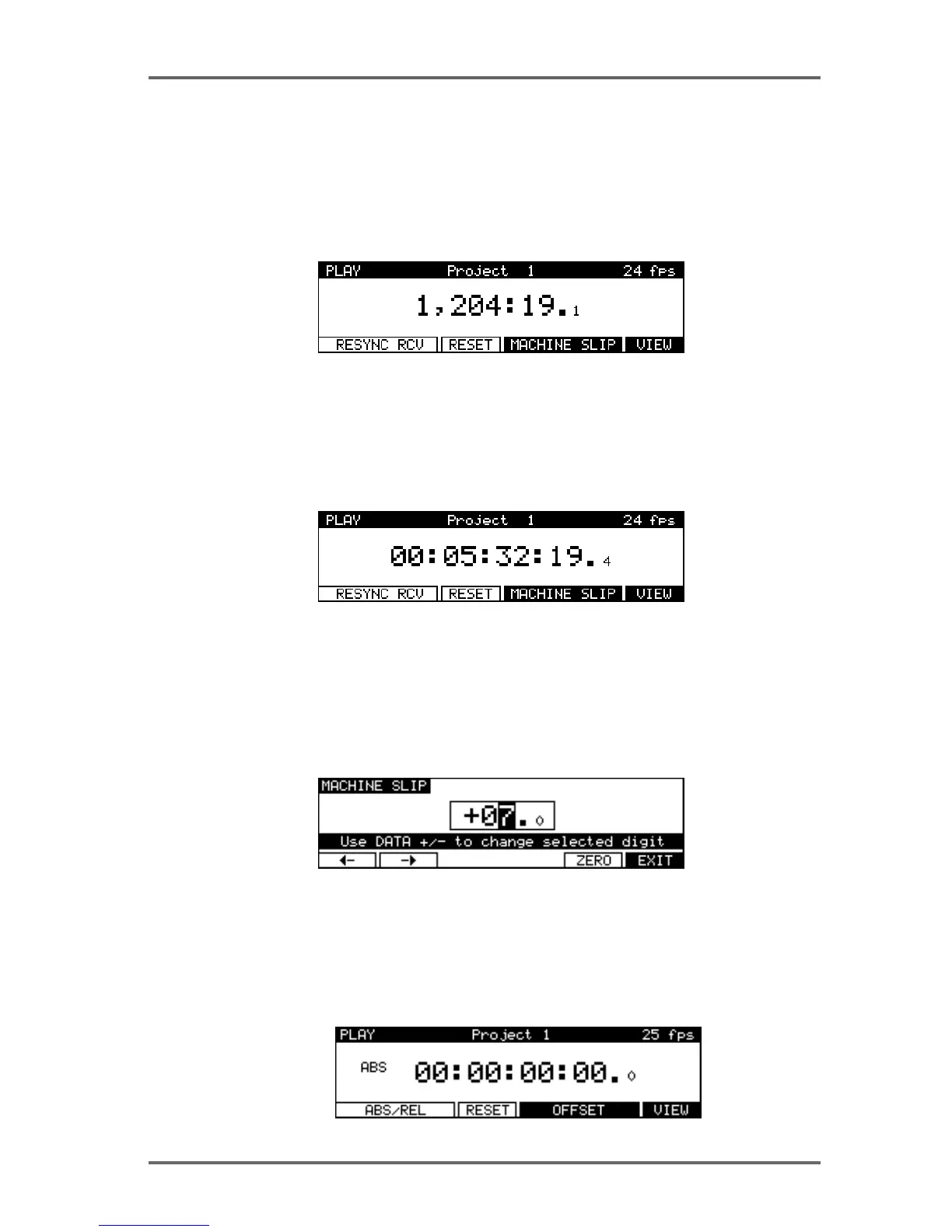
menu. When a Biphase time source is selected, the PLAY screen will look similar to this:
The top line of the screen shows the name of the current Project, as well as the current frame
rate of the timecode display.
The time display style and sub-frame display depend on the parameters set in the SYSTEM/
DISPLAY menu. In the example shown above, the timecode display style has been set to display
footage. However, it is also possible to select ‘conventional’ timecode formats in which case the
display will look something like this:
The top line of the screen shows the name of the current Project, as well as the current frame
rate.
Pressing the RESYNC RCV key (F1/F2) resets the biphase reader to the current position.
The RESET key (F3) resets the time counter to zero at the current position.
Pressing MACHINE SLIP (F4/F5) takes you to the MACHINE SLIP page :
This page allows you to slip the DD8’s time with respect to the biphase machine. F1 and F2 are
used to move the cursor to the correct position (frames or sub-frames), and the DATA +/- keys
are used to adjust the value. Note that the Sub-Frame value (1/10th frame, 1/4th frame, 1/2
frame) depends on the setting in SYSTEM/DISPLAY (10th Frame, Film Perfo, Video Field). The
ZERO key (F5) resets the offset to zero.
When an external time source other than biphase is selected, the PLAY screen will look like this:


 To Next Page