Page 85DD8
plus
Version 2.20 - September 1998
SYSTEM - 8
THIRD SYSTEM SETTING PAGE
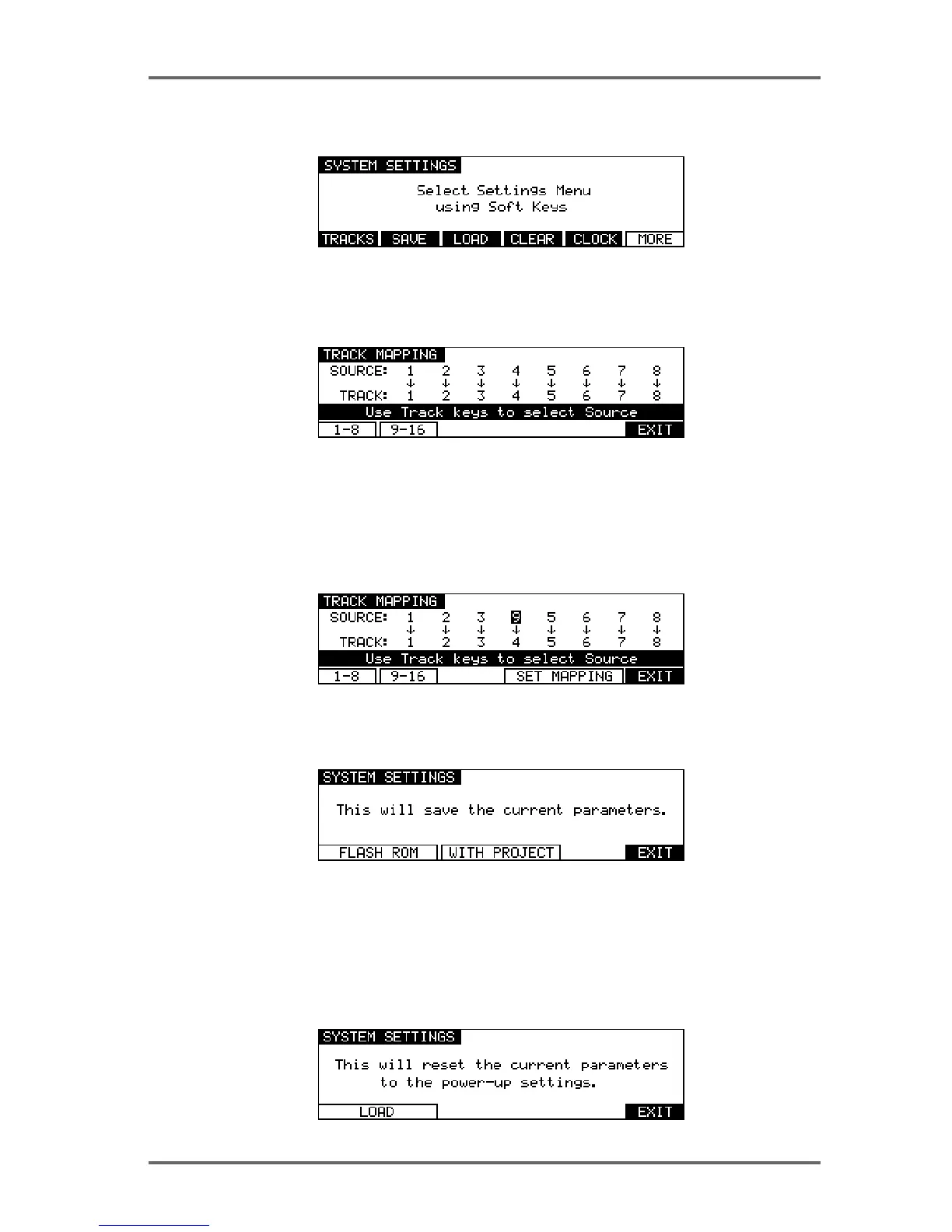
Pressing MORE (F6) on the second SYSTEM SETTINGS page will show this screen:
The functions are:
TRACK MAPPING
Pressing TRACKS (F1) on the third System Settings page takes you to the Track Mapping page:
This page is used to assign ‘virtual’ tracks from the current project to the 8 playback tracks. For
example, if you are using a project created on the DD1500 or DR16 with 16 tracks, you can
choose which 8 of these tracks you want to play on the DD8. The soft keys ‘1-8’ (F1) and ‘9-16’
(F2) can be used to quickly select tracks 1-8 or 9-16 for playback. You can also select individual
tracks by using the track keys (1-8) to select a playback track and using the DATA +/- keys to
select the required source. After changing the mapping for individual tracks a new soft key, SET
MAPPING, will appear. Press this key (F4/F5) to confirm your selection.
SAVE SETTINGS
Pressing SAVE (F2) on the third System Settings page takes you to a page which allows you to
save the current system parameter settings:
If you want to save the settings to disk with the current project, select WITH PROJECT (F3/F4).
If you want to save the settings to flash ROM (where they will become the default settings for
new projects created), select FLASH ROM (F1/F2).
LOAD SETTINGS
Pressing LOAD (F3) on the third System Settings page takes you to a page which allows you to
load the current system parameter settings:
Pressing LOAD (F1/F2) will replace the current system settings with those stored in Flash-ROM.


 To Next Page