Page 49DD8
plus
Version 2.20 - September 1998
COPYING DISKS
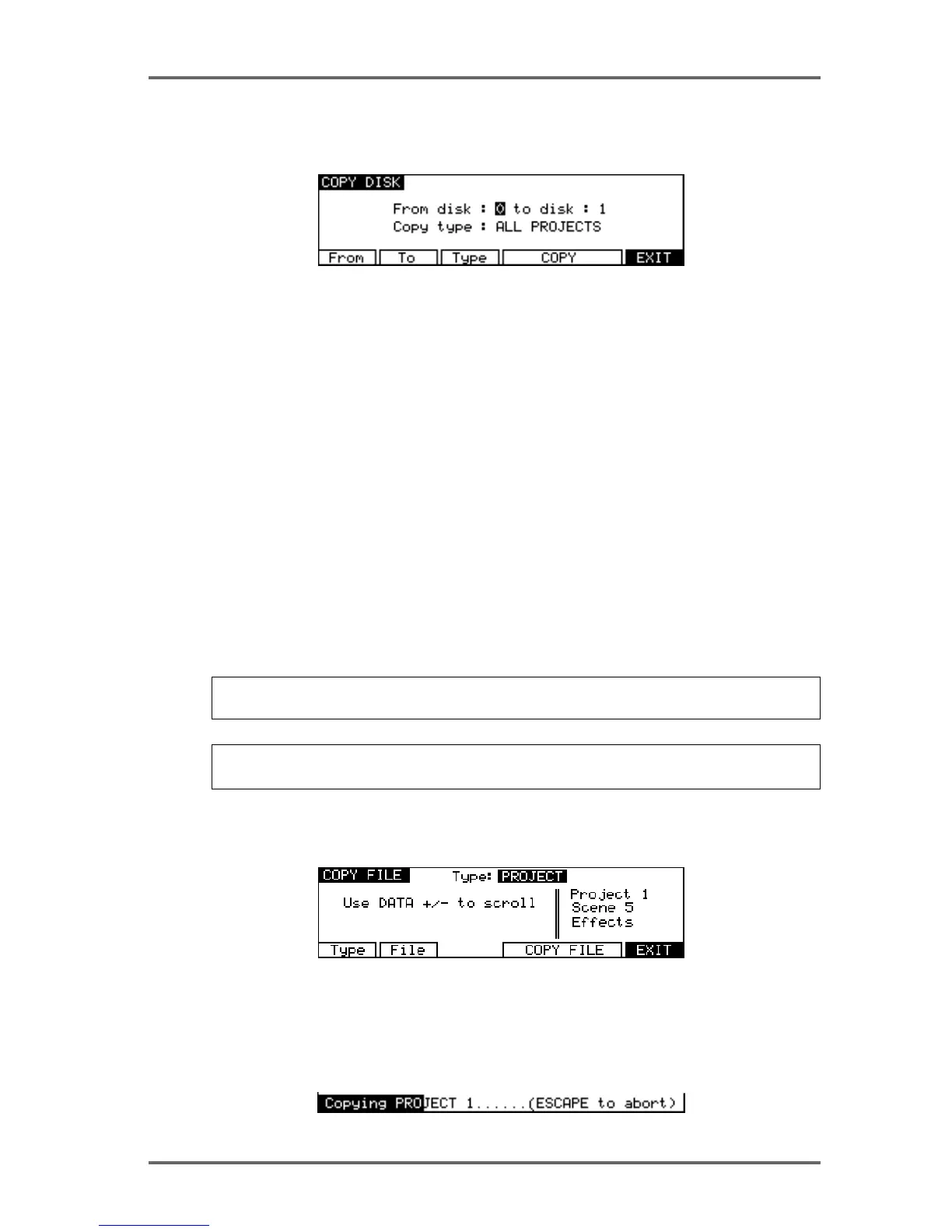
Selecting COPY (F5) on the DISK UTILITIES page goes to the Disk Copy screen which allows
files to be copied from one disk to another.
The parameters are:
FROM DISK Pressing F1 (From) will move the cursor to the ‘From disk’ field where you
may select the ‘source’ disk you are copying from.
TO DISK Pressing F2 (To) will move the cursor to the ‘to disk’ field where you may
select the ‘destination’ or ‘target’ disk you are copying to.
COPY TYPE Pressing F3 (Type) will move the cursor to the ‘copy type’ field where you
may select the type of copy operation. You may select:
SINGLE FILE - this will copy a specific file as selected on the COPY FILE
page.
ALL PROJECTS - This will copy all projects on the source disk to the
destination disk.
ALL LIBRARIES - This will copy all the libraries on the source disk to the
destinations disk.
DUPLICATE DISK - This will copy everything from the source disk to the
destination disk.
IMPORTANT NOTE: DUPLICATE WILL FIRST ERASE THE DESTINATION DISK BEFORE
DUPLICATING THE SOURCE DISK TO IT.
NOTE: It is not possible to copy from a disk to itself (i.e. from disk 0 to disk 0). You will receive
the prompt: DISK CAN’T BE COPIED TO ITSELF!
If SINGLE FILE is selected as the copy type, soft keys F4/F5 will change to show SELECT FILE.
Pressing either of these keys will take you to the COPY FILE screen where you can select the
file to copy.
Press Type (F1) to select the type of file you wish to copy (PROJECT or LIBRARY). Press File
(F2) to move the cursor to the file list to and the file you want to copy using the DATA+/- keys.
Pressing COPY (F4/F5) on the COPY DISK page, or COPY FILE (F4/F5) on the COPY FILE
page, initiates the COPY process. During the copying process, the bottom line of the LCD will
show something like this display:
DISK PAGES - 7


 To Next Page