Page 27DD8
plus
Version 2.20 - September 1998
DIRECTORY PAGE
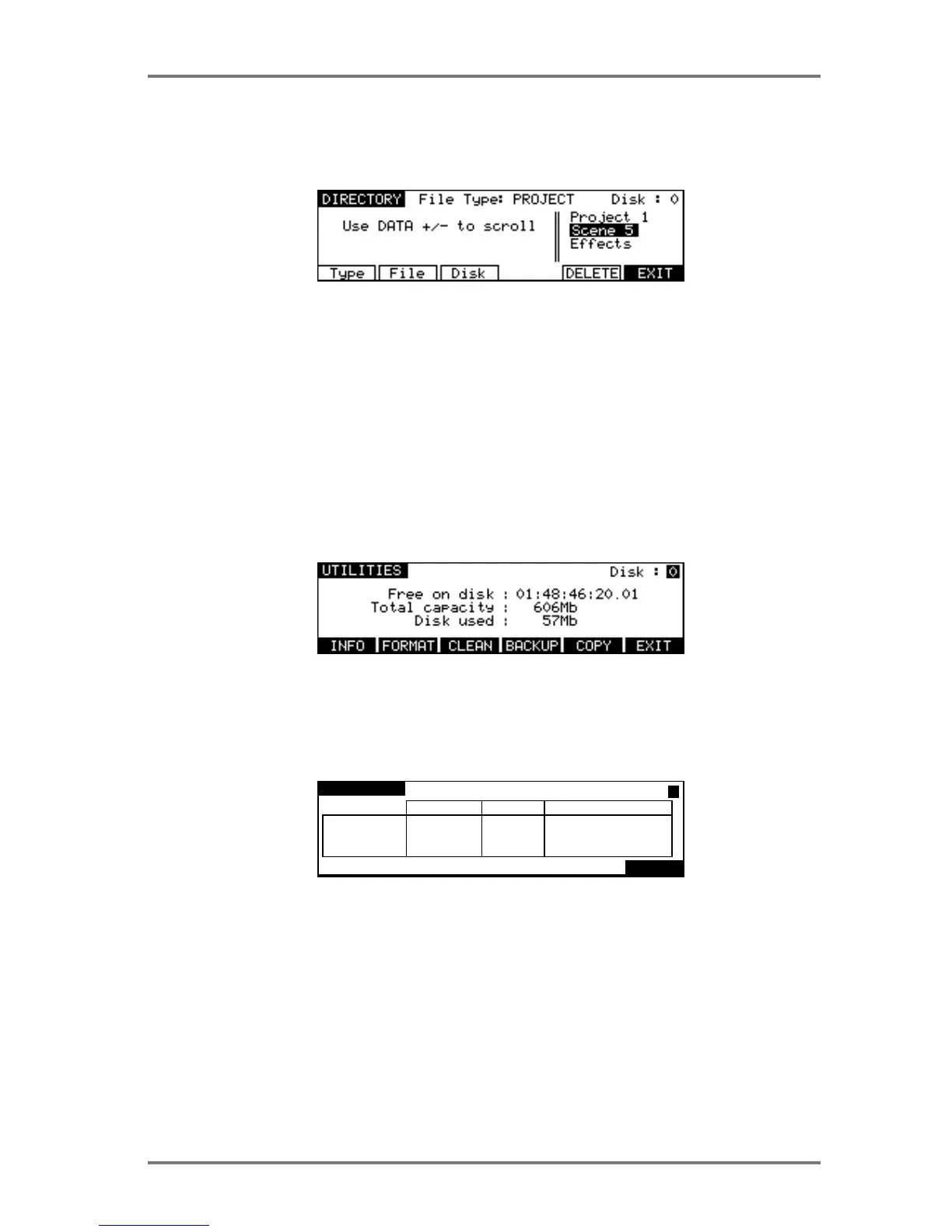
The Directory page allows you to view all files on a selected disk. The default is to show Project
files on the disks, but there are other files as well.
Pressing Type (F1) moves the cursor to the File Type field which allows you to select which type
of file will be displayed.
Pressing File (F2) moves the cursor into the list of files and allows you to scroll through the list
using the DATA +/- keys.
Pressing Disk (F3) moves the cursor to the Disk field which allows you to select the SCSI ID of
the drive you wish to view.
Pressing DELETE (F5) deletes the Project selected by the cursor.
UTILITIES PAGE
Pressing UTILITIES on the LOAD PROJECT page will take you to the following screen.
Here you may perform certain disk utility routines. These are:
DISK INFO
Pressing INFO (F1) will display the following screen:
DISK INFO
Format: Normal
MEDIA
DATA
AUDIO
SONY SMO-F521-()() 1.()4
622Mb
9Mb
612Mb
91Mb
()Mb
91Mb
53()Mb
9Mb
512Mb
total used available
EXIT
ID:()()
This screen gives more information about the type and size of the disk, how much of the disk is
used and how much is free. These values are expressed in Megabytes.
The only field accessible in this page is the ID field in the top right hand corner. Here, you may
select to view other disks that may be connected to the system.
DISK PAGES - 7


 To Next Page