Page 74 DD8
plus
Version 2.20 - September 1998
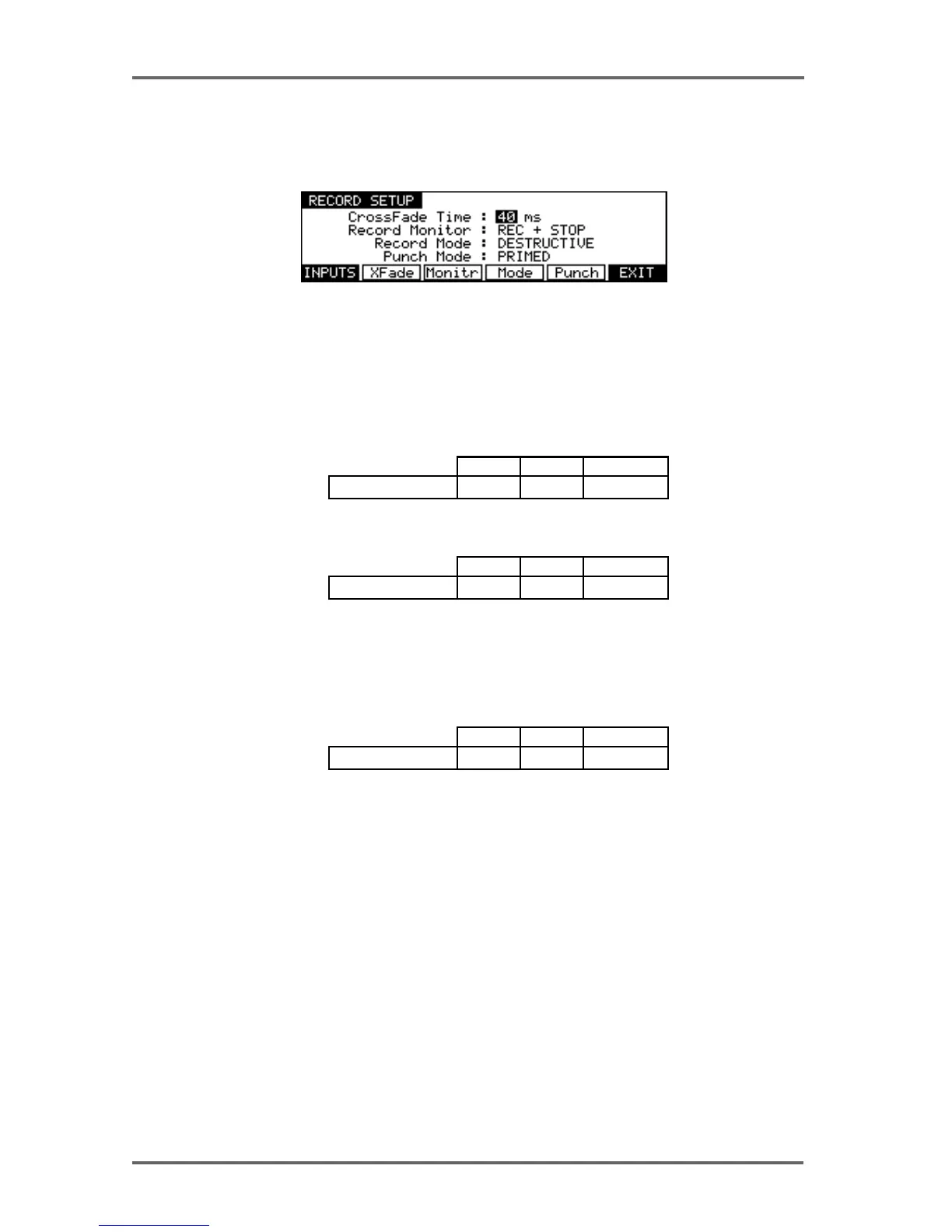
RECORD SETUP
Pressing RECORD (F4) on the first System Settings page takes you to the Record Setup
menu :
Pressing the XFade key (F2) moves the cursor to the CrossFade Time field. This allows a
record crossfade of 0 to 80ms to be set.
Pressing Monitr (F3) moves the cursor to the Record Monitor field.
Here you may select how you will monitor the input signal. The default selection is RECORD
AND STOP. With this selected, you will hear the input signal under the following conditions:
HEAR INPUT?
RECORDSTOP PLAYBACK
YES NOYES
RECORD TRACK'S PLAY SELECT KEY ON
RECORDSTOP PLAYBACK
YESYES
RECORD TRACK'S PLAY SELECT KEY OFF
YES
HEAR INPUT?
The other selection you may make is RECORD ONLY. With this selected, you will only hear the
input signal whilst actually recording, regardless of the status of the record track’s PLAY select
key. I.e.:
RECORDSTOP PLAYBACK
YESNO
RECORD TRACK'S PLAY SELECT KEY ON OR OFF
NO
HEAR INPUT?
RECORD ONLY is useful when you only ever want to hear the input signal during record and at
no other time. The DD8 will take care of the switching automatically.
SYSTEM - 8


 To Next Page