— 11 —
Section Header
3810380843
1
4
Video Playback System SetupRecording Setup
Camera Info Motion Alerts Manage System
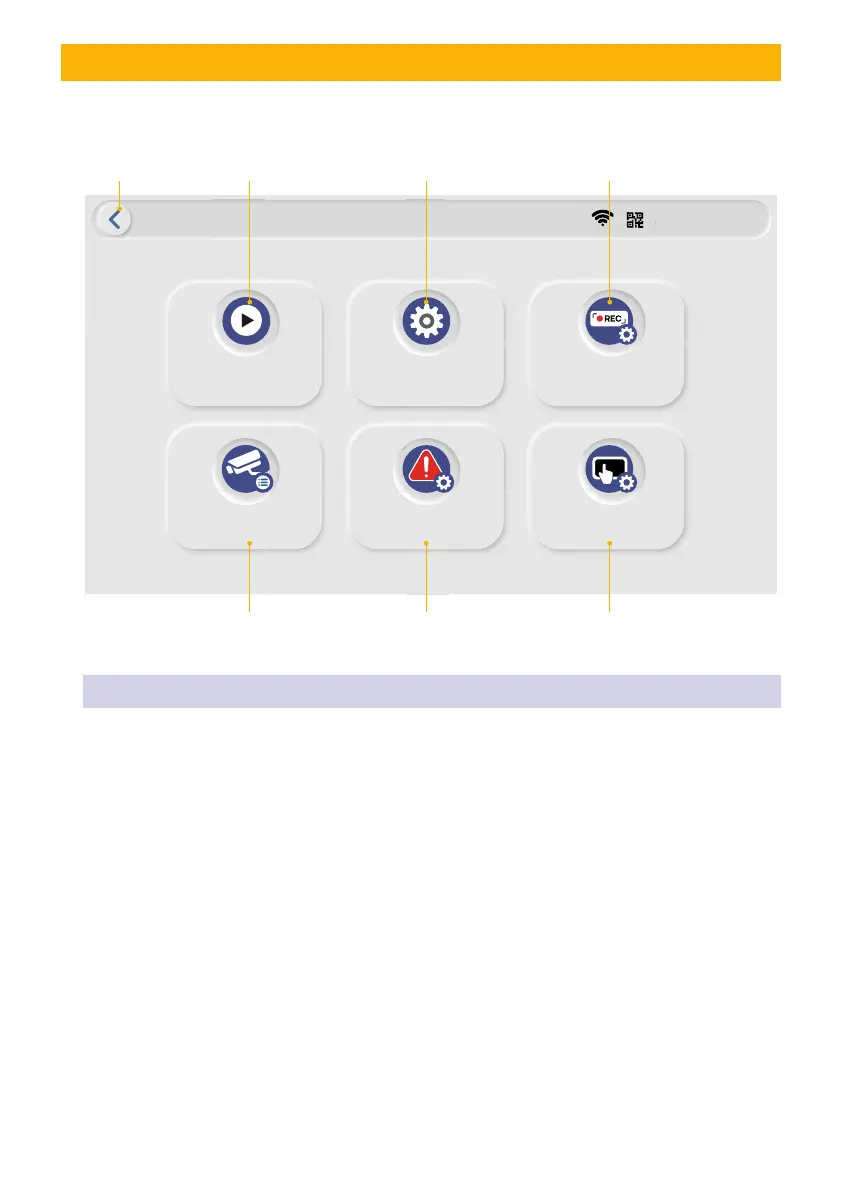
This screen allows you control the various actions and options that are available on your Monitor.
BACK BUTTON: Will return to LIVE VIEW
Video Playback: This function allows you to
search and play previously recorded videos
that are stored on the TF card.
SYSTEM Setup: This function allows you
to setup the system, including date setup,
language, display, and power saving.
RECORDING Setup: This function allows
you setup recording schedule. Select one or
all cameras then setup the time section and
recording type.
CAMERA Info: This section allows you
to add the camera, if you have purchased
addition cameras or change original camera
channel.
MOTION Alerts: This section allows you to
setup the motion area for each camera.
Manage System: This section allows you
to RESET device, change PASSWORDS and
update the FIRMWARE.
MONITOR MAIN MENU SCREEN
TIP: Touch the screen near bottom to see the menu on bottom appear and press Home Icon to get to the Main Menu


 To Next Page