— 22 —
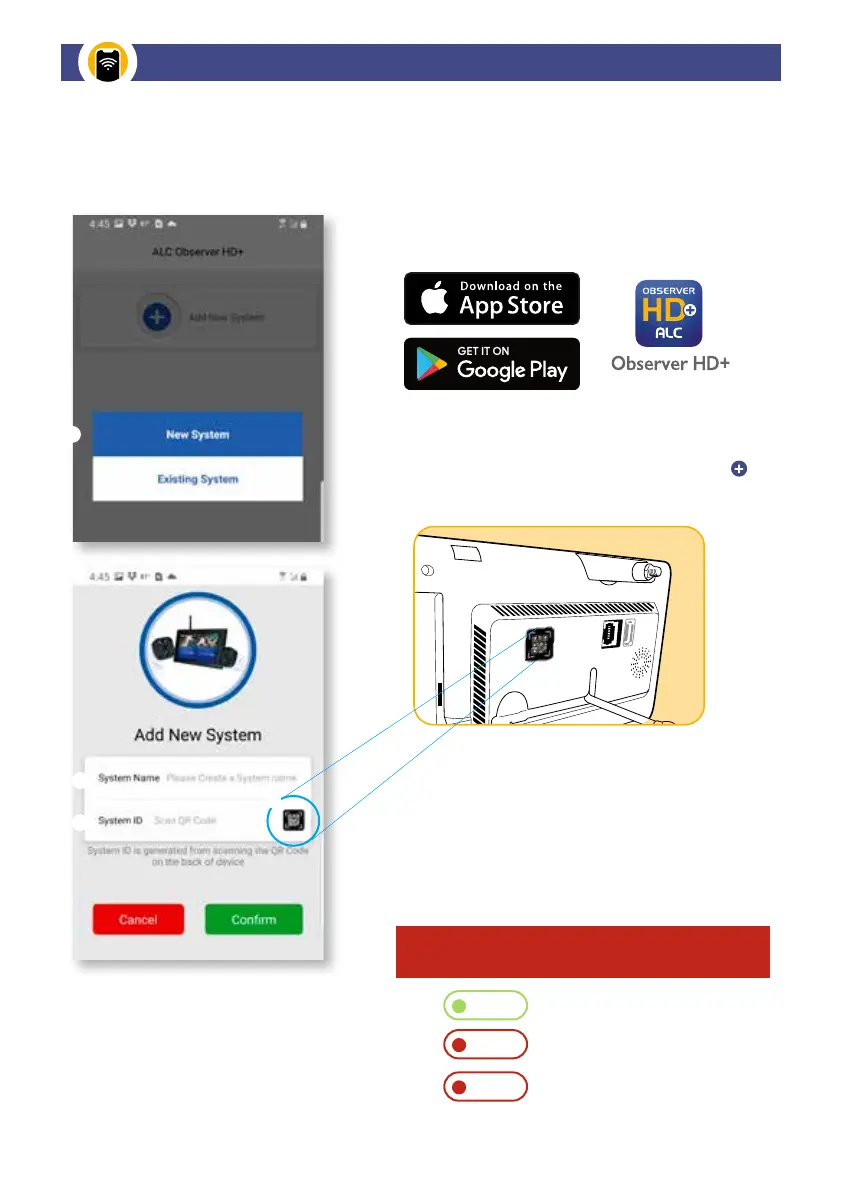
Download the Observer HD+ free app to your phone
or tablet.
Have your smart device in proximity of the Observer
HD+ Monitor screen, open the app on your smart
phone, or tablet, and select “Add New System”
then choose “New System” for initial Set Up.
REMOTE ACCESS
To view LIVE, or RECORDED videos, from an iPhone, iPad or Android Phone, you
must first connect the system to the Internet through Wi-Fi or Ethernet.
System Name: Choose and enter any name you want
To obtain System ID, tap the QR code symbol on
the App to then scan the QR code label located on
the back side of the Monitor to sync to your system.
The System ID will appear once it has synced,
tap CONFIRM when complete. Allow app to
verify the code.
IMPORTANT! This may take more than one try.
If System indicates "OFFLINE," tap it to reconnect.
Online
Ofine
Connecting
Connection Successful
Connection Failure
Processing
Setting Up Remote Access


 To Next Page