— 12 —
MONITOR SYSTEM SETUP
LANGUAGE
LANGUAGE
English
NEXT PAGE
Please select Language
3810380843
LANGUAGE
System Setup
English
TIME SETUP
Network Mode
Wired Internet
AUTO
ng
s
T
1/2
re
nternet
3810380843
2022/02/02 19: 08: 15
Sync Time with Internet
System Setup
TIME ZONE
Manual Setup
-05:00 Eastern Time (USA & Canada)U
1
4
A &
anada
3810380843
LANGUAGE
System Setup
English
TIME SETUP
Network Mode
Wired Internet
AUTO
ng
s
T
1/2
re
nternet
System Setup
AUTO
Wired
Wireless
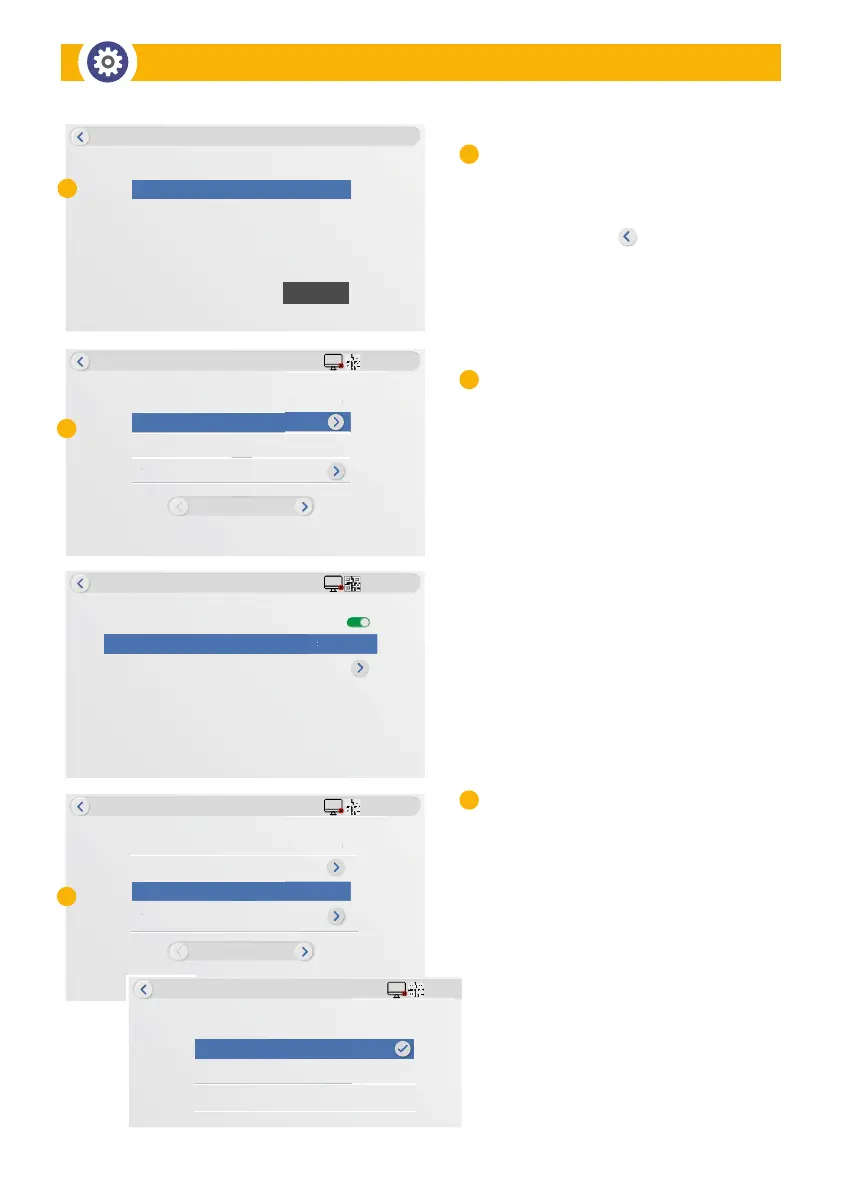
Select Your LANGUAGE:
• Touch Home > SYSTEM SETUP
• Select LANGUAGE > Choose from Menu
• Tap BACK button < twice to return
to the Main Menu
Select TIME SETUP:
• From SYSTEM SETUP, enable
Sync Time with Internet (Factory Default)
• Tap TIME ZONE to select a different time zone
than Sync with Internet
• Disregard Manual Set Up
NETWORK Mode:
• AUTO Mode: is the defalut, which allows
wireless and wired connections automatically.
• WIRED Mode: for Monitor direct connection
to router through supplied Ethernet cable.
• WIRELESS Mode: The Wi-Fi setting allows you
to choose the wireless connection and setup
the suitable Wi-Fi environment. The monitor
automatically scans the nearby network
and shows the available Wi-Fi routers in the
drop-down list. Choose the appropriate Wi-Fi
router and enter the Wi-Fi router password.
A
A
B
B
C
C


 To Next Page