— 17 —
Section HeaderMOTION ALERTS
3810380843
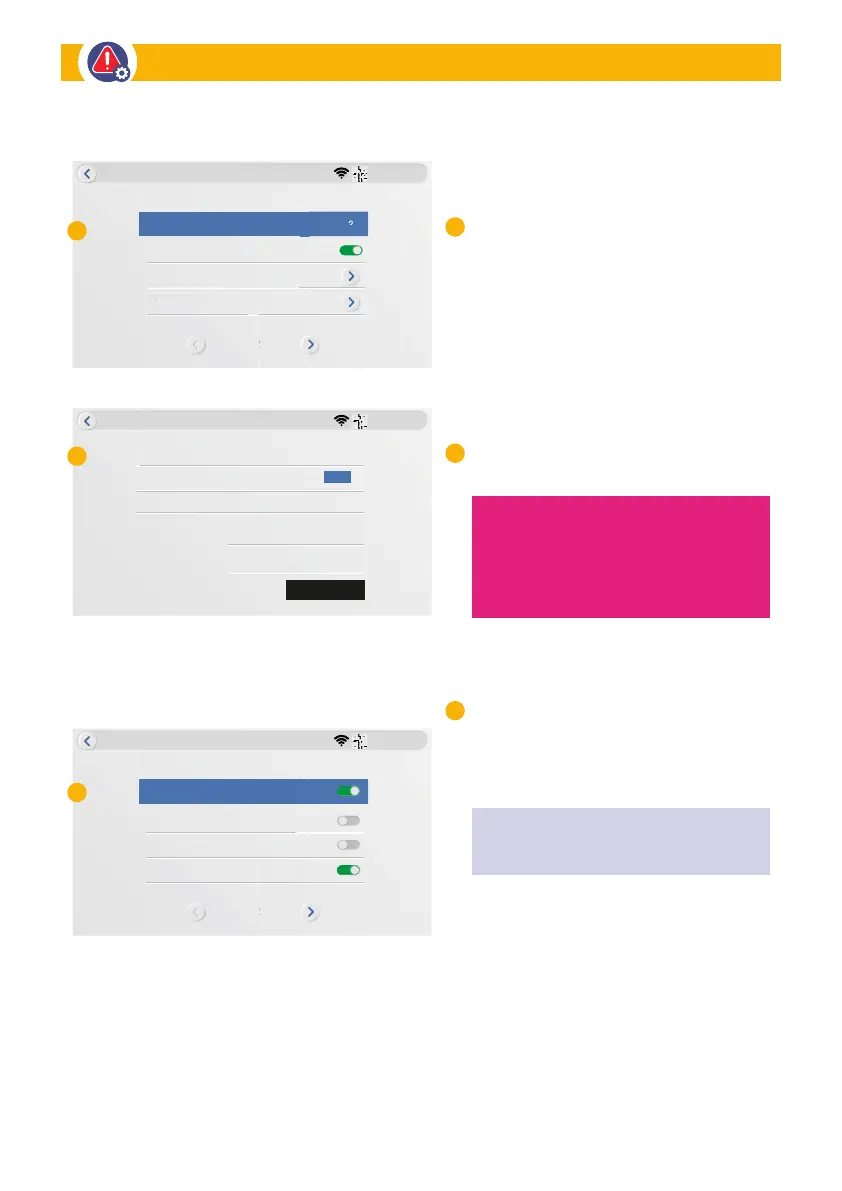
Motion Alerts
Motion Detection Full Screen
E-Mail
Camera 1
Monitor Siren Volume 2
1/2
amera
gmail
None
E-mail Notication
TEST
Email Username
Password
test@gmail.com
****
Encryption Type
E-mail (SMTP) Provider
3810380843
Motion Alerts
Software Motion
1/2
App Notication
Sound Siren
E-mail Alert
3810380843
Motion Alerts
Monitor Siren Volume: When camera
is triggered, the audio alarm sound in the
monitor speaker can be heard. Audio can
be configured among three volume levels.
(Low-1
•
Medium-2
•
High-3).
Motion detection full screen:
When motion detection is triggered on
a camera, the monitor will go to full
screen mode for that camera.
E-mail: Follow the Setup Wizard to set
up the e-mail push notification
Software Motion: Enable/Disable
motion detection in this camera.
The PIR Motion sensor is active all of
the time. The Software Motion Detection
Sensitivity can be adjusted below.
APP Notification: Enable/Disable push
notification in the Observer HD+ APP
E-mail Alert: Enable/Disable email alerts
Sound Siren: Enable/Disable internal
siren in the monitor
Sensitivity: This section allows you to
setup the motion sensitivity for Camera 1.
(Low
•
Medium
•
High
•
Highest).
.
C
A
B
A
B
C
NOTE: For recording to occur there must
be PIR Motion AND Software Motion detected.
This is to help reduce false recordings.
NOTE: For Email Notification
Motion Alert Setup


 To Next Page