— 24 —
REMOTE ACCESS
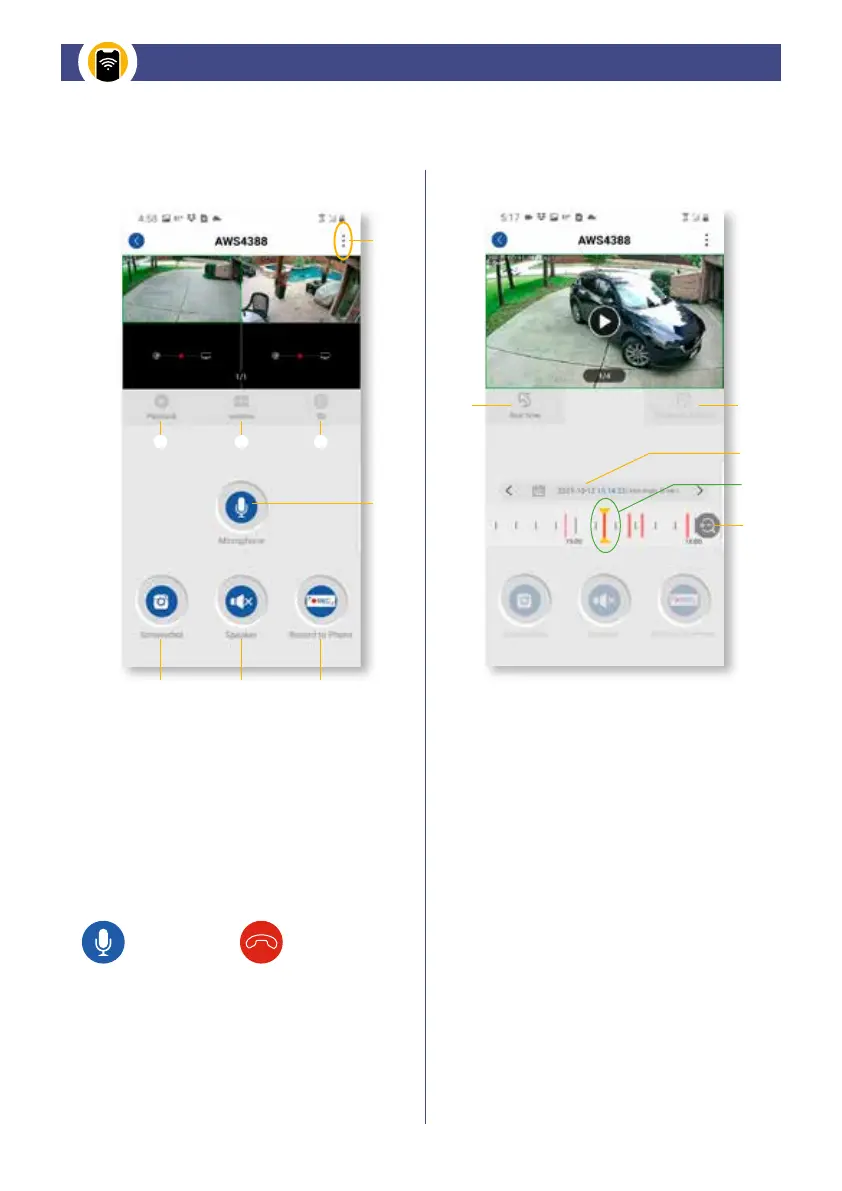
Advanced SETTINGS: Menu for device info.
Video PLAYBACK: Click to play video.
QUAD DISPLAY Select: Click to view up to
4 cameras simultaneously.
HD/SD Option: SD 720p or HD 1080p.
Microphone: Press and HOLD to enable audio
transmission from Smart Device to Camera.
Screenshot: Tap to take snapshot of the live
video. Captured snapshots will be stored on
smart device.
VOLUME on/off: Mute or unmute the live audio
RECORD: Allows recording of a short video clip.
The video is automatically saved to your device.
Real Time: Return to the Live View page.
Playback Channel: Allows you to select
a different camera's recording selection.
Calender Date: Allows zooming in and
out for timeline
Timeline Selection: Allows you to select
the Red Line from the timeline in the middle
of two yellow arrows framing the “play area”
of the recorded EVENT.
Timeline ZOOM: Allows you to zoom
into video timeline
HOLD to talk Press to hang up
LIVE VIEW Screen PLAYBACK Screen
Live View & Playback Settings


 To Next Page