— 13 —
Section Header
MONITOR SYSTEM SETUP (continued)
3810380843
System Setup
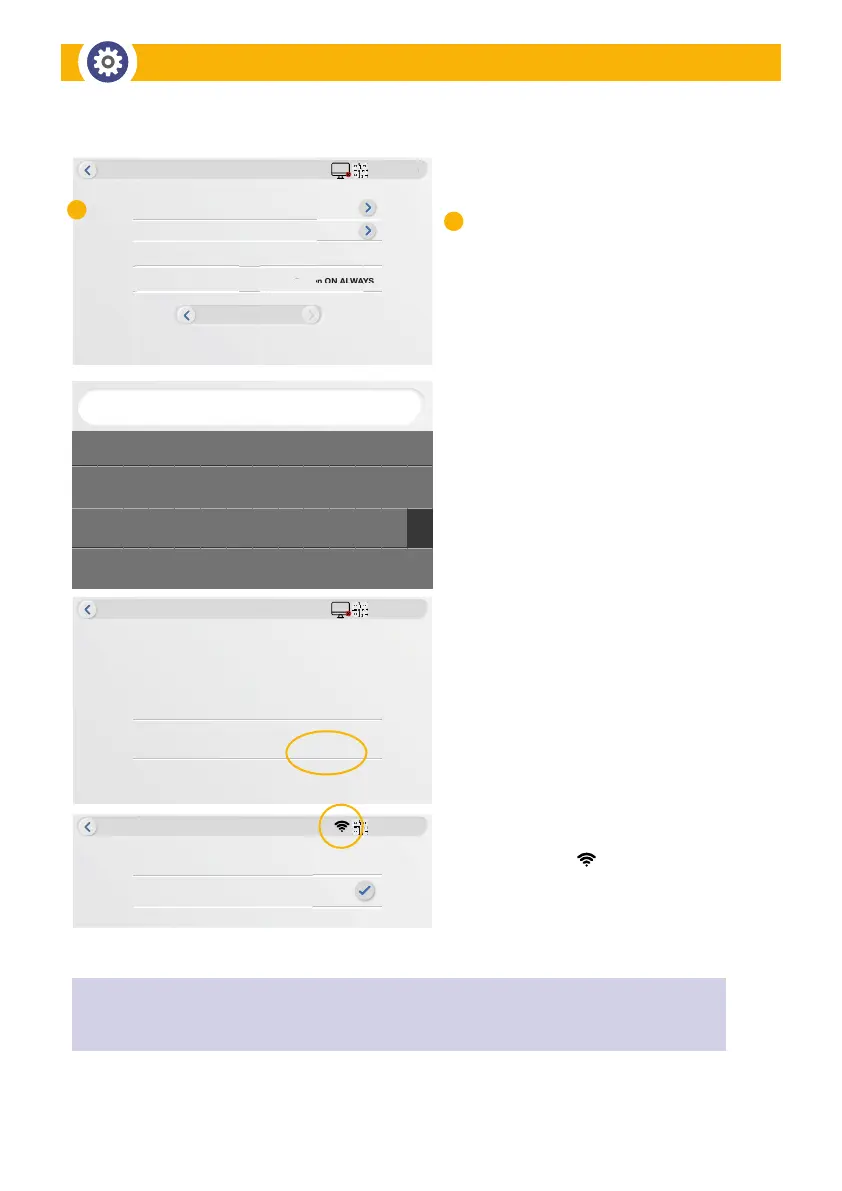
Wi-Fi Setup
Camera Audio Setup
Monitor Volume Setup
Screensaver
0
Screen ON ALWAYS
1
4
creensave
2/2
3810380843
MyWiFiNetwork_2.4
System Setup
Wi-Fi Password
Cancel Connect
*********
3810380843
System Setup
NVR083a2f1da2b3
MyWiFiNetwork_2.4
enter password
` 1 2 3 4 5 6 7 8 9 0 – + <–
Ta
lr
caps En
shift Enter
q w e r t y u i o p [ ]
a s d f g h j k l ; ‘ \
z xc v b n m , . /
Wi-Fi Setup:
• Tap Wi-Fi Setup to enable discoverability
• Tap Available Wi-Fi Networks
• Select your personal Wi-Fi network
• Enter your Wi-Fi PASSWORD using the
keyboard; toggle upper and lower case
using ”caps” for the password in use
for your Internet and connection to your
wireless devices.
• Tap CONNECT to complete the
System Setup
• Wireless icon will appear when
successfully connected
C
C
Wireless Setup
NOTE: The Wi-Fi setting allows you to choose the wireless connection and setup the suitable
Wi-Fi environment. The monitor automatically scans the nearby networks and shows the available Wi-Fi
routers in the drop-down list. Choose the appropriate Wi-Fi router and enter the Wi-Fi router password.


 To Next Page