— 21 —
Section HeaderMANAGE SYSTEM
NOTE: During firmware downloading
MAKE SURE TO KEEP UNIT POWERED ON.
2/2
3810380843
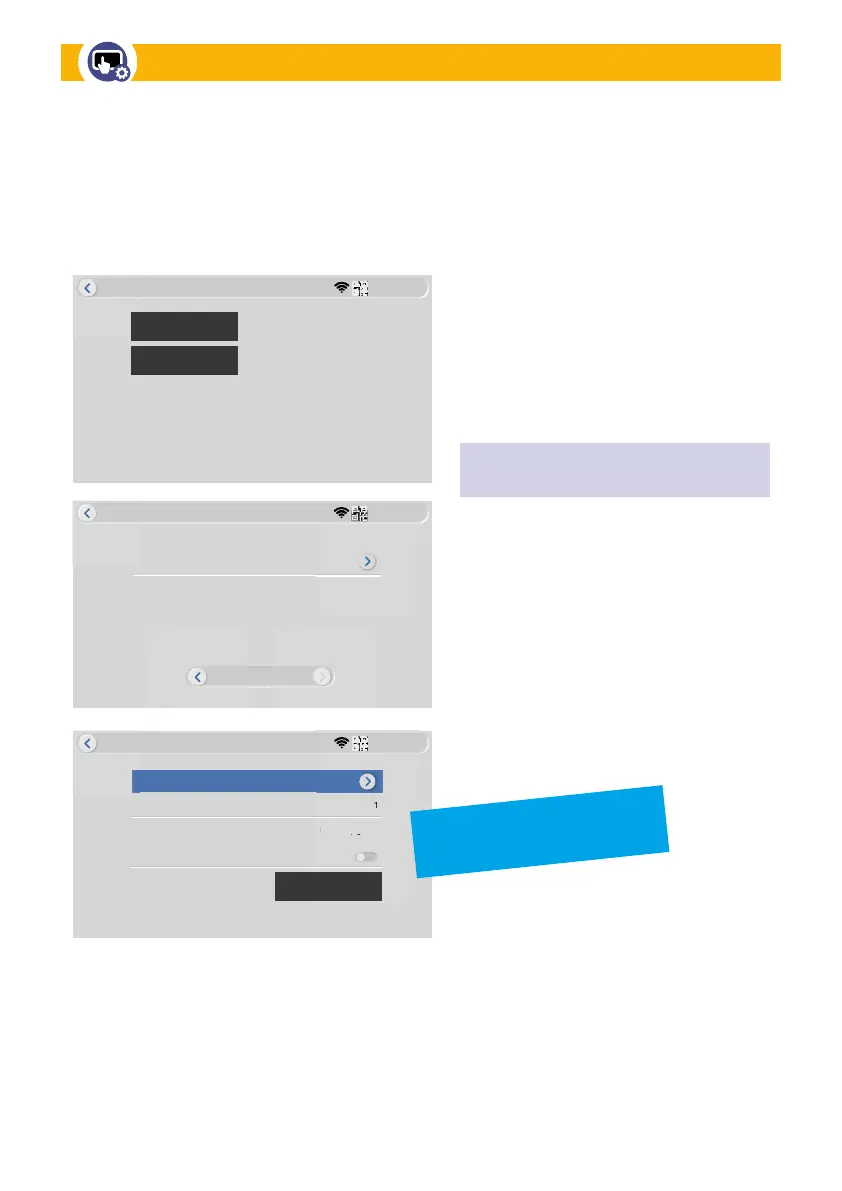
Manage System
Camera Upgrade
3810380843
Manage System
It’s the Latest Version.
During device upgrade, Please Keep Powered on!
Local Upgrade
Online Upgrade
Camera Audio Setup
Camera
Source
Allow Downgrade
Local Upgrade
1
Info
3810380843
Manage System
Start
Firmware Upgrades:
• Local Upgrade: If required, a data
file will be provided to perform a local
upgrade. Instructions will be provided
at that time.
• Online Upgrade: If new Firmware is
available, it will be indicated here.
Camera Firmware Upgrade:
If notified of a firmware update for
your camera, tap Camera Upgrade.
A firmware file and instructions will be
provided at that time.
MARK:
what is this specic screen suppose to represent?
is it in the wrong place? Please advise
This section allows you to upgrade system firmware on both Monitor and Camera devices.
Monitor Firmware Upgrades


 To Next Page