16
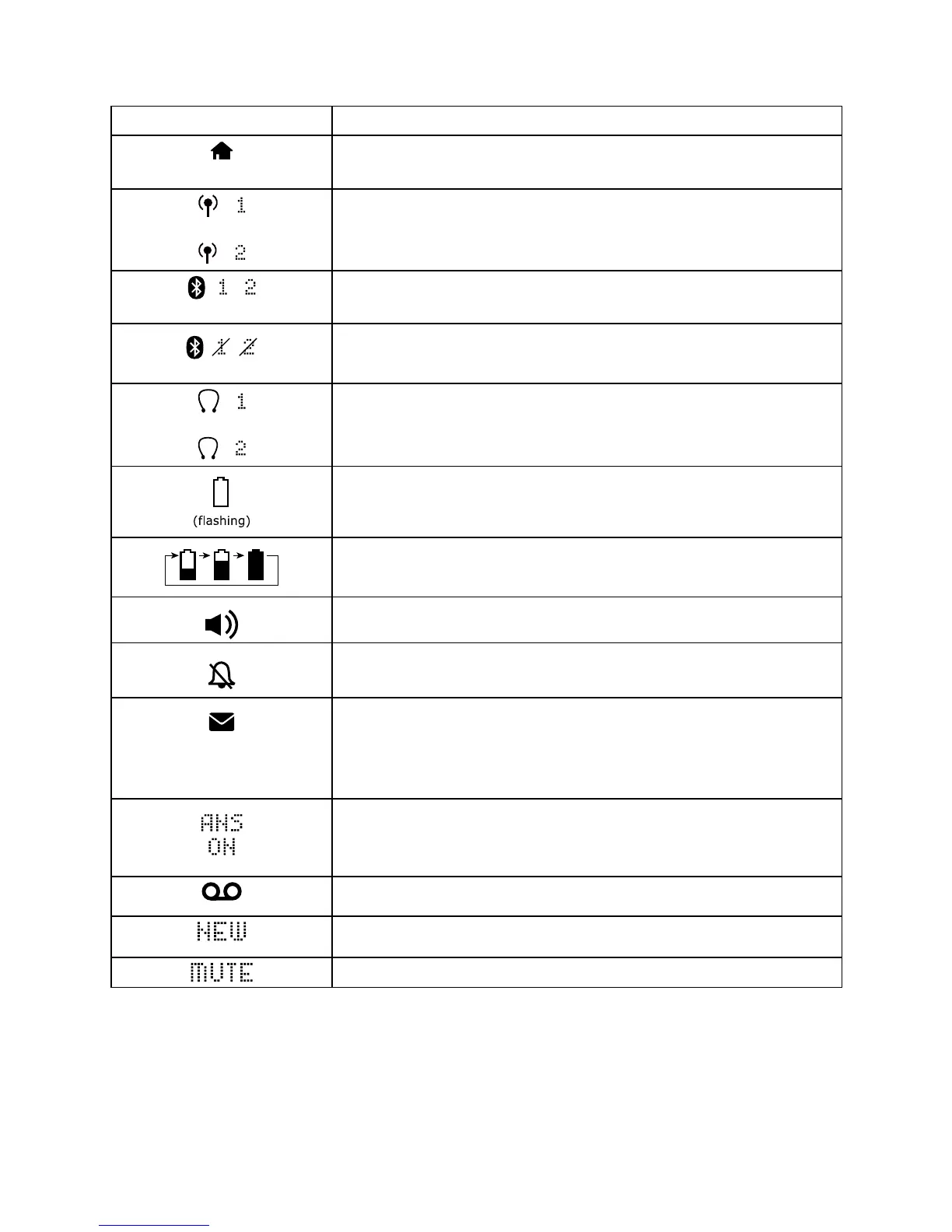
3.3 Display Icons and Symbols
Display icons Description
On steadily when the fixed line is in use or there is
an incoming fixed line call.
On steadily when a mobile line is in use or there is an
incoming mobile call.
There are Bluetooth connected devices on the active
devices list.
There are Bluetooth disconnected devices on the
active devices list.
On steadily when a wireless Bluetooth headset is in
use on the fixed line.
Indicate when the battery needs charging.
Flash when low battery power level is detected.
Battery is charging.
The speakerphone is in use.
On steadily if the fixed line and mobile ringers are
turned off. Flashes if either one ringer is turned off.
Indicate when there are received new Voice Message
Waiting (VMWI) not yet read.
Disappear when all the voice messages have been
read. (Network service dependent)
Indicate when the telephone answering machine
(TAM) is turned on.
The answering machine is turned on.
On when new TAM messages are received.
New call list - Missed and new calls.
Microphone is muted.



 To Next Page