21
To remove a device:
1. Repeat step 1 to 3 in last section.
2. Press
or
to select a selected device, then press
.
OR
• Press
or
to select a selected device, then press OPTION.
• Press
or
to select Remove, then press SELECT.
3. The handset displays Remove DEVICE A? Press YES to conrm.
The handset displays Device removed from device list. You hear a
conrmation tone.
4.3.3.4. Rename a device
You can change the name of a paired device on the paired devices list.
1. Repeat step 1 to 3 in last section.
2. Press
or to select a device when necessary, then press OPTION.
3. Press
or to select Rename, then press SELECT. The screen displays
ENTER NEW NAME to edit the name.
4. Press SAVE. The handset displays Device renamed. You hear a
conrmation tone.
Note: Only the rst 11 characters of the device name are shown on the device
list.
4.3.4. Download phonebook
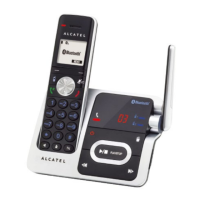
You can download up to 4 mobile phone phonebooks to Alcatel XP 1050
telephone system via Bluetooth wireless technology. Each downloaded
phonebook can store up to 1,500 entries with up to 30 digits for each phone
number and 15 characters for each name.
Before downloading a phonebook, make sure the mobile phone is paired, active,
and connected to Alcatel XP 1050. Make sure the handset battery is charged
for at least 30 minutes.
Place your mobile phone next to the telephone base when you download
a mobile phone phonebook to your Alcatel XP 1050.
4.3.4.1. To download a mobile phone phonebook:
1. Press MENU on the handset in idle mode.
2. Press
or
to select Bluetooth, then press SELECT.
3. Press
or
to select Download PB., then press SELECT.
4. Press
or
to select a desired device, then press SELECT.
• If the selected device is active but disconnected, the handset displays
Mobile phone not connected. Press CONNECT.
5. Press
or to select one of the following options:
• Phone memory - download all contacts stored in your phone memory.
• SIM card only - download all contacts stored in your SIM card.
• Phone and SIM - download all contacts stored in both your phone
memory and SIM card.
Press SELECT. During the download, the handset displays the progress.
All other idle system handsets display Downloading PB.


 To Next Page