4
2
3
27Ver. 1.01
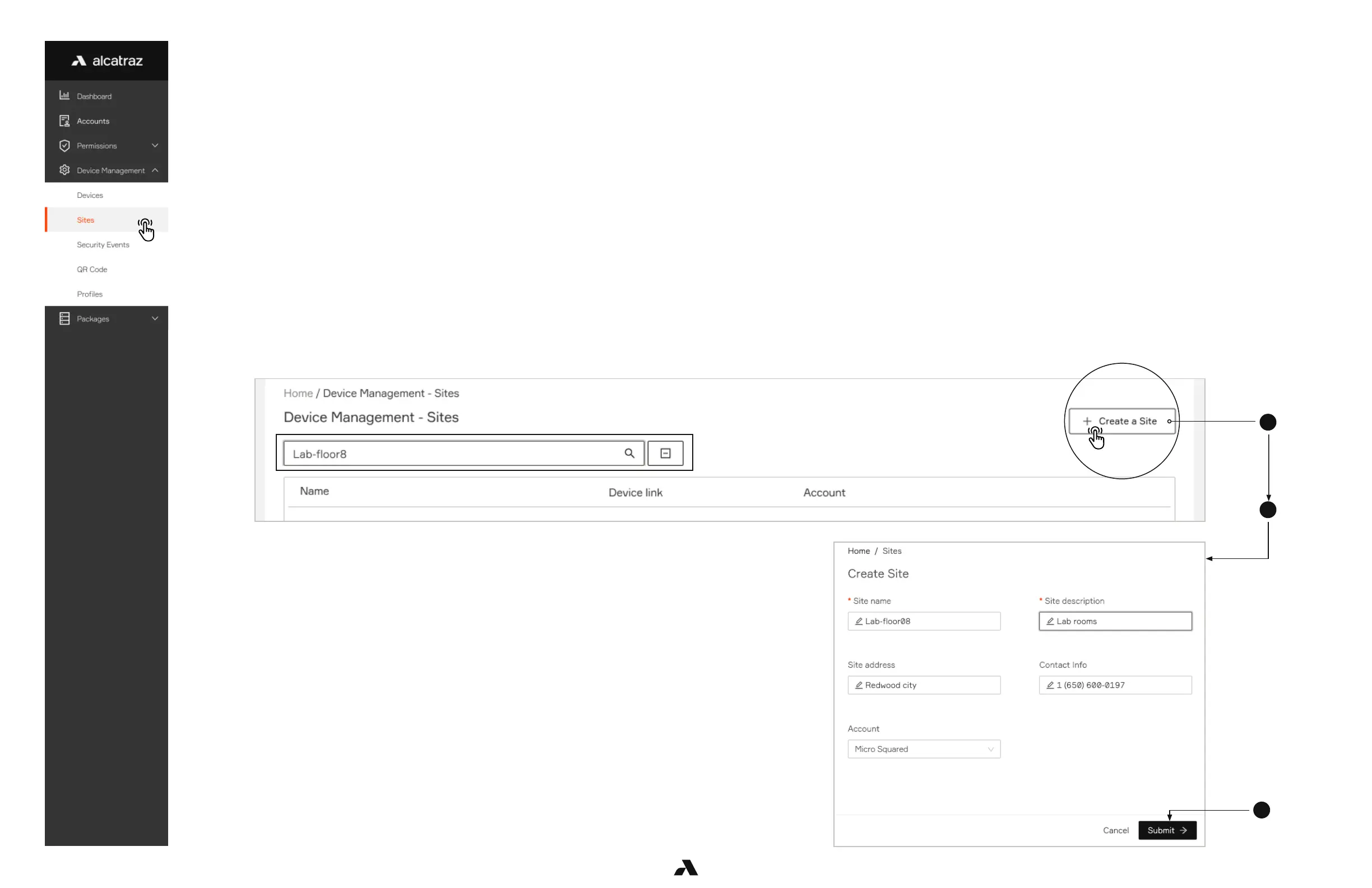
Verify Existing Site or Create a New Site
1. Go to Device Management->Sites
■ Use the filter to search if site already exists
■ Best practice is to name by geographical locations
Login to the Alcatraz Admin Portal
Onboarding a Rock is carried out after the physical installation has been successfully verified and no status icons except Not Onboarded and QR
Code Receptive remain.
This process associates the Rock with the Customer Site for where the Rock is installed and operating.
You must have
■ login credentials to the Alcatraz Admin Portal to carry out this process
■ The Device ID for the Rock to search for it and associate with the correct customer
■ Resolved all status icons with the exception of the Not Onboarded and QR Code Receptive icons
It is important at this step to ensure that the Site for the Customer has been created.
The Site:
1. Identifies the location where the Rock has been installed
2. Is associated with the Customer account
2. If the site does not exist, create a new site by clicking Creating a Site
3. Fill out the info and select the Account for where the site is located
4. Click ‘Submit’



 To Next Page