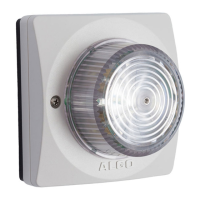
8138 SIP Multicolor Strobe Light
Multicasting can also be used to distribute loud ring or other alerting (e.g. safety, security,
or emergency events) over multiple Algo endpoints (e.g. 8190, 8186, 8188, 8128, 8201,
8301, and 8373).
SIP Paging: Multiple 8138 (Using Multicast)
To use 8138 multicast feature, setup an 8138 Strobe Light as a Multicast master.
The Master device will flash a light pattern normally while simultaneously streaming audio
to the slave speakers. The Slave speakers do not require SIP extensions and do not need
to register with the SIP Communication Server.
To enable multicast streaming from the 8138 SIP Strobe Light go to its web interface and
navigate to the Basic Settings > Multicast tab. Choose multicast mode ‘Master/Sender’
and zone ‘All Call’. The multicast addresses pre-populated in the table, under Advanced
Settings > Advanced Multicast section, will work in most cases and should only be
altered for rare cases.
To enable multicast monitoring in the 8138, go to the web interface for each strobe and
again navigate to the Basic Settings > Multicast tab. This time though, choose multicast
mode ‘Slave/Receiver’ There is no need to select a zone as the strobe will automatically
monitor the ‘All Call’ zone IP address.
Note: See “Basic Setting Tab – Multicast” section bellow for more configuration
options and instructions.
SIP Paging: Multiple Strobe (Using Individual SIP extensions)
In some cases, it may be desirable for every strobe to have a SIP extension. Multicast
may still be used to page multiple strobes but each strobe can also be called individually
or generate a call when appropriately configured.
A strobe configured as a SIP Multicast Slave will give its highest priority to the ‘Priority
Call’ zone. Other than the ‘Priority Call’ zone, a page using its SIP extension, has priority
over all other multicast zones.
Communication Servers with the capability of dialing many SIP extensions simultaneously
for paging may be able to create zones by calling “page groups” and also page telephone
speakers in conjunction with overhead speakers.
SIP Activated Notification Alerts
In addition to voice paging, the 8138 can multicast audio files for emergency, safety, and
security announcements, customer service, shift changes, etc.
Audio WAV files can be stored in strobe memory and also multicast to other Algo SIP
endpoints on the network. See Additional Features > Emergency Alerts and Additional
Features > Input/Output for more details.
Document 90-00102C
11/27/2019
Page 13
Algo Communication Products Ltd
4500 Beedie St Burnaby BC Canada V5J 5L2
www.algosolutions.com
(604) 454-3792
support@algosolutions.com



 To Next Page