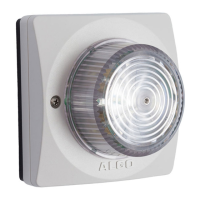
8138 SIP Multicolor Strobe Light
Setup and Installation
Getting Started - Quick Install & Test
This guide provides important safety information which should be read
thoroughly before permanently installing the strobe.
1. Connect the 8138 SIP Strobe Light to a 802.3af PoE network switch using the RJ45
jack in the back recess of the housing.
2. Allow the 8138 SIP Strobe Light time to boot, about 30 seconds. While booting the
Strobe will activate a small dim amber light in the center.
3. If there is no DHCP server found the 8138 SIP Strobe Light will default to the static
IP address 192.168.1.111. Most often however the 8138 will be assigned an IP
address. The IP address may be discovered by downloading the Algo Locator Tool
to find Algo devices on your network: www.algosolutions.com/locator
4. Access the 8138 web page by entering the IP address into a browser (Chrome,
Firefox etc.) and login using the default password: algo
5. Enter the IP address for the SIP server into the SIP Domain field under the Basic
Settings > SIP tab.
6. Enter the Ring and/or Page SIP extension and credentials. Leave the credentials
blank for either extension if there is no intended use to have both registered.
(Note: The strobe supports multiple Ring, Emergency Alert, and Page SIP
extensions. The Page extension auto-answers and flashes a light pattern. The Ring
and Emergency Alert extensions will flash a light pattern without answering.)
7. Make a test call from a telephone to the strobe for one or both extensions. The Page
SIP extension should auto-answer and flash the light pattern. The Ring SIP
extension will flash the light pattern without answering the call.
Document 90-00102C
11/27/2019
Page 9
Algo Communication Products Ltd
4500 Beedie St Burnaby BC Canada V5J 5L2
www.algosolutions.com
(604) 454-3792
support@algosolutions.com



 To Next Page