8138 SIP Multicolor Strobe Light
The TLS handshake happens to make sure that the client and server can trust each other,
and once that trust is established, the two parties can freely send encrypted data and
decrypt any data that they receive. After the TLS handshake process is complete, a TLS
session is established, and the server and client can then exchange messages that are
symmetrically encrypted with shared (pre-master) secret key.
Provisioning
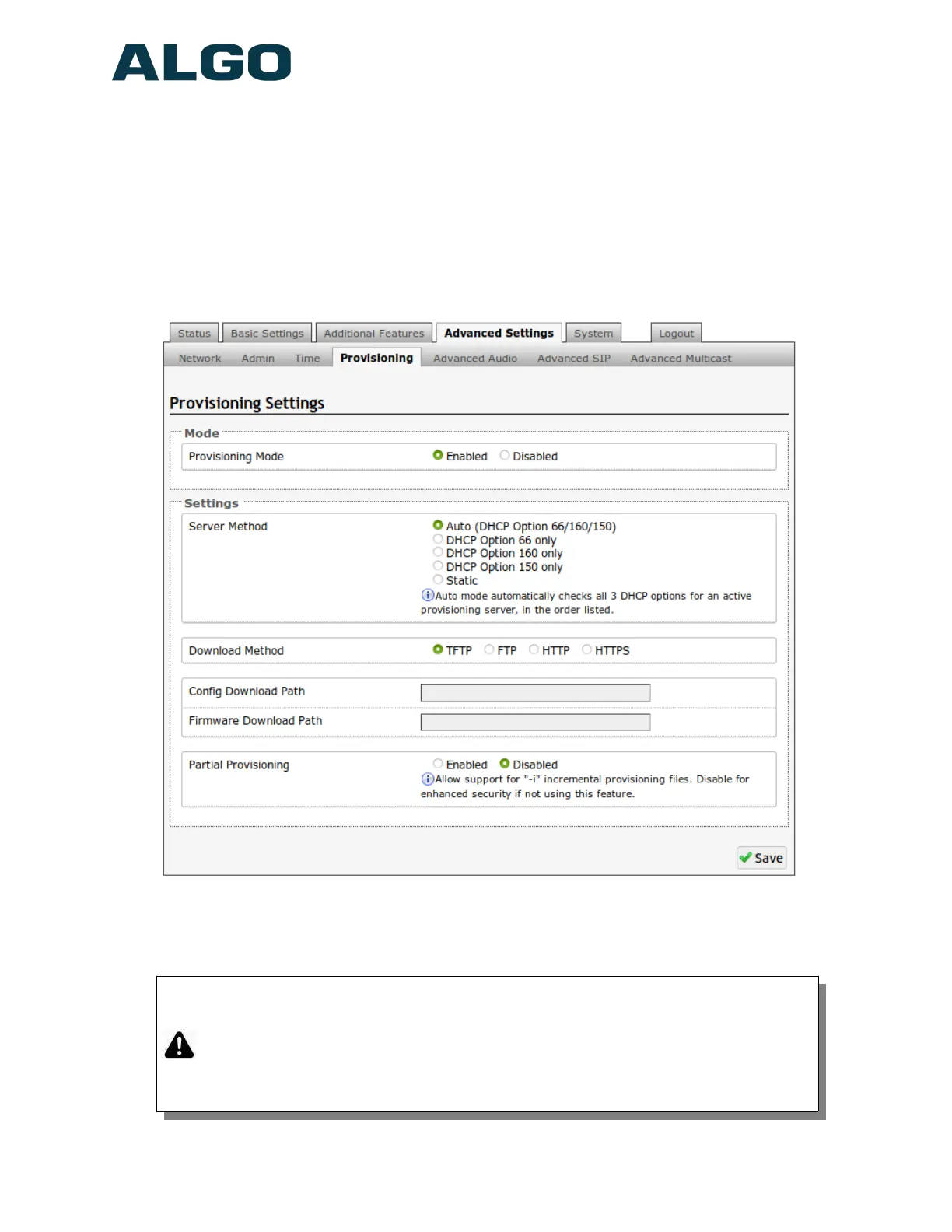
Provisioning is secured by setting the ‘Download Method’ to ‘HTTPS’ (under the
Advanced Settings > Provisioning tab)
Setting provisioning to ‘HTTPS’ prevents configuration files from being read by unwanted
third-party devices/ attackers. This resolves the potential risk of having sensitive data:
admin passwords and SIP credentials stolen.
Important: To verify the server you must ‘Enable’ the ‘Validate Server Certificate’
option. This then checks if the certificate that is provided by the server is signed by
any of the CAs included in the list of trusted CAs (used by the Debian infrastructure
and Mozilla browsers). If we receive a certificate signed by any of these CAs, then
that server will be trusted. Certificates can also be manually uploaded using the
‘File Manager’.
Document 90-00102C
11/27/2019
Page 15
Algo Communication Products Ltd
4500 Beedie St Burnaby BC Canada V5J 5L2
www.algosolutions.com
(604) 454-3792
support@algosolutions.com



 To Next Page