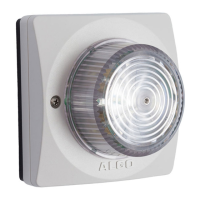
8138 SIP Multicolor Strobe Light
Setting ‘SIP Transportation’ from ‘Auto’ (default) to ‘TLS’, ensures the encryption of SIP
traffic. Setting ‘SDP SRTP Offer’ to ‘Standard’ or ‘Optional’, means the SIP call’s RTP data
will be left unencrypted if the other party does not support SRTP. Setting ‘SDP SRTP
Offer’ to ‘Standard’, encrypts RTP voice data, meaning the normal audio RTP packets will
now be secure (SRTP). This means SIP calls will be rejected if other party does not
support SRTP. The ‘Standard’ option secures the audio data between parties, by making
sure that it’s not left out in the open for third parties to later reconstruct and listen to.
Important: In order for a SIP server to validate the Algo device, an additional
certificate has to be installed on the Algo device manually. For Firmware v1.7, the
only way to add this user certificate file is to use a ‘.pem’ file type extension and
have the file named ‘sipclient’. This is done by manually adding a file named
‘sipclient.pem’, which contains a device certificate and private key, to the ‘certs’
folder (under the ‘Advanced Settings’ tab File Manager’). In the future, ‘.crt’, ‘.cer’,
and ‘.der’ certificate extensions will also be supported and you will not be restricted
to naming the file ‘sipclient.pem’.
Document 90-00102C
11/27/2019
Page 17
Algo Communication Products Ltd
4500 Beedie St Burnaby BC Canada V5J 5L2
www.algosolutions.com
(604) 454-3792
support@algosolutions.com



 To Next Page