21ALI-NS8014VR IP PTZ Camera Installation and Setup Guide
SECTION 3
Congure Network Access
3.1 Install the Alibi Cong Tool software
NOTE: If the camera LAN extension cable is attached to a Network Video Recorder (NVR) internal switch, skip to the next section.
The Alibi Cong Tool is a PC-based network utility for discovery of Alibi compatible devices. It provides an easy way to activate
devices, congure camera and recorder network conguration settings, and set device passwords. It can be installed on a
Microsoft® Windows® operating system that has direct access to the network where your Alibi devices are installed. You can
download Alibi Conguration Tools from AlibiSecurity.com/Resources.
1. Download the Alibi Cong Tool from the AlibiSecurity.com/Resources website. At the time when this document was
published, the le is named: alibi-cong-tool.zip and is about 80MB.
2. Un-zip the le on a computer with Microsoft Windows (Windows 7 or newer) that is connected to the LAN where your Alibi
camera is connected.
3. Run the le contained in the zip le: Alibi Cong Tool.exe. Follow the on-screen instructions to install the le.
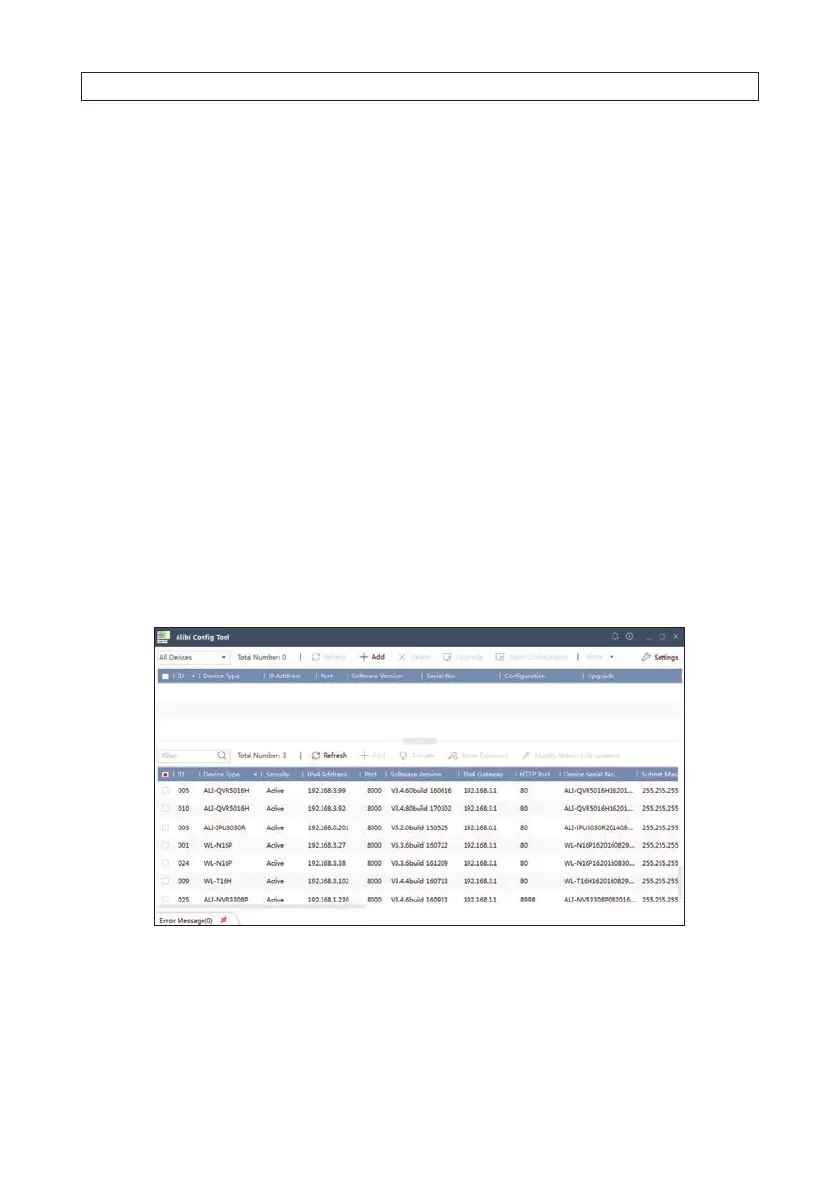
4. Open the Alibi Cong Tool application. When the application opens, it automatically “discovers” and lists all Alibi compatible
devices on the LAN. See below.
Notice: In the screen above, the tool discovered devices with IP addresses of 192.168.0.xxx and 192.168.3.xxx. It will also list
other Alibi compatible devices on the LAN, and devices with the address 192.168.1.64 (an inactive Alibi device).
SECTION 3: CONFIGURE NETWORK ACCESS



 To Next Page