35ALI-NS8014VR IP PTZ Camera Installation and Setup Guide
APPENDIX C: WATERPROOF ETHERNET CONNECTOR INSTALLATION
APPENDIX C
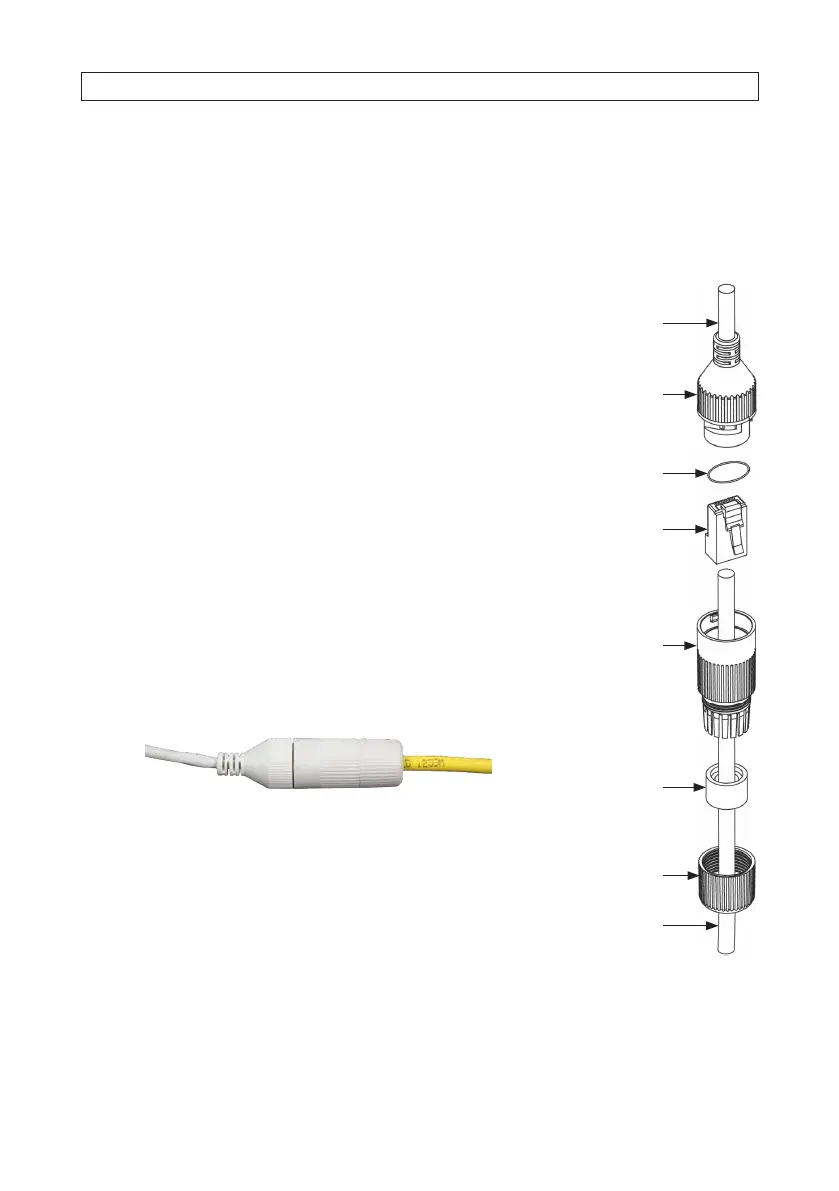
Waterproof Ethernet Fitting Installation
Install the Waterproof Ethernet Fitting on the Ethernet cable end at the camera when moisture or contamination exists in the
area near the camera. The tting includes several parts that must be installed in a specic order. To install the tting:
1. Place the rubber O-ring over the camera drop cable end cap. Push the O-ring up to the
connector cap.
2. Place the Lock Nut onto the network cable from the router or switch as shown in the
drawing to the right. The inside threads must be toward the camera end.
3. Place the rubber basket onto the network cable above the lock nut as shown.
4. Place the end cap onto the network cable above the rubber gasket as shown. The
ngered end must be toward the router or switch.
5. Install an RJ-45 connector onto the network cable.
6. Plug the RJ-45 connector with the network cable into the camera network drop cable.
7. Fit the end cap on the network cable onto the camera drop cable end cap. Rotate the
network cable end cap to lock it in place.
8. Push the rubber gasket fully into the end of the network cable end cap.
9. Screw the lock nut onto the network cable end cap until it is fully seated.
Network drop cable
from camera
Network cable from
router or switchEthernet Fitting installed
Ethernet Fitting assembled and connected
Drop cable
end cap
Network drop
cable from
camera
Rubber
O-ring
seal
RJ-45
connector
End cap
Rubber
gasket
Network
cable
from
router or
switch
Lock nut









 To Next Page