22
3.2 Activate Inactive Alibi device
NOTE: If the camera LAN extension cable is attached to a Network Video Recorder (NVR), skip this step. Refer to the documentation
available for your NVR rmware for the procedure to activate the camera, if necessary.
When an Alibi device is rst installed, or reset to its factory conguration, it must be “Activated” before it can be used. In the
Alibi Conguration Tool, “Inactive” devices have a Security status of Inactive, and an IPv4 address of 192.168.1.64. A device is
“Activated” when a password is assigned to the admin username of the device.
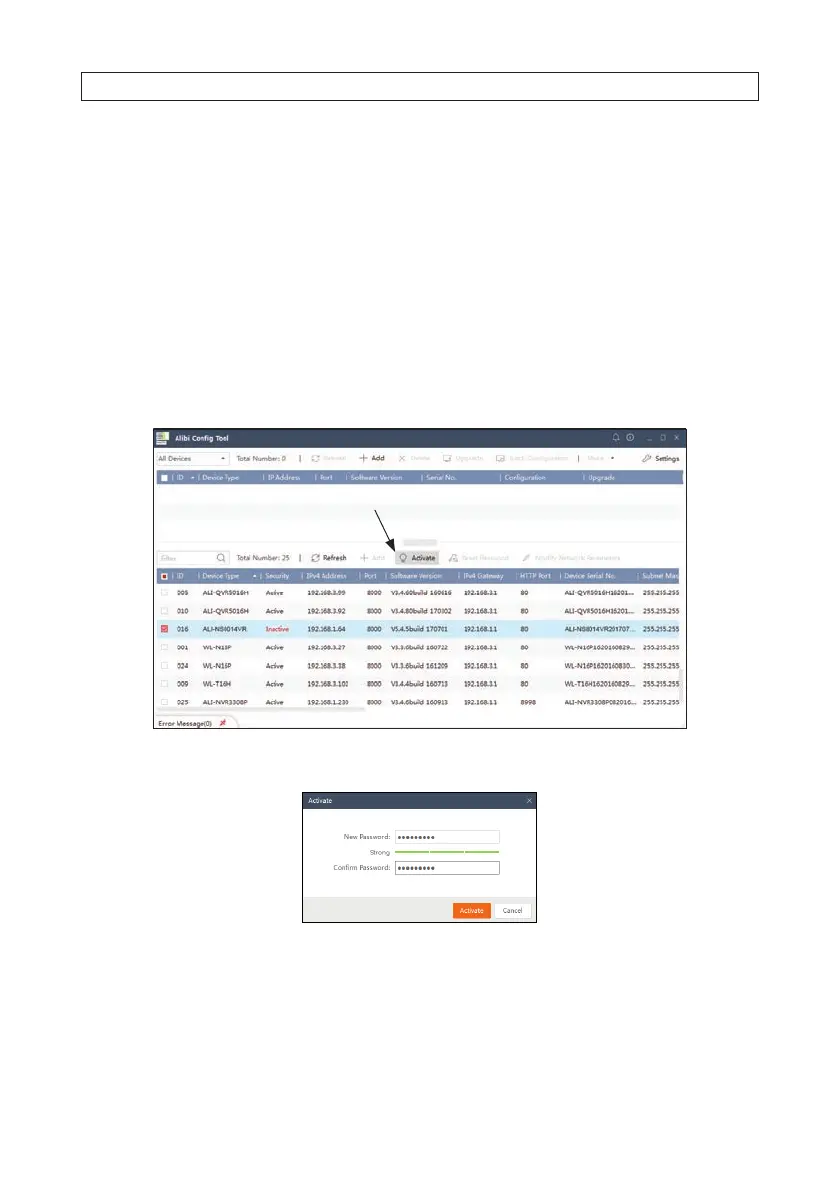
In the example below, an ALI-NS8014VR camera is activated and congured for its network. The procedure is similar for all other
Alibi network cameras currently available.
1. Scan through the list of devices the Alibi Cong Tool discovered for the Inactive device you want to activate (see below). Click
on the device in the list to highlight it, and then click the select box to check it. See below.
Activate
2. Click the Activate button. In the Activate window, you will create a password for the admin (administrator) username.
a. In the Activate window, enter an a password for admin in the New Password eld. Include a combination of uppercase,
lowercase alphabetic characters and numbers to create a “Strong” password. The rating is shown beneath the eld. See
above.
SECTION 3: CONFIGURE NETWORK ACCESS




 To Next Page