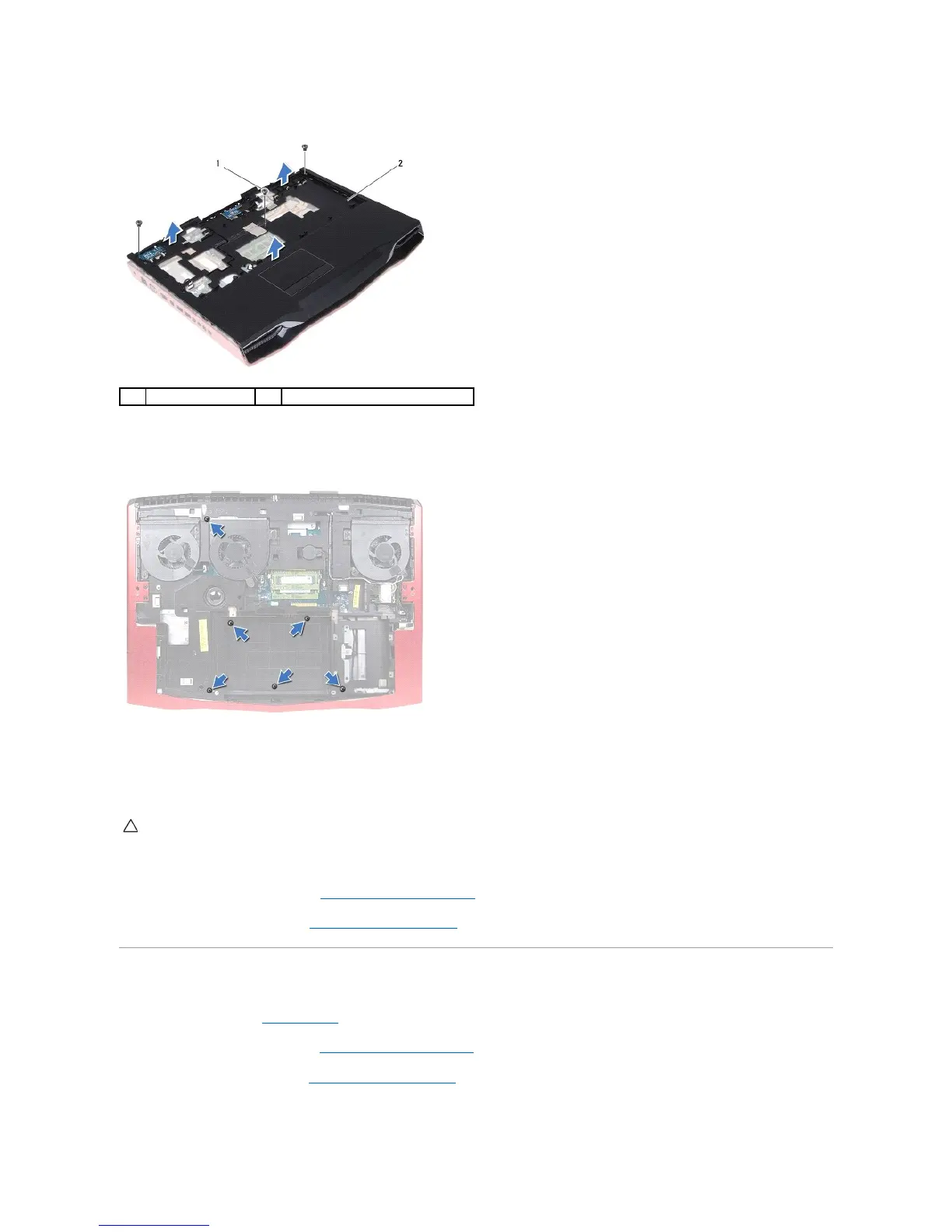
11. Remove the three screws that secure the palm-rest assembly to the computer base.
12. Turn the computer over.
13. Remove the six screws that secure the palm-rest assembly to the computer base.
14. Turn the computer over.
15. Carefully pry out the palm-rest assembly from the two tabs along the rear edge of the computer, and then ease the palm-rest assembly from the
computer base.
16. Lift the palm-rest assembly off the computer base.
17. Remove the power-button board (see Removing the Power-Button Board).
18. Remove the status-light board (see Removing the Status-Light Board).
Replacing the Palm Rest
1. Follow the instructions in Before You Begin.
2. Replace the power-button board (see Replacing the Power-Button Board).
3. Replace the status-light board (see Replacing the Status-Light Board).
4. Align the palm-rest assembly on the computer base and gently snap the palm-rest assembly into place.


 To Next Page