EasyManua.ls Logo

Alinx AXU2CGA - Part 10: USB to Serial Port

Alinx AXU2CGA
29 pages
Print Icon
To Next Page IconTo Next Page
To Previous Page IconTo Previous Page
Loading...
ZYNQ Ultrascale + FPGA Board AXU2CGA/B User Manual
17 / 29
Amazon Store: https://www.amazon.com/alinx
The Gigabit Ethernet pin assignments are as follows:
Signal Name
Pin Name
Pin Number
Description
PHY1_TXCK
PS_MIO64
E19
RGMII Transmit Clock
PHY1_TXD0
PS_MIO65
A18
Transmit data bit
PHY1_TXD1
PS_MIO66
G19
Transmit data bit1
PHY1_TXD2
PS_MIO67
B18
Transmit data bit2
PHY1_TXD3
PS_MIO68
C18
Transmit data bit3
PHY1_TXCTL
PS_MIO69
D19
Transmit data Enable Signal
PHY1_RXCK
PS_MIO70
C19
RGMII Receive Clock
PHY1_RXD0
PS_MIO71
B19
Receive Data Bit0
PHY1_RXD1
PS_MIO72
G20
Receive Data Bit1
PHY1_RXD2
PS_MIO73
G21
Receive Data Bit2
PHY1_RXD3
PS_MIO74
D20
Receive Data Bit3
PHY1_RXCTL
PS_MIO75
A19
Receive Data Enable Signal
PHY1_MDC
PS_MIO76
B20
MDIO Clock Management
PHY1_MDIO
PS_MIO77
F20
MDIO Management Data
Part 10: USB to Serial Port
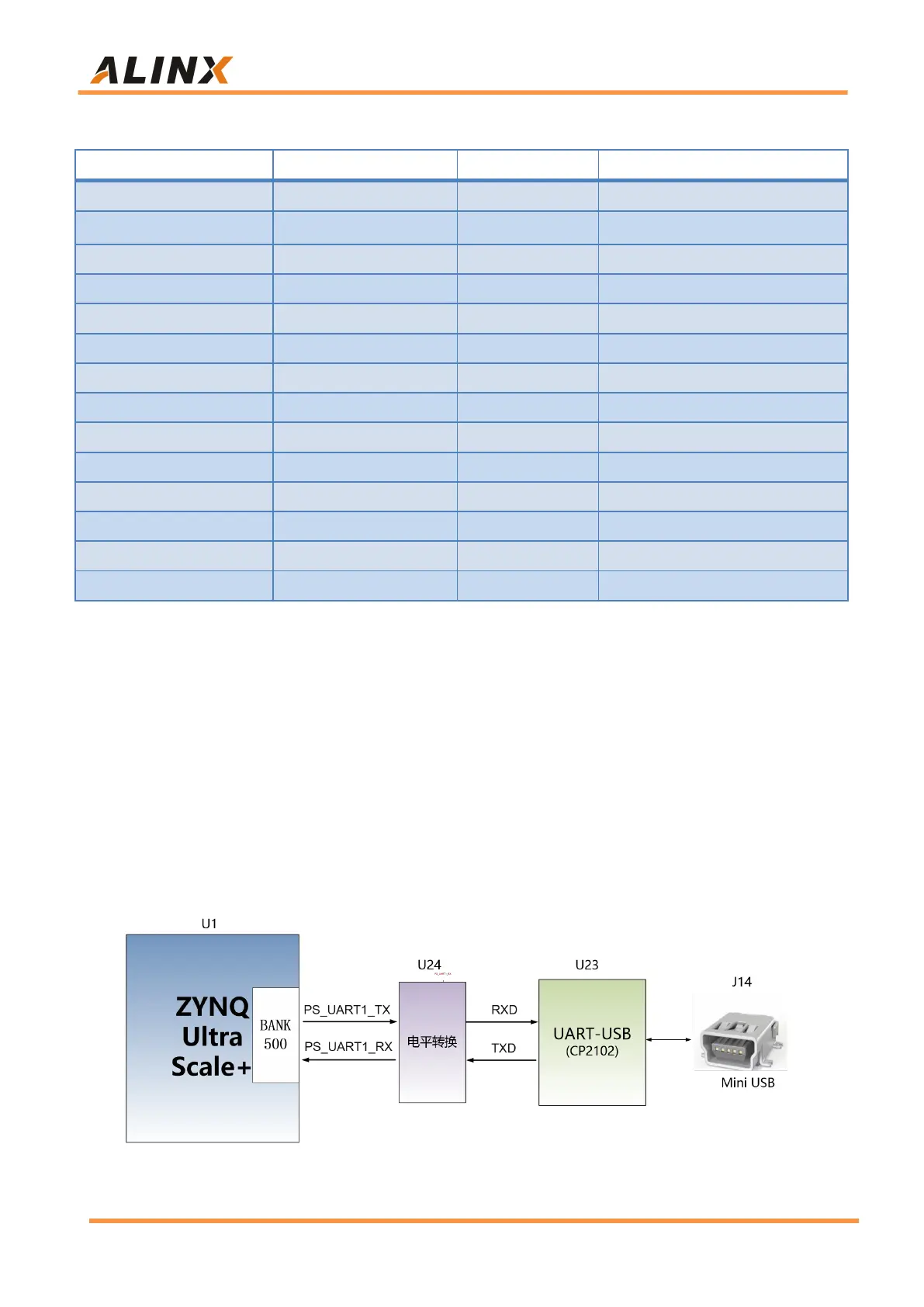
There is a Uart to USB interface on the AXU2CGA/B board for system
debugging. The conversion chip uses the USB-UAR chip of Silicon Labs
CP2102, and the USB interface uses the MINI USB interface. It can be
connected to the USB port of the PC with a USB cable for independent power
supply of the core board and serial data communication. The schematic
diagram of the USB Uart circuit design is shown in Figure 10-1:
Figure 10-1: USB to serial port schematic

Related product manuals