4 Instrument Use
The SADPmini2 is designed for quick start-up and ease of use. This section details how to
power up the instrument and how to use the Navigation Keypad to access the different
instrument displays and functions.
4.1 Powering Up the Instrument
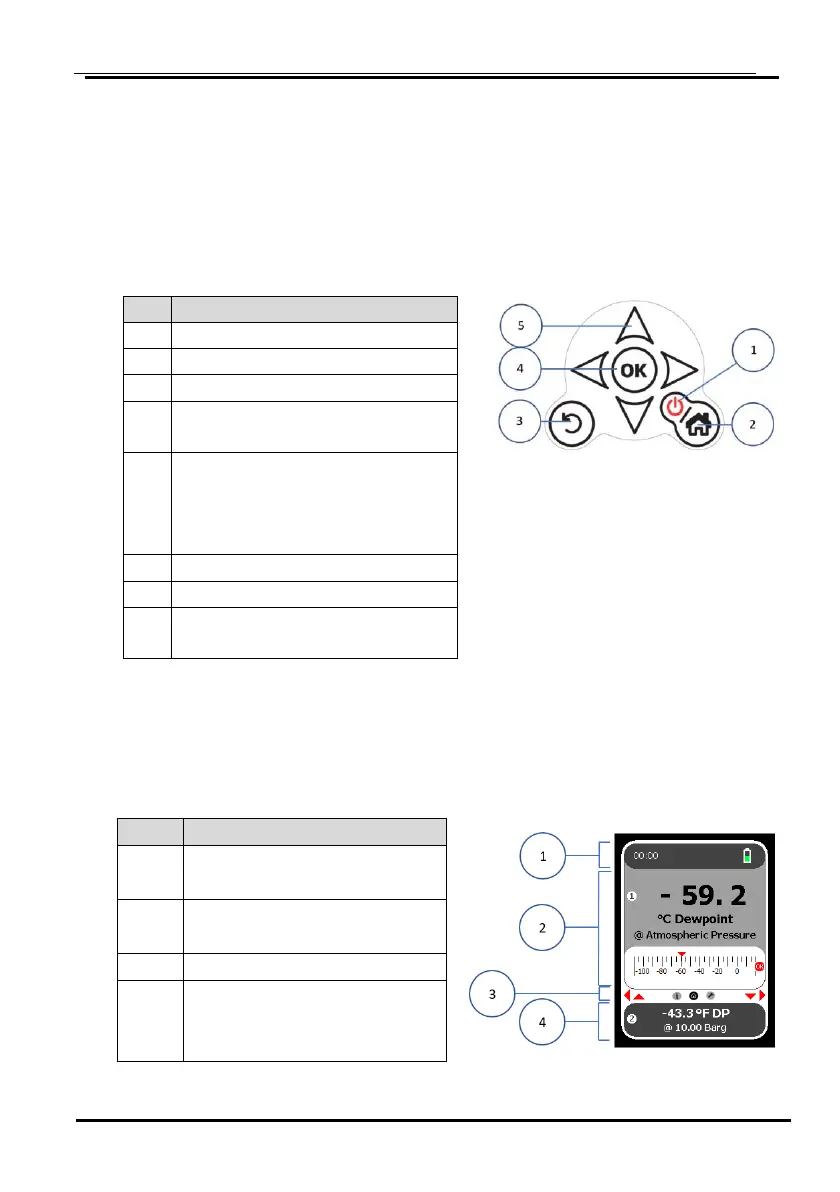
Press and hold to switch OFF
Home Key (returns to Home
screen)
Press Home Key to exit power
saving Mode (no activity for 10
min.) Current screen
re-activated
Back (to previous screen)
OK (confirm desired selection)
Navigation keys (move between
screens)
4.2 Start Up Screen
After displaying the Splash screen, the SADPmini2 will display the following screen on
start up.
Status bar (Time and battery
status)
Upper Section of Screen
(Main Unit/Analogue scale)
Lower Section of Screen
(Secondary Units display,
additional information)


 To Next Page