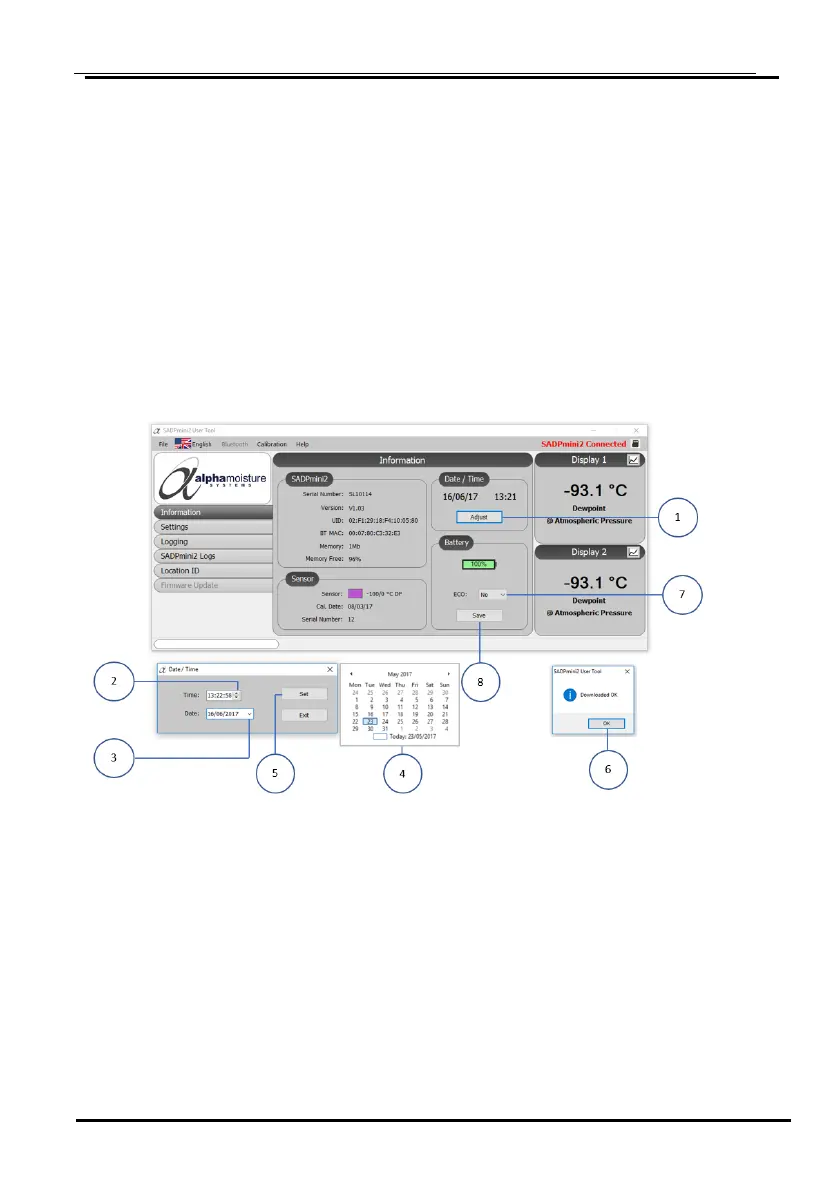
5.7 Setting the Time, Date, and Power Saving Mode (ECO): User Tool
1. Select the Date/ Time Set key ①.
2. Using the arrows ② set the correct time.
3. Using the arrow ③ select the drop-down calendar ④ and set the date.
4. Select Set ⑤ to confirm settings.
5. Select OK ⑥ on the Download dialogue box to download the date and time settings
to the SADPmini2.
6. Using the arrow ⑦ select the ECO enabled (No/ OFF: Yes/ ON).
7. Select the Save ⑧ to save the settings.
8. Select OK ⑥ on the Download dialogue box to download the ECO setting to the
SADPmini2.


 To Next Page