EasyManua.ls Logo

Alpha Moisture Systems SADPmini2 - Setting the Time, Date and Power Saving Mode (ECO): Navigation Keypad

Alpha Moisture Systems SADPmini2
57 pages
Print Icon
To Next Page IconTo Next Page
To Previous Page IconTo Previous Page
Loading...
17
5.2 Setting the Time, Date and Power Saving Mode (ECO): Navigation Keypad
NOTE
To save power and extend the battery life, the SADPmini2 has a power saving
mode (ECO). When the ECO setting is enabled, the display will dim after 10
minutes and turn off after a further 30 minutes. When not enabled the display
will not dim and the unit will remain active using normal power
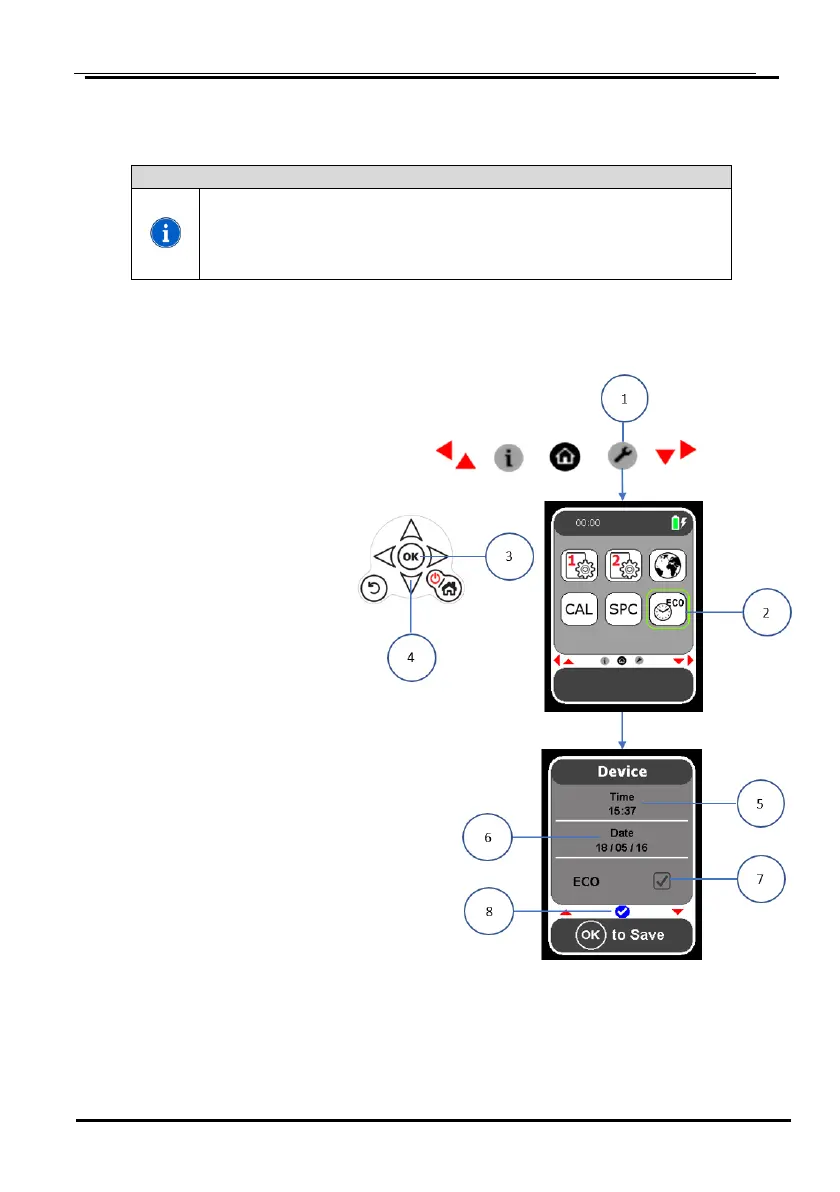
1. Select the Setting icon from the Navigation Carousel ① to display the Settings
screen.
2. Select the Time/ Date
and ECO icon ② on
the Settings screen.
3. Select OK on the
navigation keypad ③.
4. Select OK ③ again
to access the time
display.
5. Using the navigation
keys set the
time ⑤.
6. Select OK (3) to save
the time setting.
7. Using the navigation
keys highlight
the date display ⑥.
8. Select OK ③ to access
the date display.
9. Using the navigation
keys set the date.
10. Select OK ③ to save
the date setting.
11. Using the navigation
keys highlight the
ECO display ⑦.
12. Select OK ③ to
enable/ disable the ECO setting.
13. Select the navigation down key ④ to display a blue tick icon ⑧.
14. Select OK ③ to save the time/ date and ECO settings.

Table of Contents

Other manuals for Alpha Moisture Systems SADPmini2

Related product manuals