6.2 CalSet
The instrument may be checked against a known moisture level, for example a reference
standard, such as a chilled mirror hygrometer or a psychrometer using the function
CalSet. This procedure is particularly useful when calibrating a Blue Spot sensor (-80°C to
+ 20°C) where the wettest end of the range is usually above normal ambient conditions.
For the CalSet procedure the user must enter the dewpoint of the gas the sensor is
exposed to. Using the current calibration curve, the software calculates the target gain at
this point.
1. Select the Settings icon ① from the Navigation Carousel to display the Settings
screen.
2. Using the navigation keys highlight the CAL settings ②.
3. Select OK ③ to display the Calibration Screen ④.
4. Use the navigation keys to highlight the CalSet function ④.
5. Select OK ③.
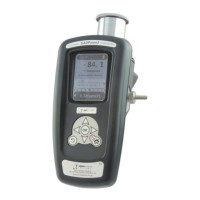
6. Extend the Desiccant Head of the SADPmini2 as shown ⑤.
7. Select OK ③.
8. Using the navigation keys input the CalSet value ⑥.
9. Select OK ③ to start the CalSet procedure.
10. The SADPmini will display the CalSet procedure in progress ⑦ and CalSet procedure
complete screen ⑧ when finished.
11. Select OK ③.
12. Close the Desiccant Head of the SADPmini2 as shown ⑨.
13. Select BACK ⑩ to return to the Settings Screen.


 To Next Page