%5HY
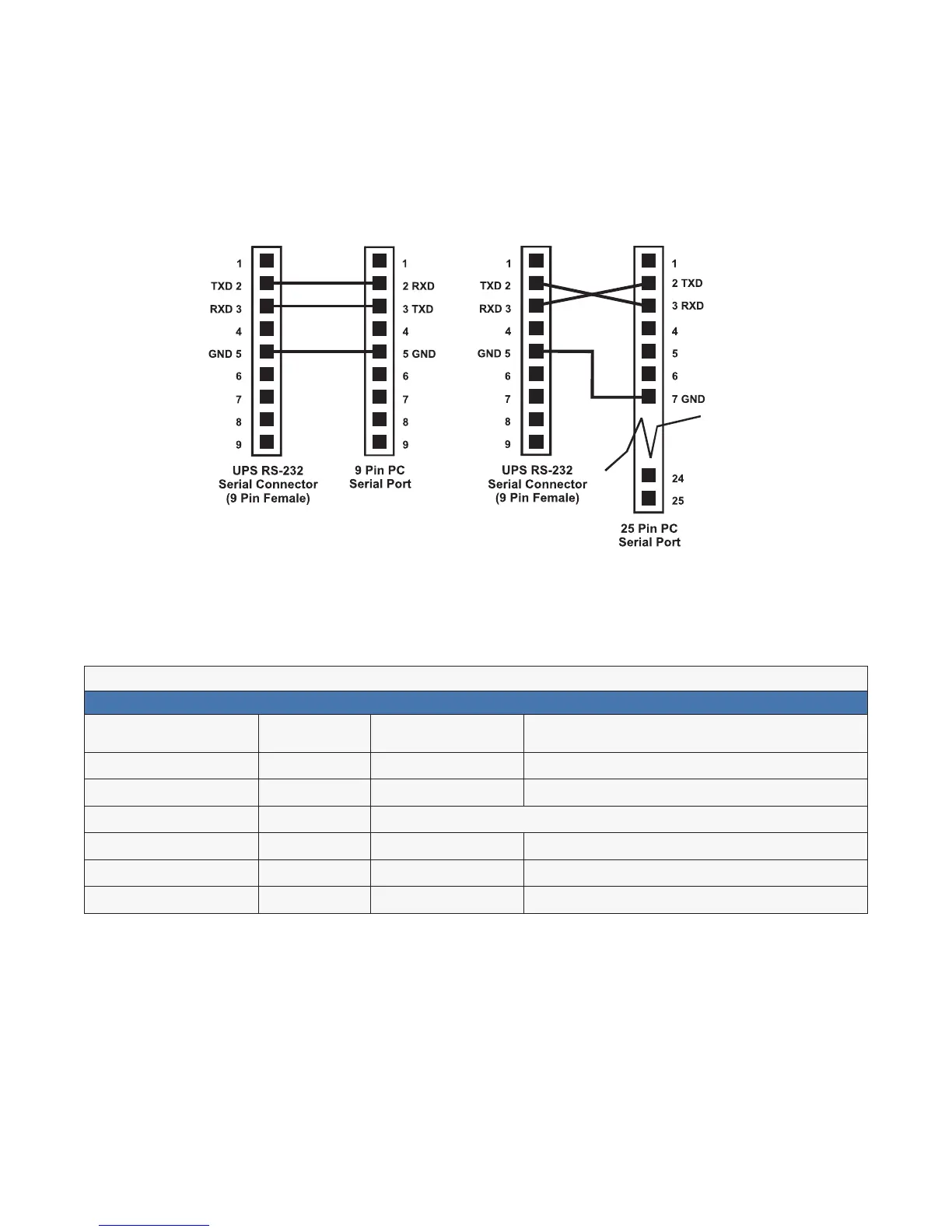
6.7.1 Wiring the RS-232 port
The Alpha FXM’s front panel has a DE-9 female connector. When connected to a PC with Windows HyperTer-
minal or other terminal emulation software, the Alpha FXM can be remotely monitored and controlled with it’s
command-line system. The Alpha UPS Monitor provides a Windows or web browser type of control.
Procedure
1. Connect a 9-pin, fully shielded, straight-through DE-9 to DE-9 connector cable between the computer’s port
and the Alpha FXM’s port.
2. Configure the communications parameters to the values shown in the terminal set up table below.
)LJXUH ² 56SLQFRQQHFWLRQV
7DEOH) ² 7HUPLQDO6HW8S7DEOH
(PXODWLRQ7\SH
97RU
&RPSDWLEOH
%DFNVSDFH 1$
'XSOH[0RGH +DOI'XSOH[ %UHDN/HQJWK 1$
;RQ;RII)ORZ&RQWURO 1RQH (PXODWLRQ7\SH 1$
576&76)ORZ&RQWURO 2II &RPPXQLFDWLRQ3DUDPHWHUV
/LQH:UDS 2Q +DQGVKDNLQJ 6RIWZDUH+DQGVKDNLQJ
6FUHHQ6FUROO 2Q %DXG5DWH ESV
&57UDQVODWLRQ &5 'DWD)RUPDW ELW'DWD1R3DULW\6WRS%LW1R)ORZ&RQWURO



 To Next Page