%5HY
6.9.10 100-Event Log
Up to 100 events are stored in the Alpha FXM’s log. If more than 100 events occur, the oldest is over-written.
Procedure
1. To see the log, type event (all lower case) and press Enter. The events are listed starting with the most
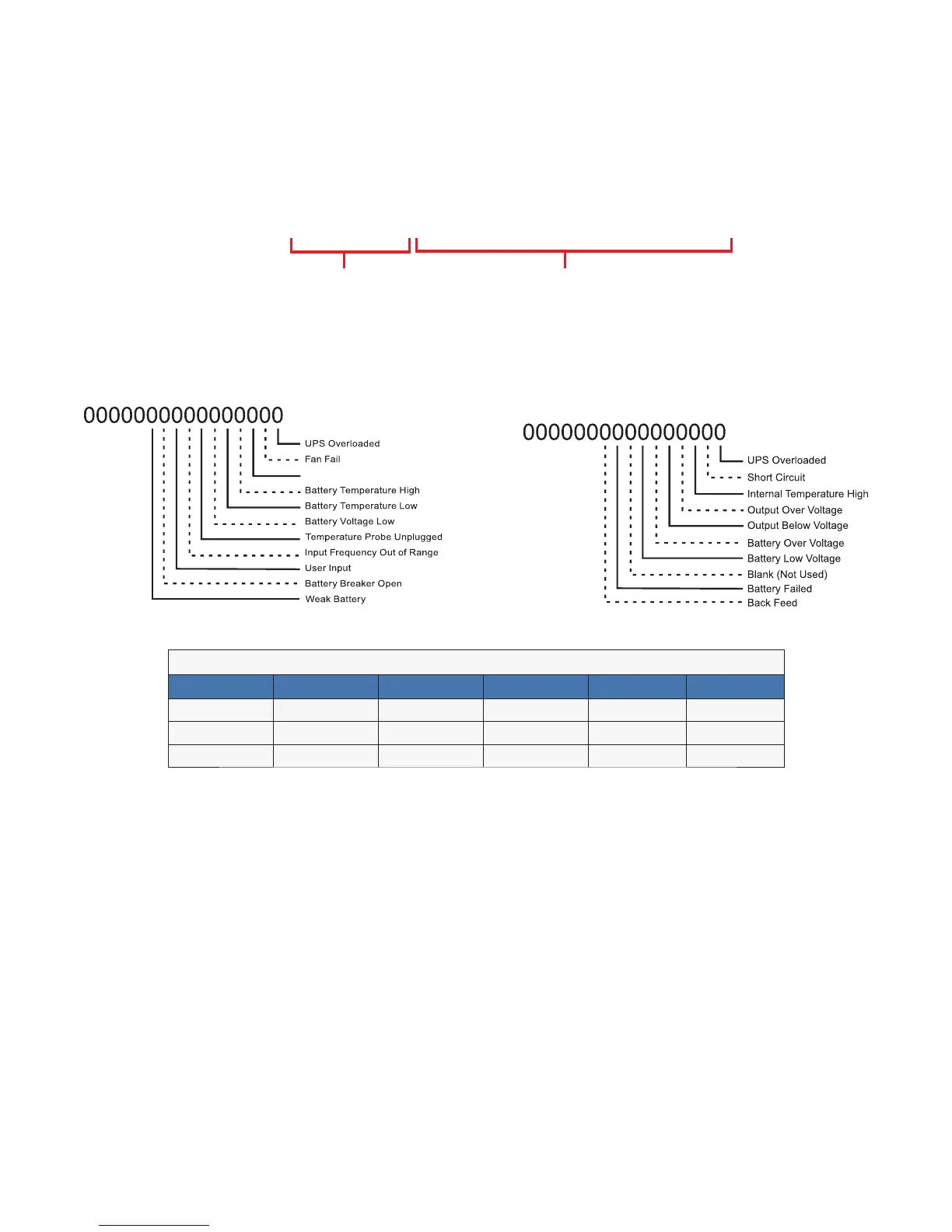
recent and appear as: If less than 100 events occurred, the last entry will appear as:
See below for details on these
readouts.
HYHQW;
(YHQW'DWH7LPH $ODUP )DXOW 0RGH
Date & Time formats depend
on selected display format
$ODUP:KHQWKHIROORZLQJELWVVKRZD
WKHIROORZLQJDODUPVDUHGLVSOD\HG
6HOI7HVW
)DXOW:KHQWKHIROORZLQJELWVVKRZD
WKHIROORZLQJIDXOWVDUHGLVSOD\HG
7DEOH2 ² (YHQW&RGHV
&RGH 0RGH &RGH 0RGH &RGH 0RGH
6WDQGE\ %RRVW ,QYHUWHU
/LQH %XFN 6KXWGRZQ
%RRVW %XFN %\SDVV
2. If less than 100 events occurred, the last entry will appear as:
3. To clear the log, type eventclr and press Enter. It takes the Alpha FXM 30 seconds to clear the log. Do not
enter any other commands during this time.
4. To see a specific event, type eventX where X is from 1 to 100 and press Enter. To see a range of events (for
example, events 20 to 30), type eventX-X where X are events from 1 to 100 and press Enter. To clear the
log, type eventclr and press Enter. It takes the Alpha FXM 30 seconds to clear the log. Do not enter any
other commands during this time.
5. To see a specific event, type eventX where X is from 1 to 100 and press Enter. To see a range of events (for
example, events 20 to 30), type eventX-X where X are events from 1 to 100 and press Enter.
HYHQW;



 To Next Page