Often it is necessary to pause between the dialing of the digits. Only after this pause the dial tone is being signaled. You
equal this when you press the key during the memorizing process. When the pause is made during the dialing of the
first five digits, it takes 2 seconds. By pressing the key repeatedly, you may lengthen this pause accordingly.
If the pause is made after the fifth digit, the dialing stops during the memory recall and is only continued when pressing
the key . This is a very useful function for some services. The number of the service is dialed and when the dial-up is
completed, the identification code may be entered.
3.3.4 Mute key
It is possibility to activate muting with the mute key. Your dialog partner can't hear you anymore. By pressing the mute
key once more you are back to normal.
3.3.5 Inquiry key
According to the adjustment, either a flash function or an earth function is activated by pressing the ‘R’ key. As a rule,
this function is only required for private branch exchange switchboards for putting through incoming calls or for making
an inquiry.
Note The pressing of the inquiry key will not be taken over in the last number memory and in the storage.
3.3.6 Temporary change-over of the dialing procedure
When the dialing procedure IWV is pre-set, it is sometimes necessary to change over to MFV temporarily. This is
required for example if you to listen to your mailbox.
Please press the ‘*’ key if you need to change over the dialing procedure during a telephone conversation. Now all the
following digits will be dialed with the dialing procedure MFV. After ringing off the dialing procedure will be changed to
IWV again automatically.
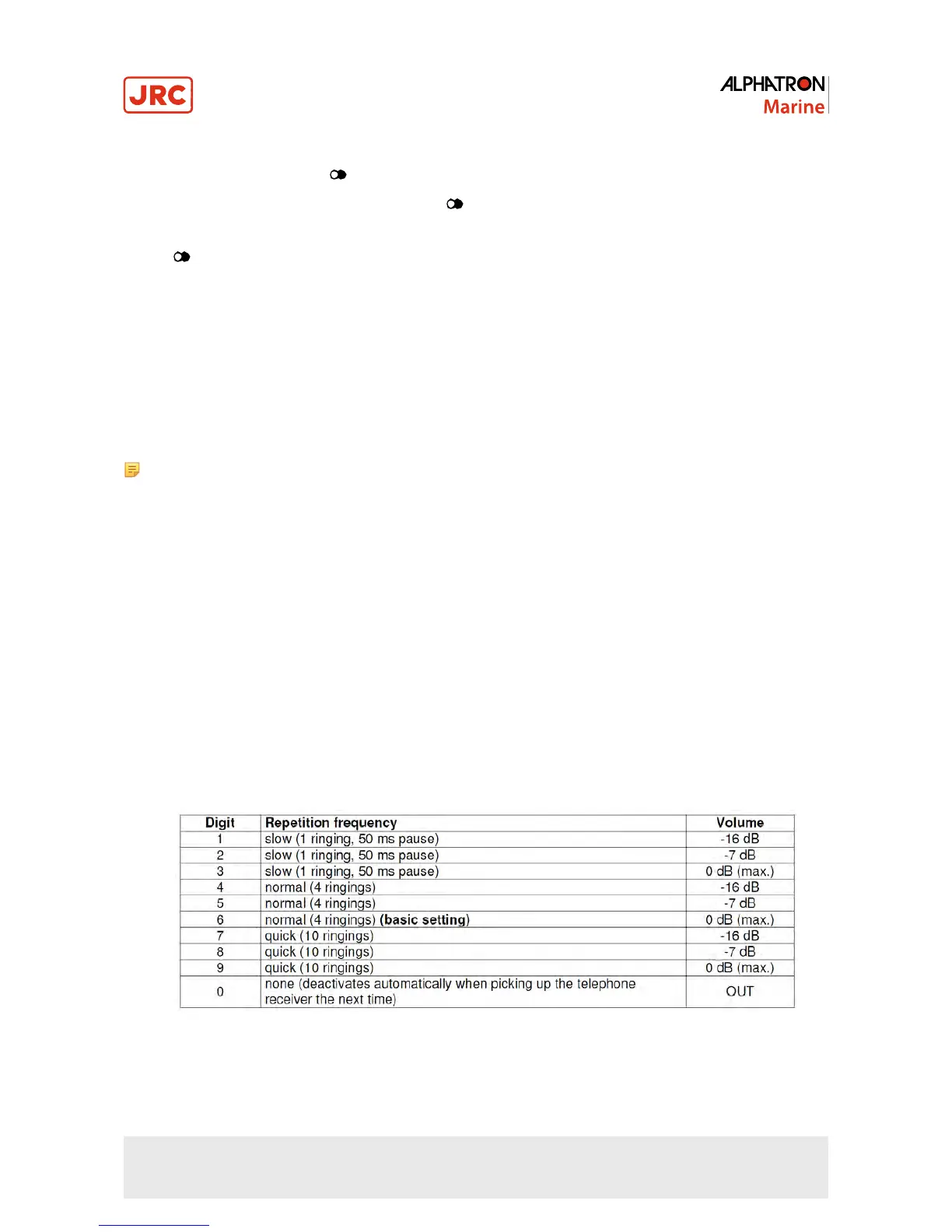
3.3.7 Programming of the ring-tone
The ring-tone is composed of 3 frequencies which generate the melody. It can be adjusted to several volumes and tone
cycles.
Ring-tone adjustment procedure:
1. Pick up the receiver
2. Press the mute key
3. Press the ‘#’ key
4. Enter now the desired adjustment of the ringing tone according to the following schedule:
Figure 20: EBT430 programming ring-tone
5. Press the mute key
6. Put down the receiver
42 | Operating of telephones



 To Next Page