4.2 Operation of AlphaConnect P220 communication station
4.2.1 Controls and visualization
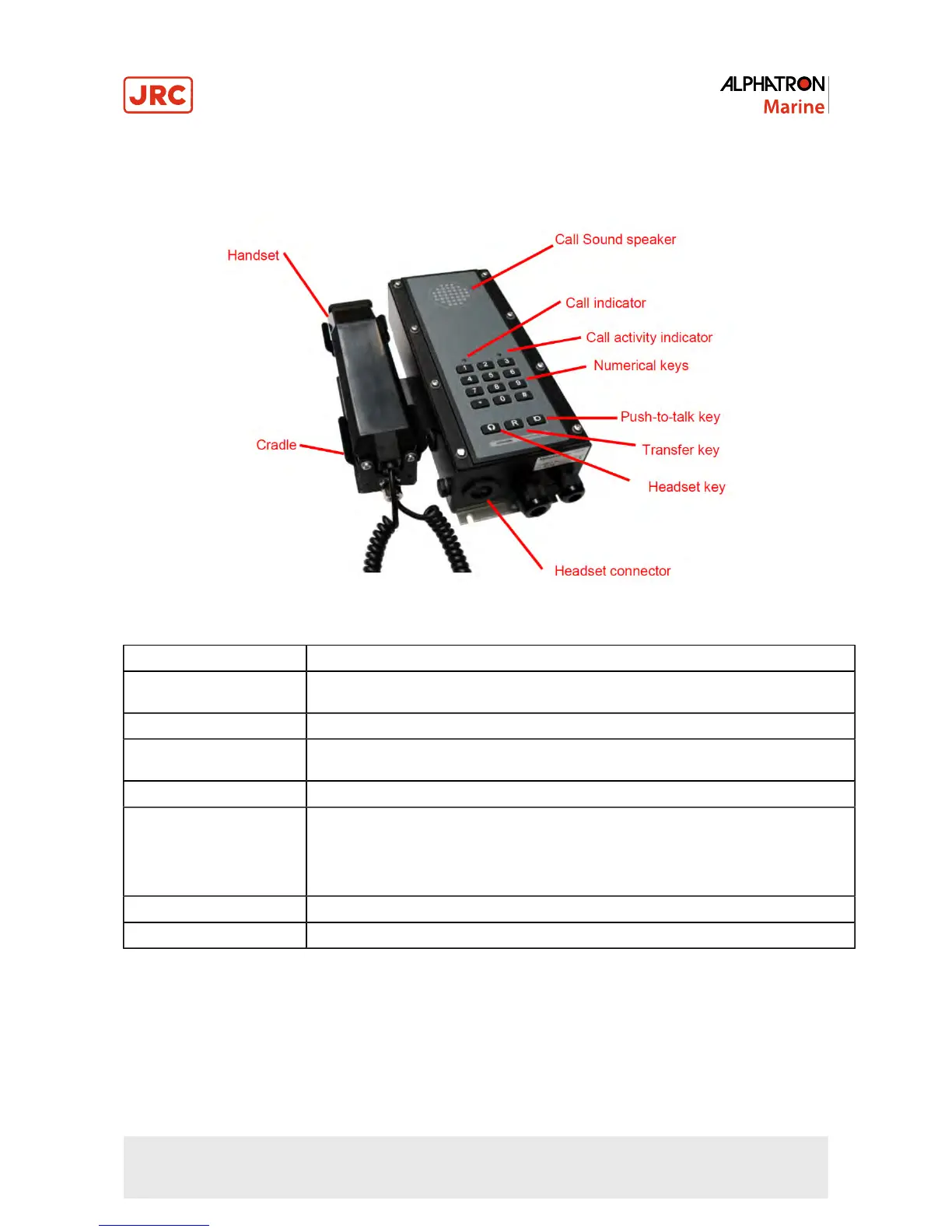
Figure 23: AlphaConnect P220 details
Item Description
Call Sound Speaker The speaker will sound whenever the telephone is ringing. Many installations have external
horn/flash for boosting call indication.
Call indicator A red indicator flashing when a call comes in.
Call activity indicator A green indicator showing that the telephone is active. Flashing when the conversation is in
push-to-talk mode.
Numerical keys Used for dialing
Push-to-talk key When pressed for more than 0.5 seconds, the microphone of the handset turns into push-
to-talk mode. In this mode, the microphone of the handset is only turned on when the push-
to-talk key is pressed, and it is muted when the key is released. This is useful in noisy
environment. Return to full duplex mode can be done by pressing the push-to-talk key
shortly (less than 0.2 sec).
Transfer key Used for transferring a call to a 3rd party
Headset key Key for starting and terminating a call using the headset only
49 | Operation of communication stations


 To Next Page